Izegrar i yiminig Firefox
  • Isiɣzaf
  • Isental
    • I Firefox
    • Imawalen & ikemmusen n tutlayin
    • Ismal nniḍen n tunigin
    • Izegrar i Android
Qqen
Taskant n Create Test Tabs

Create Test Tabs sɣur Rodrigo Diniz da Silva

Creates tabs with filled forms, making testing easier. Register URLs from web projects (localhost). For each registered page, add form input combinations. "Create Test Tabs" button creates tabs with forms filled in based on the combinations.

0 (0 reviews)0 (0 reviews)
2 yiseqdacen2 yiseqdacen
Sader Firefox syen awi isiɣzaf
Sader afaylu

Asiɣzef aɣefisefka

Tuṭṭfiwin n wegdil
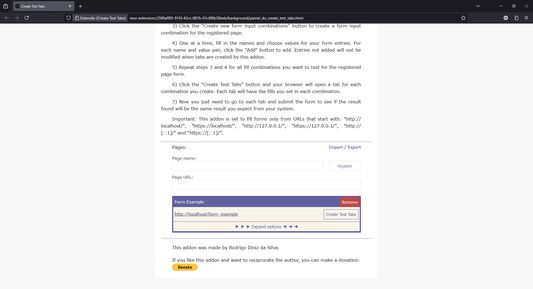
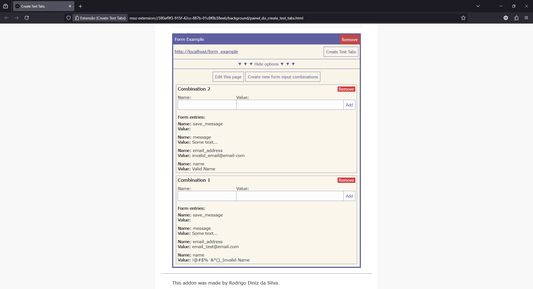
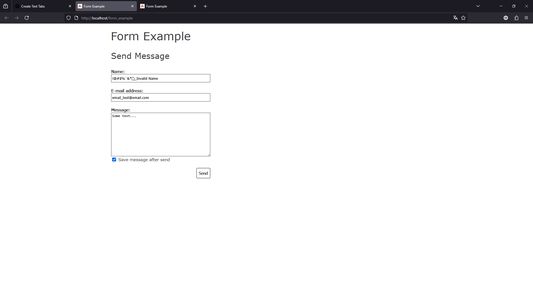
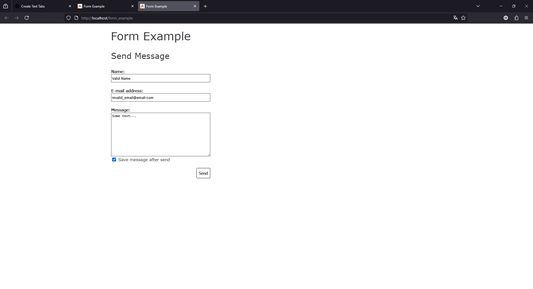
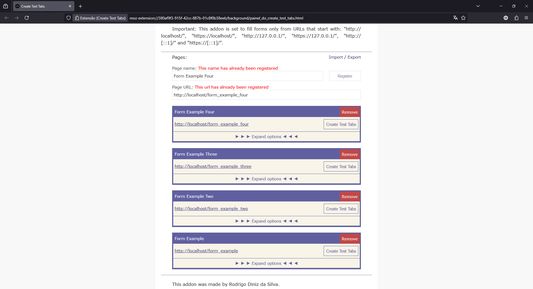
Add a page of your project that has a form.Expand options to create new form input combinations.The more combinations you add the less you need to retype when testing again.After clicking Create Test Tabs, First combination resulted in a new tab with filled form.Second combination is another tab to test with the form already filled in and so on.You can add other pages too, everything is saved locally even after closing the browser.
Ɣef usiɣzef agi
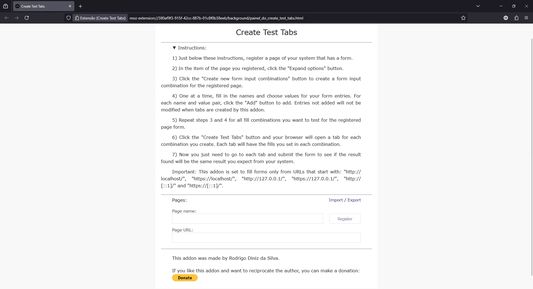
This addon allows you to register pages with forms from your project, form input combinations for each page and name and value pairs for each combination. After registering a page with one or more combinations of form inputs, you can click the Create Test Tabs button and your browser will create a tab for each combination. Each tab opened in your browser in this way will appear with the form filled in with the respective name and value pairs of the combination. So, just submit each form and check if the result found is the expected result. This addon is recommended for developers who need to run the same tests several times on each form page of the web project they are developing.

Step by step:
Install this addon;
Click on the toolbar icon;
This addon's page will open. Read the instructions;
Register a page from a web project (localhost) that contains a form (just choose the name of the page, enter the URL and click register);
Expand the options for the page you registered;
Create one or more combinations of form inputs, add name and value pair for each desired input;
Click on "Create Test Tabs" button, for each combination the browser will create a tab with the form filled out.
Rated 0 by 0 reviewers
Qqen akken ad ternud tazmilt i usiɣzef-agi
Ulac tazmilt akka tura

Amḍan n yitran yettwasekles

5
0
4
0
3
0
2
0
1
0
Ulac iceggiren tura
Tisirag akked yisefka

Yesra tisirag:

  • Kcem γer icarren n iminig
  • Kcem ɣer isefka-ik i localhost
  • Kcem ɣer isefka-ik i 127.0.0.1
  • Kcem ɣer isefka-ik i [::1]
Issin ugar
Ugar n telɣut
TigIseɣwan n uzegrir
  • Asebter agejdan
  • Imayl n tallelt
Lqem
2025.1
Teɣzi
24,54 KB
Aleqqem aneggaru
10 kuukautta sitten (9. helmi 2025)
Taggayin i ilan assaɣ
  • Taneflit Web
  • Iccaren
Turagt
Turagt IT
Amazray n Lqem
  • Wali akk ileqman
Rnu ar tegrumma
Mmel azegrir-a
Ddu γer usebter agejdan n Mozilla

Izegrar

  • Γef
  • Ablug n yizegrar Firefox
  • Tanemselt ɣef usiɣzef
  • Tarbaɛt n ineflayen
  • Tasertit i yineflayen
  • Ablug n temɣiwent
  • Anmager
  • Azen-d abug
  • Aḍris n ucegger

Iminigen

  • Desktop
  • Mobile
  • Enterprise

Ifarisen

  • Browsers
  • VPN
  • Relay
  • Monitor
  • Pocket
  • Bluesky (@firefox.com)
  • Instagram (Firefox)
  • YouTube (firefoxchannel)
  • Tabaḍnit
  • Inagan n tuqqna
  • Usḍif

Ala ma yettwammel akken-nniḍen, agbur n usmel-agi yella ddaw n turagt Creative Commons Attribution Share-Alike v3.0 neɣ ileqman imaynuten.