Export Memrise Progress sɣur neoncube
Export your Memrise community course's progress.
44 yiseqdacen44 yiseqdacen
Asiɣzef aɣefisefka
Tuṭṭfiwin n wegdil
Ɣef usiɣzef agi
This extension lets you save your Memrise community course's progress, so that you can import it into another site, such as mylittlewordland.com or deckademy.com
To download your progress:
1. Go to https://community-courses.memrise.com
2. Open a course. You should now be on the course's overview page.
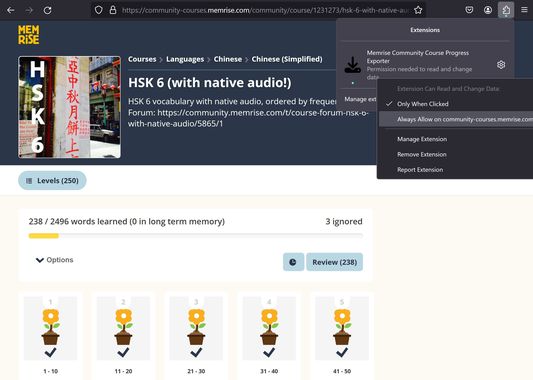
3. Click the Firefox extensions icon, right click the Memrise Community Course Progress Exporter extension, and select "Always Allow on community-courses.memrise.com" (See screenshot).
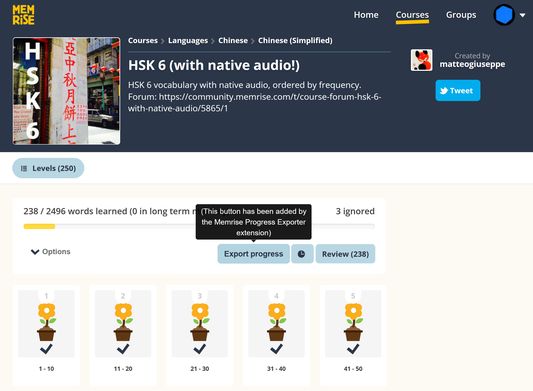
4. Click the blue "Export progress" button.
To download your progress:
1. Go to https://community-courses.memrise.com
2. Open a course. You should now be on the course's overview page.
3. Click the Firefox extensions icon, right click the Memrise Community Course Progress Exporter extension, and select "Always Allow on community-courses.memrise.com" (See screenshot).
4. Click the blue "Export progress" button.
Rated 0 by 0 reviewers
Tisirag akked yisefka
Yesra tisirag:
- Kcem ɣer isefka-ik i community-courses.memrise.com
- Kcem ɣer isefka-ik i app.memrise.com
Tisirag tifrayanin:
- Kcem ɣer isefka-ik i community-courses.memrise.com
- Kcem ɣer isefka-ik i app.memrise.com
Ugar n telɣut
- Lqem
- 1.12
- Teɣzi
- 24,21 KB
- Aleqqem aneggaru
- 5 hónapja (2025. júl. 12.)
- Taggayin i ilan assaɣ
- Turagt
- Akk izerfan ttwaḥerzen
- Amazray n Lqem
- Rnu ar tegrumma