Izegrar i yiminig Firefox
  • Isiɣzaf
  • Isental
    • I Firefox
    • Imawalen & ikemmusen n tutlayin
    • Ismal nniḍen n tunigin
    • Izegrar i Android
Qqen
Taskant n QR Issue Card Printer PRO for Jira Cloud

QR Issue Card Printer PRO for Jira Cloud sɣur MrAddon

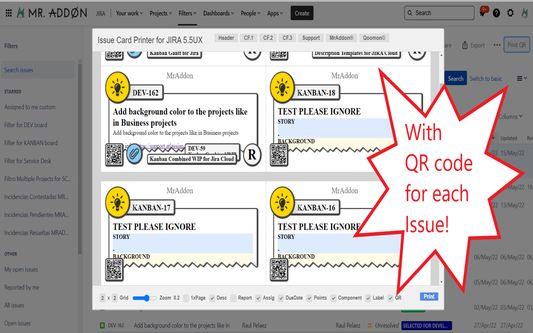
Print your filters and issues with a single click, with a configurable and beautiful layout.Show a large QR code in each card to quickly locate your tickets.Now you can also print from your Kanban or Scrum board and from your backlog view!New feature

ArmitanArmitan
0 (0 reviews)0 (0 reviews)
2 yiseqdacen2 yiseqdacen
Sader Firefox syen awi isiɣzaf
Sader afaylu

Asiɣzef aɣefisefka

Tuṭṭfiwin n wegdil
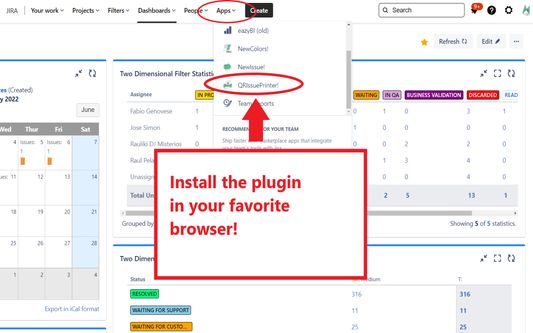
Install the add-on in your favorite browser!
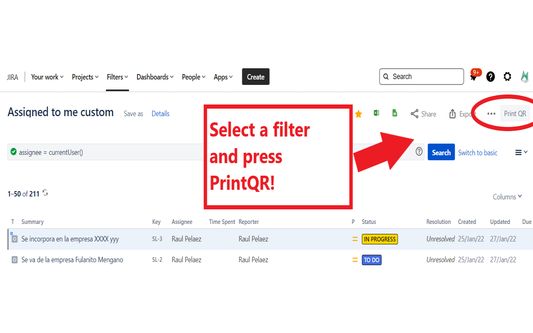
Go to Apps → QRIssuePrinter! and install the add-on in your favorite browserPush PrintQR! button in issues, filters or boards
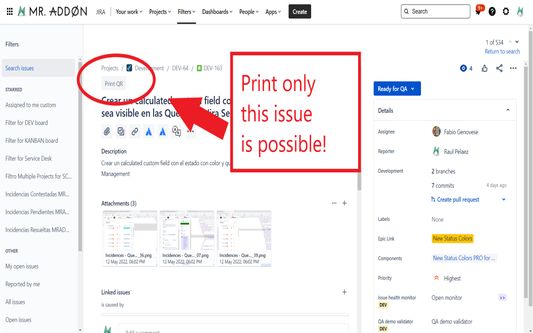
That’s all! Now take a look in your Issues, Filters and Kanban/SCRUM boards and backlogs and you will see a new button “Print QR”Ready to print in one click!!
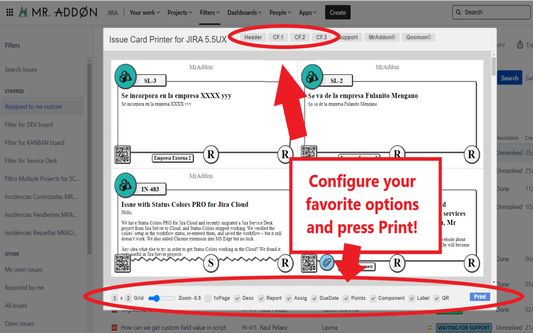
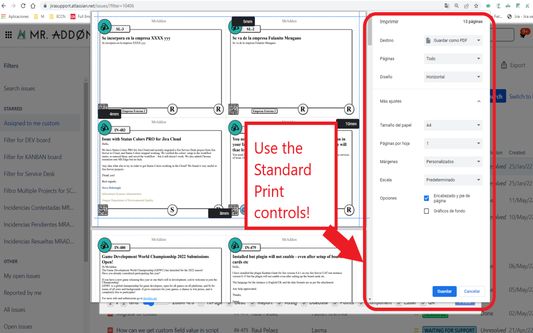
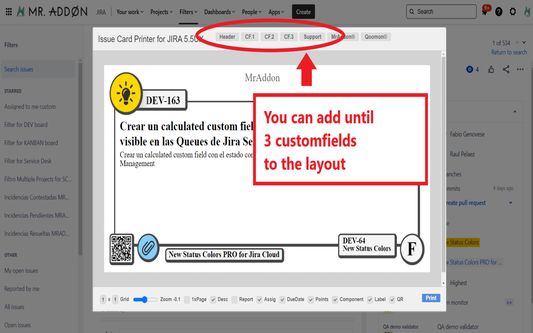
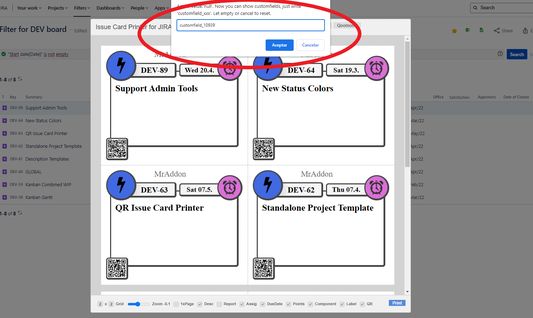
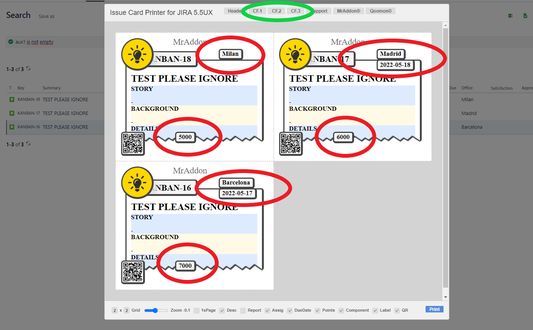
After press the “Print QR” button you will see a beatiful cards ready to print in one click!!Just configure the final part, page margins and Save it as PDF or just print in your usual printer!Now we can configure show/hide the system fields of Jira, we have a Zoom control and grid control, also of course, the QR code.If you need to print only one issue, it’s possible of course! Search the “Print QR” button and that’s all!Click in CF1 or CF2 or CF3 buttons and add the “customfield_xxxx” value where “xxxx” is the ID of the customfieldClick in CF1 or CF2 or CF3 buttons and add the “customfield_xxxx” value where “xxxx” is the ID of the customfieldClick in CF1 or CF2 or CF3 buttons and add the “customfield_xxxx” value where “xxxx” is the ID of the customfield
Ɣef usiɣzef agi
Print your filters and issues with a single click, with a configurable and beautiful layout.Show a large QR code in each card to quickly locate your tickets.Now you can also print from your Kanban or Scrum board and from your backlog view!New features coming soon!

Install the add-on in your favorite browser!
Go to Apps → QRIssuePrinter! and install the add-on in your favorite browser

Push PrintQR! button in issues, filters or boards
That’s all! Now take a look in your Issues, Filters and Kanban/SCRUM boards and backlogs and you will see a new button “Print QR”

Ready to print in one click!!
After press the “Print QR” button you will see a beatiful cards ready to print in one click!!

Vide summary: https://www.youtube.com/watch?v=AVp7n4f4qUk
Rated 0 by 0 reviewers
Qqen akken ad ternud tazmilt i usiɣzef-agi
Ulac tazmilt akka tura

Amḍan n yitran yettwasekles

5
0
4
0
3
0
2
0
1
0
Ulac iceggiren tura
Tisirag akked yisefka

Yesra tisirag:

  • Kcem ɣer yisefka-ik n i yismal di atlassian.net n taɣult
  • Kcem ɣer yisefka-ik n i yismal di jira.com n taɣult

Tisirag tifrayanin:

  • Kcem ɣer yisefka-ik n i yismal di atlassian.net n taɣult
  • Kcem ɣer yisefka-ik n i yismal di jira.com n taɣult
Issin ugar
Ugar n telɣut
TigIseɣwan n uzegrir
  • Asebter agejdan
  • Asmel n tallelt
  • Imayl n tallelt
Lqem
7.3.0
Teɣzi
170,84 KB
Aleqqem aneggaru
4 månader sidan (18. des. 2025)
Taggayin i ilan assaɣ
  • Taneflit Web
Turagt
Turagt tazayezt n Mozilla 2.0
Amazray n Lqem
  • Wali akk ileqman
Rnu ar tegrumma
Mmel azegrir-a
Ddu γer usebter agejdan n Mozilla

Izegrar

  • Γef
  • Ablug n yizegrar Firefox
  • Tanemselt ɣef usiɣzef
  • Tarbaɛt n ineflayen
  • Tasertit i yineflayen
  • Ablug n temɣiwent
  • Anmager
  • Azen-d abug
  • Aḍris n ucegger

Iminigen

  • Desktop
  • Mobile
  • Enterprise

Ifarisen

  • Browsers
  • VPN
  • Relay
  • Monitor
  • Pocket
  • Bluesky (@firefox.com)
  • Instagram (Firefox)
  • YouTube (firefoxchannel)
  • Tabaḍnit
  • Inagan n tuqqna
  • Usḍif

Ala ma yettwammel akken-nniḍen, agbur n usmel-agi yella ddaw n turagt Creative Commons Attribution Share-Alike v3.0 neɣ ileqman imaynuten.