Jira Exporter sɣur Picsweb
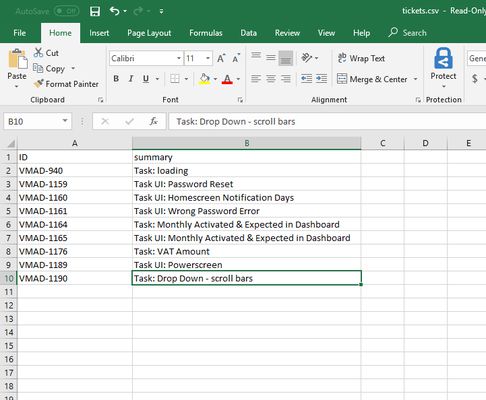
Export Jira tickets to csv file from Jira board. Latest version export JIRA tickets from Active Sprints board and Backlogs . watch demo - https://youtu.be/yKbO_U2ltHU Extension sponsored by https://bestvpn.se/ Best VPN
1 useqdac1 useqdac
Asiɣzef aɣefisefka
Tuṭṭfiwin n wegdil
Ɣef usiɣzef agi
The extension export JIRA tickets from Active Sprints and Backlogs.
Latest version include copy to clipboard feature. User can copy individual ticket details to clipboard by clicking Copy button next it.
Follow this below steps to try the export option
1) Install add-on in Firefox.
2) Visit your Atlassion JIRA website . Go to active sprints or backlogs.
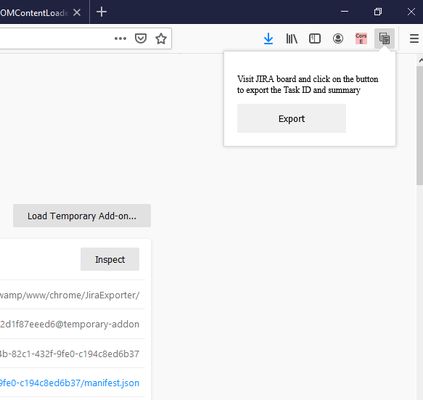
3) Click on the addon icon on top right side.
4) Click on the export button which will download csv file.
watch demo - https://youtu.be/yKbO_U2ltHU
Please share your valuable feedback. We will try to enhance this extension.
Extension sponsored by https://bestvpn.se/ Best VPN
Latest version include copy to clipboard feature. User can copy individual ticket details to clipboard by clicking Copy button next it.
Follow this below steps to try the export option
1) Install add-on in Firefox.
2) Visit your Atlassion JIRA website . Go to active sprints or backlogs.
3) Click on the addon icon on top right side.
4) Click on the export button which will download csv file.
watch demo - https://youtu.be/yKbO_U2ltHU
Please share your valuable feedback. We will try to enhance this extension.
Extension sponsored by https://bestvpn.se/ Best VPN
Rated 0 by 0 reviewers
Tisirag akked yisefka
Yesra tisirag:
- Sers isefka ɣef afus
- Kcem γer icarren n iminig
- Kcem ɣer yisefka-ik n i yismal di atlassian.net n taɣult
Ugar n telɣut
- TigIseɣwan n uzegrir
- Lqem
- 1.2.0
- Teɣzi
- 21,11 KB
- Aleqqem aneggaru
- 6 år siden (21. mai 2020)
- Taggayin i ilan assaɣ
- Turagt
- Akk izerfan ttwaḥerzen
- Amazray n Lqem
- Rnu ar tegrumma
Aneflay n usiɣzef-agi isutur-ak-d tallelt akken ad iseddu taneflit ines ticki tmuddeḍ-as cwiṭ n tewsa.
1) Install addon in Firefox
2) Visit your Atlassion JIRA website . Go to active sprints with tickets
3) Click on the addon icon on top right side
4) Click on the export button which will download csv file