PrivateSearch sɣur Patrik
Search any text privately, with a simple right-click. The extension adds an option to the context menu to instantly open a search in a new private window, using your default search engine.
39 yiseqdacen39 yiseqdacen
Asiɣzef aɣefisefka
Tuṭṭfiwin n wegdil
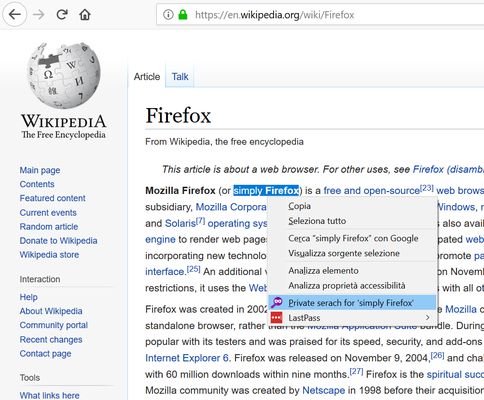
Ɣef usiɣzef agi
How does it work?
1. Select the text you want to search
2. Right-click on the selected text
3. Select "Private search for..."
4. A new private window will open with the search results.
No data collected, no configuration needed.
⚠️ Important
To work properly, the extension requires the "Run in Private Windows" permission. Firefox will ask you to enable it during installation; you can also do it later from the extensions settings.
1. Select the text you want to search
2. Right-click on the selected text
3. Select "Private search for..."
4. A new private window will open with the search results.
No data collected, no configuration needed.
⚠️ Important
To work properly, the extension requires the "Run in Private Windows" permission. Firefox will ask you to enable it during installation; you can also do it later from the extensions settings.
Rated 5 by 4 reviewers
Ugar n telɣut
- Lqem
- 1.2resigned1
- Teɣzi
- 22,47 KB
- Aleqqem aneggaru
- 2 years ago (Apr 26, 2024)
- Taggayin i ilan assaɣ
- Turagt
- Akk izerfan ttwaḥerzen
- Amazray n Lqem
- Rnu ar tegrumma