Izegrar i yiminig Firefox
  • Isiɣzaf
  • Isental
    • I Firefox
    • Imawalen & ikemmusen n tutlayin
    • Ismal nniḍen n tunigin
    • Izegrar i Android
Qqen
Taskant n Query Bench

Query Bench sɣur Zoldan

This Browser Add-on assists you to organize and use Query Parameters for your favorite Search Engines. The Query Parameters defined once, according the rules of the Search Engine, can be use in a very comfortable way.

5 (1 review)5 (1 review)
1 useqdac1 useqdac
Sader Firefox syen awi isiɣzaf
Sader afaylu

Asiɣzef aɣefisefka

Tuṭṭfiwin n wegdil
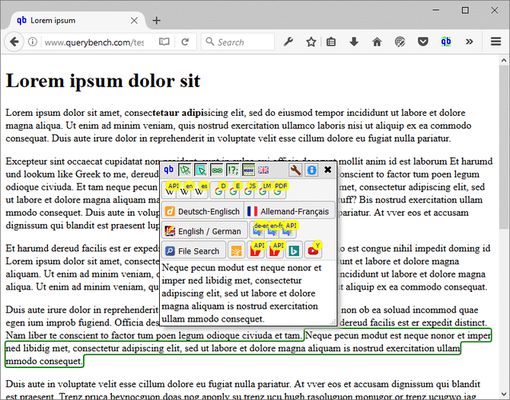
Single Word InputSelection InputSentence InputCompact LayoutSingular OutputSettings Window
Ɣef usiɣzef agi
The majority of the Search Engines can be queried with specific URLs containing the search term of interest.
Depending on the kind of Search Engines they have different rules for the composition of such URLs.
With Query Bench you can define the URLs according the Engines rules and store them in your Browser for later use.
Once you have defined a Query URL, it is very easy to use it.
Having the Add-on switched on (by a Toolbar Button), it will mark the words everywhere you are hovering with the mouse.
Then a Dialog Box appears with Buttons according your once defined Query Parameters.
A single click on the Query Button of your choice will feed the Search Engine with the marked word.
The Query Result can be displayed within the same Browser Window or you can decide it to be display in a dedicated Browser Window.
Knowing how simple it can be, querying single words you will be glad to see that querying multiple words (e.g. sentences or more) is not a big deal either.
Simply select the text you want to use as a Query Term and the same Dialog Box will appear, where again you can choose your Search Parameters with a single click.
Query Bench will help you to save your valuable time and give you the pleasure to use simple and sophisticated Query Terms the same convenient way.
Iwenniten n uneflay
Contact us if you have any question, error reports, or suggestions for improvements.
Rated 5 by 1 reviewer
Qqen akken ad ternud tazmilt i usiɣzef-agi
Ulac tazmilt akka tura

Amḍan n yitran yettwasekles

5
1
4
0
3
0
2
0
1
0
Ɣeṛ 1 n ucegger
Tisirag akked yisefka

Yesra tisirag:

  • Kcem γer icarren n iminig
  • Kcem ɣer isefka-inek deg ismal web meṛṛa
Issin ugar
Ugar n telɣut
TigIseɣwan n uzegrir
  • Asebter agejdan
  • Asmel n tallelt
  • Imayl n tallelt
Lqem
2.0.3resigned1
Teɣzi
405,77 KB
Aleqqem aneggaru
2 vite më parë (25 Pri 2024)
Taggayin i ilan assaɣ
  • Ifecka n unadi
  • Arwes
Turagt
Turagt IT
Amazray n Lqem
  • Wali akk ileqman
Rnu ar tegrumma
Mmel azegrir-a
Ddu γer usebter agejdan n Mozilla

Izegrar

  • Γef
  • Ablug n yizegrar Firefox
  • Tanemselt ɣef usiɣzef
  • Tarbaɛt n ineflayen
  • Tasertit i yineflayen
  • Ablug n temɣiwent
  • Anmager
  • Azen-d abug
  • Aḍris n ucegger

Iminigen

  • Desktop
  • Mobile
  • Enterprise

Ifarisen

  • Browsers
  • VPN
  • Relay
  • Monitor
  • Pocket
  • Bluesky (@firefox.com)
  • Instagram (Firefox)
  • YouTube (firefoxchannel)
  • Tabaḍnit
  • Inagan n tuqqna
  • Usḍif

Ala ma yettwammel akken-nniḍen, agbur n usmel-agi yella ddaw n turagt Creative Commons Attribution Share-Alike v3.0 neɣ ileqman imaynuten.