Izegrar i yiminig Firefox
  • Isiɣzaf
  • Isental
    • I Firefox
    • Imawalen & ikemmusen n tutlayin
    • Ismal nniḍen n tunigin
    • Izegrar i Android
Qqen
Taskant n ResizeIT 2

ResizeIT 2 sɣur Daniel Betz

Restore one of four preset window sizes + positions

4.6 (35 reviews)4.6 (35 reviews)
475 yiseqdacen475 yiseqdacen
Sader Firefox syen awi isiɣzaf
Sader afaylu

Asiɣzef aɣefisefka

Tuṭṭfiwin n wegdil
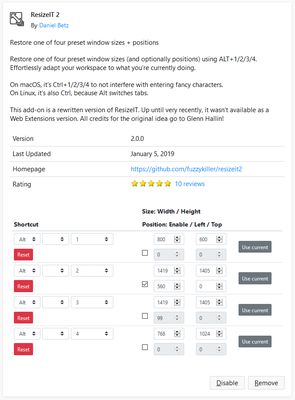
Settings UI
Ɣef usiɣzef agi
Restore one of four preset window sizes (and optionally positions) using customizable keyboard shortcuts. Effortlessly adapt your workspace to what you’re currently doing.

Default keyboard shortcuts:
<ul>
<li>Alt+1/2/3/4 on Windows</li>
<li>ctrl+1/2/3/4 on macOS</li>
<li>Ctrl+1/2/3/4 on Linux</li>
</ul>

You can also select one of the presets to be applied on startup or to all new windows.

This add-on is a rewritten version of <a href="https://addons.mozilla.org/firefox/addon/resizeit/">ResizeIT</a>. All credits for the original idea go to Glenn Hallin!
Rated 4,6 by 35 reviewers
Qqen akken ad ternud tazmilt i usiɣzef-agi
Ulac tazmilt akka tura

Amḍan n yitran yettwasekles

5
28
4
4
3
1
2
0
1
2
Ɣeṛ akk 35 n iceggiren
Ugar n telɣut
TigIseɣwan n uzegrir
  • Asebter agejdan
  • Asmel n tallelt
  • Imayl n tallelt
Lqem
2.2.0
Teɣzi
53,61 KB
Aleqqem aneggaru
3 år siden (11. mars 2023)
Taggayin i ilan assaɣ
  • Wiyaḍ
Turagt
Apache License 2.0
Amazray n Lqem
  • Wali akk ileqman
Rnu ar tegrumma
Mmel azegrir-a
Ddu γer usebter agejdan n Mozilla

Izegrar

  • Γef
  • Ablug n yizegrar Firefox
  • Tanemselt ɣef usiɣzef
  • Tarbaɛt n ineflayen
  • Tasertit i yineflayen
  • Ablug n temɣiwent
  • Anmager
  • Azen-d abug
  • Aḍris n ucegger

Iminigen

  • Desktop
  • Mobile
  • Enterprise

Ifarisen

  • Browsers
  • VPN
  • Relay
  • Monitor
  • Pocket
  • Bluesky (@firefox.com)
  • Instagram (Firefox)
  • YouTube (firefoxchannel)
  • Tabaḍnit
  • Inagan n tuqqna
  • Usḍif

Ala ma yettwammel akken-nniḍen, agbur n usmel-agi yella ddaw n turagt Creative Commons Attribution Share-Alike v3.0 neɣ ileqman imaynuten.