Speak Dictionary sɣur Aakash Pawar
Speak Dictionary displays the meaning/definition of any word selected by the user on any webpage and also speaks the meaning/definition of the selected word.
7 yiseqdacen7 yiseqdacen
Asiɣzef aɣefisefka
Tuṭṭfiwin n wegdil
Ɣef usiɣzef agi
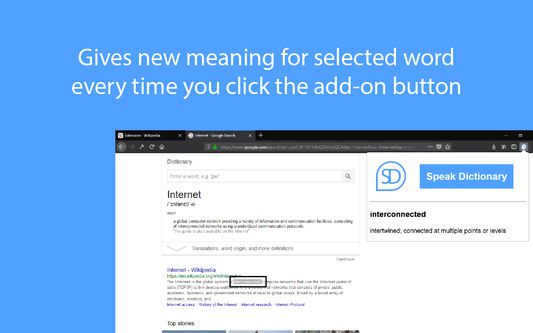
Speak Dictionary displays the meaning/definition of the word which you have selected on a webpage. It is displayed on popup window which opens when you click on the add-on button with Speak Dictionary icon which is on the top right corner of the screen. On the popup you will see the word which you have selected and the meaning/definition of the word below it.
And as the name suggests, it also speaks the meaning/definition of the word which is displayed. So, after you select the word what you have to do is, just click on the add-on button with Speak Dictionary logo or press Ctrl + Q to open the popup and you will see that as soon as the selected word and its definition is displayed, the speech also starts where the selected word is spoken first and then the meaning/definition of the word is spoken.
The Default Shortcut key to open the popup is Ctrl + Q.
And as the name suggests, it also speaks the meaning/definition of the word which is displayed. So, after you select the word what you have to do is, just click on the add-on button with Speak Dictionary logo or press Ctrl + Q to open the popup and you will see that as soon as the selected word and its definition is displayed, the speech also starts where the selected word is spoken first and then the meaning/definition of the word is spoken.
The Default Shortcut key to open the popup is Ctrl + Q.
Rated 2,5 by 2 reviewers
Tisirag akked yisefka
Ugar n telɣut
- TigIseɣwan n uzegrir
- Lqem
- 1.3resigned1
- Teɣzi
- 28,13 KB
- Aleqqem aneggaru
- 2 年前 (2024年4月25日)
- Taggayin i ilan assaɣ
- Turagt
- Turagt IT
- Amazray n Lqem
- Rnu ar tegrumma
Aneflay n usiɣzef-agi isutur-ak-d tallelt akken ad iseddu taneflit ines ticki tmuddeḍ-as cwiṭ n tewsa.