Spotify Hotkeys sɣur Jerosa
Add configurable keyboard shortcuts and notifications to the Spotify Web Player
176 yiseqdacen176 yiseqdacen
Asiɣzef aɣefisefka
Tuṭṭfiwin n wegdil
Ɣef usiɣzef agi
Add configurable keyboard shortcuts and notifications to the Spotify Web Player
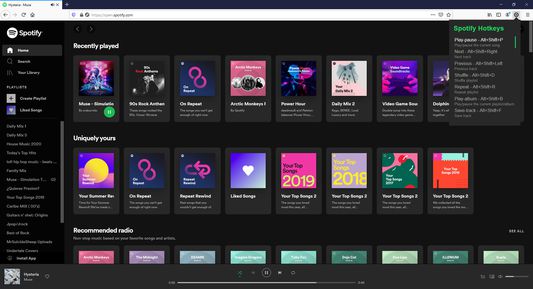
Default Keyboard Shortcuts
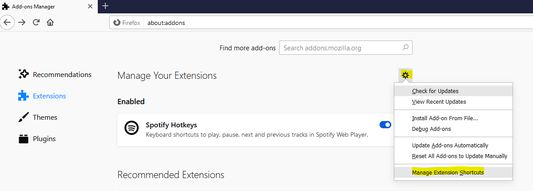
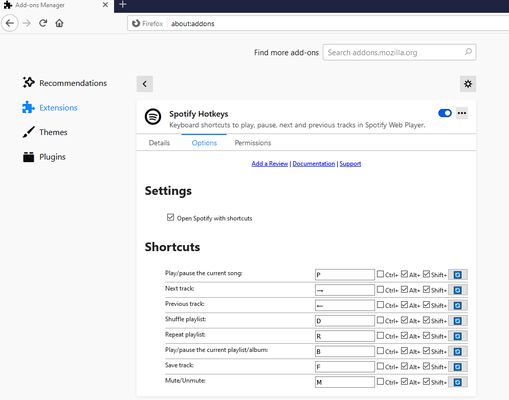
All shortcuts can be customized in Firefox extension settings. Skip duration is configurable (1-60 seconds) in the extension options page.
Default Keyboard Shortcuts
- Play/Pause: Alt+Shift+W
- Next: Alt+Shift+Right Arrow
- Previous: Alt+Shift+Left Arrow
- Shuffle: Alt+Shift+D
- Repeat: Alt+Shift+R
- Play Album: Alt+Shift+G
- Save Track: Alt+Shift+L
- Mute/Unmute: Alt+Shift+M
- Volume Up: Alt+Shift+Up Arrow
- Volume Down: Alt+Shift+Down Arrow
- Skip Forward: Alt+Shift+Period
- Skip Back: Alt+Shift+Comma
All shortcuts can be customized in Firefox extension settings. Skip duration is configurable (1-60 seconds) in the extension options page.
Rated 4,9 by 34 reviewers
Tisirag akked yisefka
Yesra tisirag:
- Ad k-d-isken ilɣa
- Kcem γer icarren n iminig
- Kcem ɣer isefka-ik i open.spotify.com
- Kcem ɣer isefka-ik i play.spotify.com
Alqaḍ n yisefka:
- Aneflay yenna-d asiɣzef-a ur yeḥwaǧ ara alqaḍ n yisefka.
Ugar n telɣut
- TigIseɣwan n uzegrir
- Lqem
- 2.2.0
- Teɣzi
- 21,6 KB
- Aleqqem aneggaru
- há um mês (21 de mar de 2026)
- Taggayin i ilan assaɣ
- Turagt
- Turagt IT
- Amazray n Lqem
- Rnu ar tegrumma