Tomato Clock - A Simple Pomodoro Timer sɣur Samuel Jun
A simple browser extension for managing your productivity
Yella ɣef Firefox i Android™Yella ɣef Firefox i Android™
30 602 yiseqdacen30 602 yiseqdacen
Asiɣzef aɣefisefka
Tuṭṭfiwin n wegdil
Ɣef usiɣzef agi
Use Tomato Clock to break down your work sessions into 25 minute 'Tomato' intervals separated by short breaks. Take a longer break after completing 4 Tomato intervals.
Features:
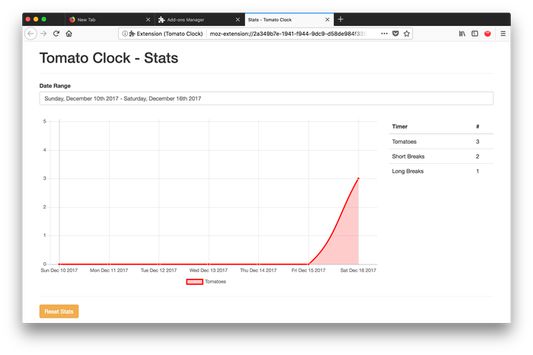
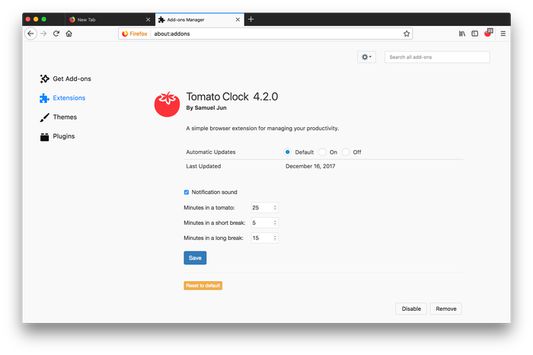
You can customize the length of the Tomatoes and breaks in the extension options page. Tomato Clock uses the default browser notification system, accompanied by a sound, to let you know when the timer is up. Tomato Clock also features stats for tracking how many Tomatoes you complete.
Features:
- Customizable timer lengths
- Browser notifications
- Customizable notification sounds
- Stat tracking
You can customize the length of the Tomatoes and breaks in the extension options page. Tomato Clock uses the default browser notification system, accompanied by a sound, to let you know when the timer is up. Tomato Clock also features stats for tracking how many Tomatoes you complete.
Please file any issues at github: https://github.com/samueljun/tomato-clock/issues.
Rated 4,5 by 423 reviewers
Tisirag akked yisefka
Ugar n telɣut
- TigIseɣwan n uzegrir
- Lqem
- 7.1.2
- Teɣzi
- 2,37 MB
- Aleqqem aneggaru
- 6 timar sidan (14. jan. 2026)
- Taggayin i ilan assaɣ
- Amazray n Lqem
- Rnu ar tegrumma
Aneflay n usiɣzef-agi isutur-ak-d tallelt akken ad iseddu taneflit ines ticki tmuddeḍ-as cwiṭ n tewsa.