
Distraction Block 제작자: Ember Extensions, LLC
Block distracting websites instantly. Simple toggle on/off. Boost productivity and stay focused on what matters right now.
사용자 18명사용자 18명
확장 메타 데이터
스크린샷
정보
Stay Focused. Get More Done. Block Distractions Instantly.
Tired of getting sidetracked by Reddit rabbit holes, YouTube binges, or endless Zillow surfing? Distraction Block is a simple, privacy-first browser extension that helps you reclaim your attention — no accounts, no tracking, no bloat.
—
Instant Website Blocking
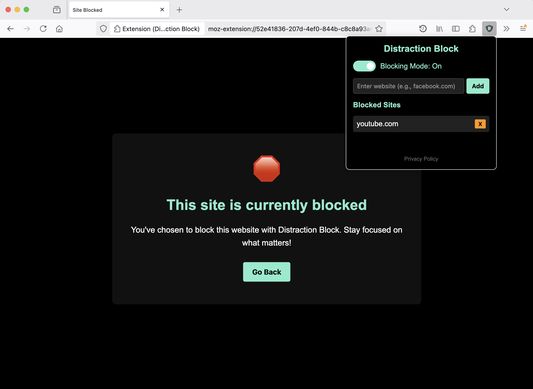
Block any distracting website with one click. Add sites like Facebook, Twitter, Reddit, YouTube, or any domain. Works across all tabs and windows. Just type a domain, click Add, and it's blocked. Remove sites anytime with a single click.
Master Blocking Toggle
One switch controls it all. Turn blocking on or off instantly. The toggle is always front and center — no digging through menus. A glowing indicator light shows your blocking status at a glance.
Scheduled Blocking
Automate your focus time with smart scheduling. Set specific hours when blocking should automatically activate. Choose weekdays, weekends, or both. Define start and end times for your focus periods. Blocking turns off automatically when your scheduled window ends, or you can override it anytime with the master toggle. Perfect for maintaining consistent work routines without having to remember to enable blocking every morning.
Auto-Disable Setting
Choose whether blocking turns off automatically when a scheduled window ends, or stays on until you manually disable it. Find this in Settings — it's on by default.
Clean, Focused Design
Dark theme interface that's easy on the eyes. Indicator lights show blocking and schedule status at a glance. Collapsible schedule section keeps the interface minimal when you don't need it. Inline validation tells you if a domain isn't valid — no jarring popup alerts. Designed to stay out of your way.
Complete Privacy
Zero data collection — everything stays on your device. No tracking, no ads, no account required. Your browsing habits remain 100% private. All settings stored locally in your browser.
Lightweight & Fast
Minimal footprint that doesn't slow down your browser. Works instantly without page refreshes. Built specifically for Chrome and Firefox.
—
Perfect For:
How It Works:
Why Choose Distraction Block?
—
Support & Feedback
Found a bug or have a feature request? Visit distractionblock.com to get in touch. If you're finding Distraction Block helpful, consider buying us a coffee — there's a link right in the extension.
Tired of getting sidetracked by Reddit rabbit holes, YouTube binges, or endless Zillow surfing? Distraction Block is a simple, privacy-first browser extension that helps you reclaim your attention — no accounts, no tracking, no bloat.
—
Instant Website Blocking
Block any distracting website with one click. Add sites like Facebook, Twitter, Reddit, YouTube, or any domain. Works across all tabs and windows. Just type a domain, click Add, and it's blocked. Remove sites anytime with a single click.
Master Blocking Toggle
One switch controls it all. Turn blocking on or off instantly. The toggle is always front and center — no digging through menus. A glowing indicator light shows your blocking status at a glance.
Scheduled Blocking
Automate your focus time with smart scheduling. Set specific hours when blocking should automatically activate. Choose weekdays, weekends, or both. Define start and end times for your focus periods. Blocking turns off automatically when your scheduled window ends, or you can override it anytime with the master toggle. Perfect for maintaining consistent work routines without having to remember to enable blocking every morning.
Auto-Disable Setting
Choose whether blocking turns off automatically when a scheduled window ends, or stays on until you manually disable it. Find this in Settings — it's on by default.
Clean, Focused Design
Dark theme interface that's easy on the eyes. Indicator lights show blocking and schedule status at a glance. Collapsible schedule section keeps the interface minimal when you don't need it. Inline validation tells you if a domain isn't valid — no jarring popup alerts. Designed to stay out of your way.
Complete Privacy
Zero data collection — everything stays on your device. No tracking, no ads, no account required. Your browsing habits remain 100% private. All settings stored locally in your browser.
Lightweight & Fast
Minimal footprint that doesn't slow down your browser. Works instantly without page refreshes. Built specifically for Chrome and Firefox.
—
Perfect For:
- Professionals who need focused work time
- Freelancers managing client projects and deadlines
- Remote workers staying productive at home
- Students preparing for exams or working on assignments
- Anyone wanting to break social media habits
- Teams establishing no-distraction hours
How It Works:
- Add distracting sites to your block list (facebook.com, reddit.com, etc.)
- Choose your blocking method — flip the master toggle for immediate blocking, or set up a recurring schedule
- If you try to visit a blocked site, you'll see a friendly block page reminding you to stay focused
- Toggle blocking off or wait for your schedule to end when you're ready for a break
Why Choose Distraction Block?
- Free with no subscription required
- Instant setup — start blocking in under 30 seconds
- Flexible blocking: manual toggle, scheduled, or both
- Actively maintained with regular updates
- Open to feedback — we build what users need
—
Support & Feedback
Found a bug or have a feature request? Visit distractionblock.com to get in touch. If you're finding Distraction Block helpful, consider buying us a coffee — there's a link right in the extension.
4명이 4점으로 평가함
권한 및 데이터
필수 권한:
- 브라우저 탭에 접근
- 탐색 중 브라우저 활동에 접근
선택적 권한:
- 모든 웹사이트에서 사용자의 데이터에 접근
데이터 수집:
- 개발자가 이 확장 기능은 데이터 수집이 필요하지 않다고 합니다.
추가 정보
- 버전
- 2.0.1
- 크기
- 136 KB
- 마지막 업데이트
- 11일 전 (2026년 3월 18일)
- 관련 카테고리
- 라이선스
- All Rights Reserved
- 개인정보처리방침
- 이 부가 기능에 대한 개인정보처리방침 읽기
- 사용자 라이선스 동의서
- 이 부가 기능에 대한 사용권 계약 읽기
- 버전 목록
- 모음집에 추가