SkipTo Landmarks & Headings ์ ์์: Nicholas Hoyt
Provides keyboard access to landmark regions and headings (h1โh6) on a web page.
์ฌ์ฉ์ 77๋ช
์ฌ์ฉ์ 77๋ช
ํ์ฅ ๋ฉํ ๋ฐ์ดํฐ
์คํฌ๋ฆฐ์ท
์ ๋ณด
Overview
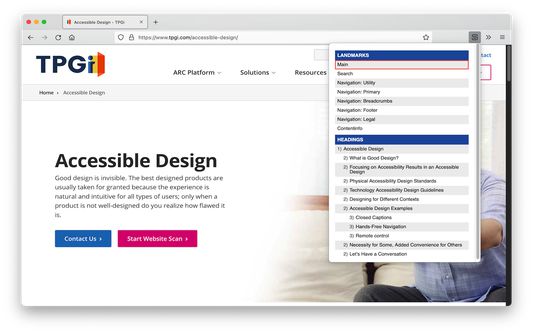
SkipTo Landmarks & Headings extends the web browser by providing a menu for easy navigation to the ARIA landmark regions and HTML section headings of a web page.
The keyboard shortcut for opening the menu is alt+2 (option+2 on Mac keyboards) and cursors keys can be used to navigate the menu.
Activating a menu item scrolls the corresponding landmark region or heading element into view and moves keyboard focus to it on the page.
Complete documentation on keyboard shortcuts, options/preferences and more is available at the SkipTo Documentation website at https://skipto.github.io/.
SkipTo Landmarks & Headings extends the web browser by providing a menu for easy navigation to the ARIA landmark regions and HTML section headings of a web page.
The keyboard shortcut for opening the menu is alt+2 (option+2 on Mac keyboards) and cursors keys can be used to navigate the menu.
Activating a menu item scrolls the corresponding landmark region or heading element into view and moves keyboard focus to it on the page.
Complete documentation on keyboard shortcuts, options/preferences and more is available at the SkipTo Documentation website at https://skipto.github.io/.
2๋ช
์ด 5์ ์ผ๋ก ํ๊ฐํจ
์ถ๊ฐ ์ ๋ณด
- ๋ถ๊ฐ ๊ธฐ๋ฅ ๋งํฌ
- ๋ฒ์
- 2.2.0
- ํฌ๊ธฐ
- 40.19 KB
- ๋ง์ง๋ง ์ ๋ฐ์ดํธ
- 4๋ ์ (2021๋ 10์ 10์ผ)
- ๊ด๋ จ ์นดํ ๊ณ ๋ฆฌ
- ๋ผ์ด์ ์ค
- Mozilla Public License 2.0
- ๋ฒ์ ๋ชฉ๋ก
- ๋ชจ์์ง์ ์ถ๊ฐ