
TwitchTime 제작자: swpease
Track how long you have watched different Twitch channels. Keeps a list of top channels and optionally show a time indicator.
사용자 148명사용자 148명
확장 메타 데이터
스크린샷
정보
TwitchTime has two primary features:
By clicking on the TwitchTime icon in your menu bar (purple clock in the top right of your browser), you can:
Purpose: TwitchTime was created with the intention of providing a metric to use for monetarily supporting channels. Of course you might simply be curious how long you've watched Bob Ross.
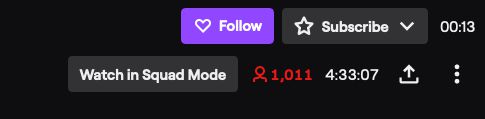
- Custom display your time spent watching a channel.
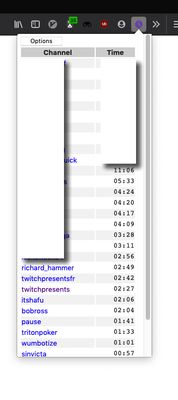
- A table of your most viewed channels.
By clicking on the TwitchTime icon in your menu bar (purple clock in the top right of your browser), you can:
- See the table of streams you've watched for at least 30 minutes.
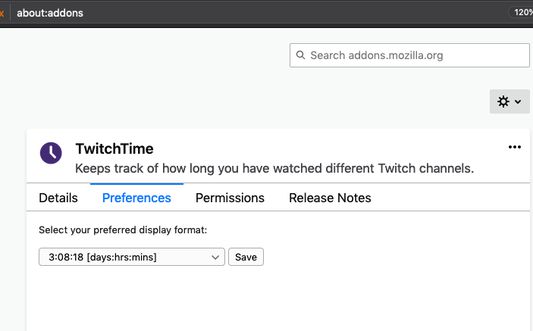
- Customize the display by clicking on the "Options" button.
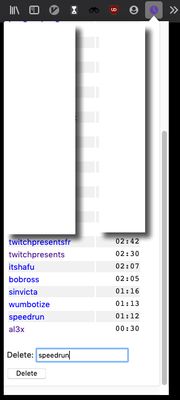
- Remove a channel with the "Delete" input.
- Remove all channels with the "Delete All" input.
- Your storage can fill up, so if new channels aren't registering, you might need to delete some / all of your times.
- Your watch times should sync across your devices.
- TwitchTime does not support mobile viewing.
Purpose: TwitchTime was created with the intention of providing a metric to use for monetarily supporting channels. Of course you might simply be curious how long you've watched Bob Ross.
리뷰어 8명이 4.3점으로 평가함
권한 및 데이터
추가 정보
- 부가 기능 링크
- 버전
- 1.10
- 크기
- 30.72 KB
- 마지막 업데이트
- 4년 전 (2022년 2월 10일)
- 관련 카테고리
- 버전 목록
- 모음집에 추가