
Wander your bookmarks 제작자: Shiva
Wander surprises you with a random page that you bookmarked once upon a time.
사용자 4명사용자 4명
확장 메타 데이터
스크린샷


정보
One click to visit a random bookmark. Search all your bookmarks. Wander through your interests and obsessions.
***
Why wander?
You bookmark interesting pages to revisit later. An intention for your future self. But the more you bookmark, the harder it gets to find bookmarks and fulfill that intention. Wander surprises you with a random page that you bookmarked once upon a time. Get back to the places you love.
Browsers are optimized to create bookmarks quickly. But bookmarks are only useful if we can revisit the places that intrigued us. Currently, revisiting a bookmark is a painstaking plod through hierarchical menus. Wander uses randomness to bring surprise and delight to the process.
How does it work?
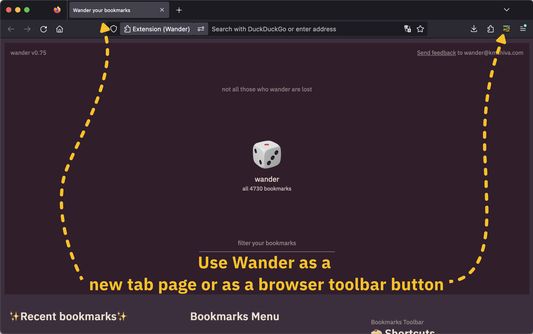
You can use Wander as a new tab page, or as a browser toolbar button.
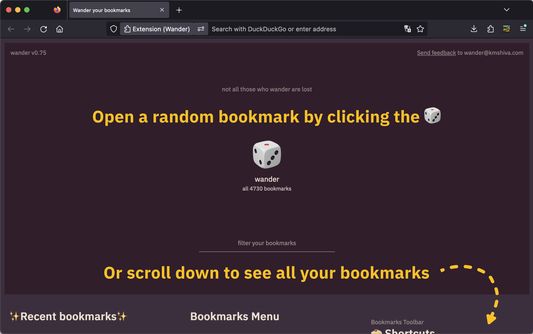
Click the 🎲 to open a random page from all your bookmarks. You can also press Enter.
You can filter down your bookmarks. And open a random bookmark from the filtered results.
Or simply scroll to view all your bookmarks. Click a folder name to open *all* the bookmarks in that folder as tabs.
***
Why wander?
You bookmark interesting pages to revisit later. An intention for your future self. But the more you bookmark, the harder it gets to find bookmarks and fulfill that intention. Wander surprises you with a random page that you bookmarked once upon a time. Get back to the places you love.
Browsers are optimized to create bookmarks quickly. But bookmarks are only useful if we can revisit the places that intrigued us. Currently, revisiting a bookmark is a painstaking plod through hierarchical menus. Wander uses randomness to bring surprise and delight to the process.
How does it work?
You can use Wander as a new tab page, or as a browser toolbar button.
Click the 🎲 to open a random page from all your bookmarks. You can also press Enter.
You can filter down your bookmarks. And open a random bookmark from the filtered results.
Or simply scroll to view all your bookmarks. Click a folder name to open *all* the bookmarks in that folder as tabs.
0명이 0점으로 평가함
권한 및 데이터
추가 정보
- 부가 기능 링크
- 버전
- 0.85
- 크기
- 28.27 KB
- 마지막 업데이트
- 3년 전 (2023년 9월 3일)
- 관련 카테고리
- 버전 목록
- 모음집에 추가