WarpDrive-ff av Krithik Rao
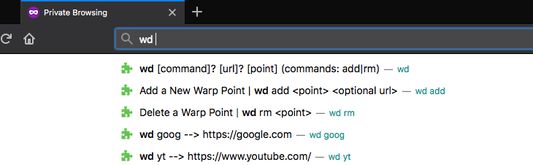
This extension allows jumping to custom urls using specified keywords, all through the omnibar! Based on the zsh extension `wd`.
1 bruker1 bruker
Metadata for utvidelser
Skjermbilder
Om denne utvidelsen
This add on is interacted with in the omnibar with the three following commands.
Example usage is as follows.
- Typing `wd add news cnn.org` or just `wd add news` on the cnn.org page, adds a custom shortcut to cnn.
- You can later come back to it by typing `wd news`.
- If you ever want to remove this shortcut, `wd rm news` does the trick.
All your warp points are synced across your devices if you're logged into a firefox account.
- `wd add <point> <url>` To specify a keyword for the current page or specified url.
- `wd remove <point>` To remove a keyword linked to a url.
- `wd <point>` To go to the url associated with a keyword
- `wd list` To get a popup or window with all saved shortcuts
Example usage is as follows.
- Typing `wd add news cnn.org` or just `wd add news` on the cnn.org page, adds a custom shortcut to cnn.
- You can later come back to it by typing `wd news`.
- If you ever want to remove this shortcut, `wd rm news` does the trick.
All your warp points are synced across your devices if you're logged into a firefox account.
Vurdert til 0 av 0 anmeldere
Tillatelser og data
Mer informasjon
- Lenker for utvidelser
- Versjon
- 1.5resigned1
- Størrelse
- 60,27 kB
- Sist oppdatert
- 2 år siden (25. apr. 2024)
- Lisens
- MIT License
- Versjonshistorikk
- Legg til i samling