Add-ons voor Firefox Browser
  • Extensies
  • Thema’s
    • voor Firefox
    • Woordenboeken en taalpakketten
    • Websites voor andere browsers
    • Add-ons voor Android
Aanmelden
Voorbeeld van QR Issue Card Printer PRO for Jira Cloud

QR Issue Card Printer PRO for Jira Cloud door MrAddon

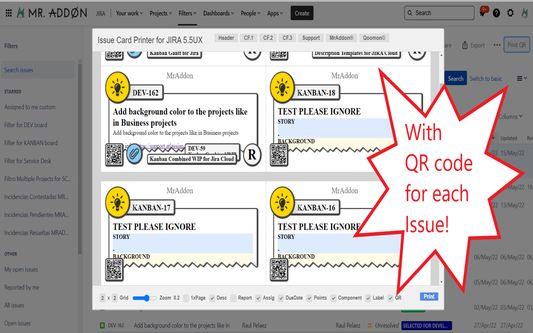
Print your filters and issues with a single click, with a configurable and beautiful layout.Show a large QR code in each card to quickly locate your tickets.Now you can also print from your Kanban or Scrum board and from your backlog view!New feature

ExperimenteelExperimenteel
0 (0 beoordelingen)0 (0 beoordelingen)
2 gebruikers2 gebruikers
Firefox downloaden en de extensie ontvangen
Bestand downloaden

Metagegevens van extensie

Schermafbeeldingen
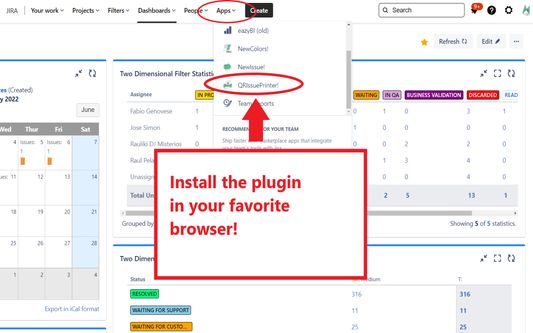
Install the add-on in your favorite browser!
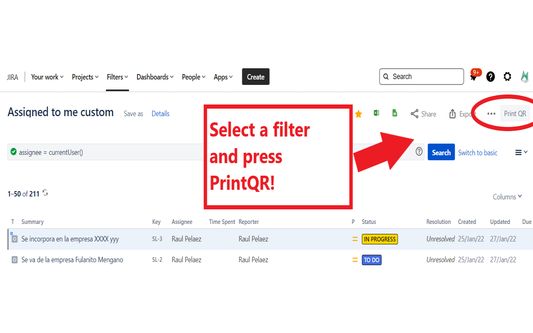
Go to Apps → QRIssuePrinter! and install the add-on in your favorite browserPush PrintQR! button in issues, filters or boards
That’s all! Now take a look in your Issues, Filters and Kanban/SCRUM boards and backlogs and you will see a new button “Print QR”Ready to print in one click!!
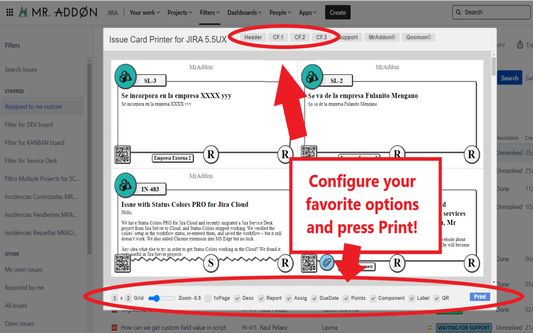
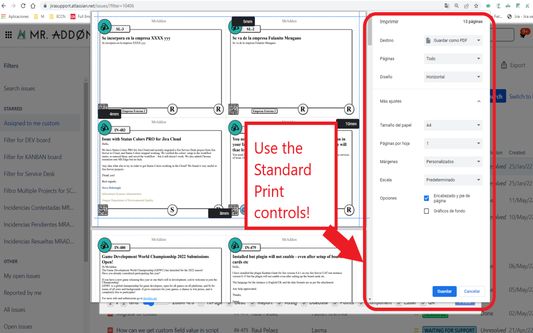
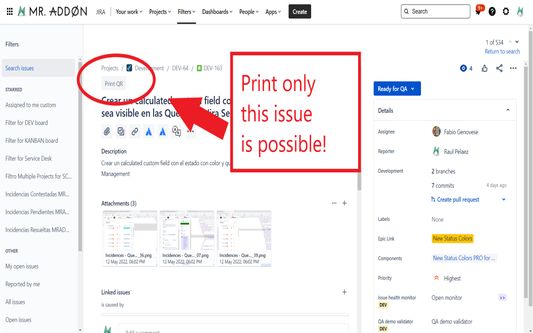
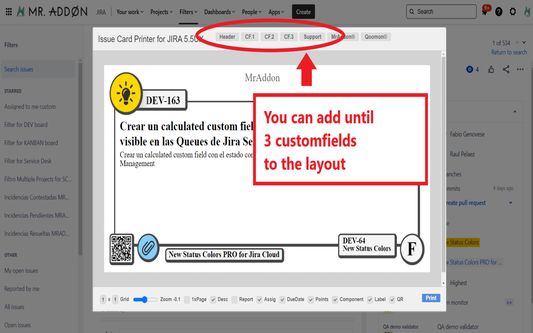
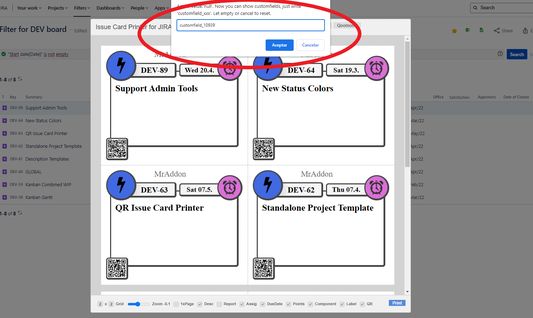
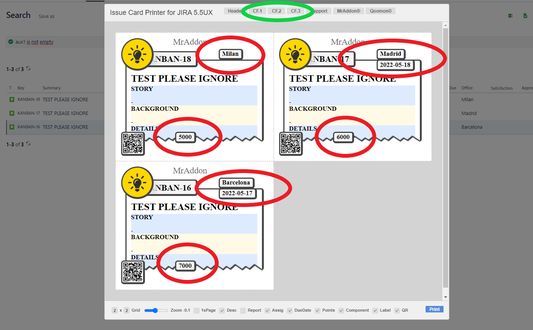
After press the “Print QR” button you will see a beatiful cards ready to print in one click!!Just configure the final part, page margins and Save it as PDF or just print in your usual printer!Now we can configure show/hide the system fields of Jira, we have a Zoom control and grid control, also of course, the QR code.If you need to print only one issue, it’s possible of course! Search the “Print QR” button and that’s all!Click in CF1 or CF2 or CF3 buttons and add the “customfield_xxxx” value where “xxxx” is the ID of the customfieldClick in CF1 or CF2 or CF3 buttons and add the “customfield_xxxx” value where “xxxx” is the ID of the customfieldClick in CF1 or CF2 or CF3 buttons and add the “customfield_xxxx” value where “xxxx” is the ID of the customfield
Over deze extensie
Print your filters and issues with a single click, with a configurable and beautiful layout.Show a large QR code in each card to quickly locate your tickets.Now you can also print from your Kanban or Scrum board and from your backlog view!New features coming soon!

Install the add-on in your favorite browser!
Go to Apps → QRIssuePrinter! and install the add-on in your favorite browser

Push PrintQR! button in issues, filters or boards
That’s all! Now take a look in your Issues, Filters and Kanban/SCRUM boards and backlogs and you will see a new button “Print QR”

Ready to print in one click!!
After press the “Print QR” button you will see a beatiful cards ready to print in one click!!

Vide summary: https://www.youtube.com/watch?v=AVp7n4f4qUk
Met 0 gewaardeerd door 0 beoordelaars
Meld u aan om deze extensie te waarderen
Er zijn nog geen waarderingen

Sterrenwaardering opgeslagen

5
0
4
0
3
0
2
0
1
0
Nog geen beoordelingen
Toestemmingen en gegevens

Vereiste machtigingen:

  • Uw gegevens voor websites in het domein atlassian.net benaderen
  • Uw gegevens voor websites in het domein jira.com benaderen

Optionele machtigingen:

  • Uw gegevens voor websites in het domein atlassian.net benaderen
  • Uw gegevens voor websites in het domein jira.com benaderen
Meer info
Meer informatie
Add-on-koppelingen
  • Startpagina
  • Ondersteuningswebsite
  • E-mailadres voor ondersteuning
Versie
7.3.0
Grootte
170,84 KB
Laatst bijgewerkt
3 dagen geleden (18 dec. 2025)
Verwante categorieën
  • Webontwikkeling
Licentie
Mozilla Public License 2.0
Versiegeschiedenis
  • Alle versies bekijken
Toevoegen aan collectie
Deze add-on rapporteren
Naar Mozilla’s startpagina

Add-ons

  • Over
  • Firefox-add-onsblog
  • Extensieworkshop
  • Ontwikkelaarshub
  • Ontwikkelaarsbeleid
  • Gemeenschapsblog
  • Forum
  • Een bug melden
  • Beoordelingsrichtlijnen

Browsers

  • Desktop
  • Mobile
  • Enterprise

Producten

  • Browsers
  • VPN
  • Relay
  • Monitor
  • Pocket
  • Bluesky (@firefox.com)
  • Instagram (Firefox)
  • YouTube (firefoxchannel)
  • Privacy
  • Cookies
  • Juridisch

Tenzij anders vermeld, is op de inhoud van deze website de Creative Commons Attribution Share-Alike License v3.0 of latere versie van toepassing.