Nettlesartillegg for Firefox
  • Utvidingar
  • Tema
    • for Firefox
    • Ordbøker og språkpakkar
    • Andre nettlesarplassar
    • Utvidingar for Android
Logg inn
Førehandsvising REtoUN

REtoUN av DBSH

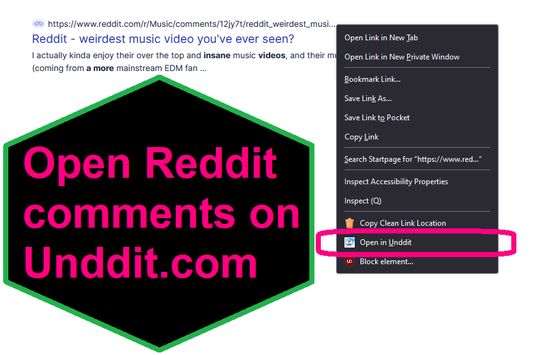
EXTENSION IS DEPRECATED - SEE ABOUT THIS EXTENSION BELOW FOR MORE DETAIL A simple extension that adds an option to the context menu to open links to Reddit comments on unddit.com instead, in a new tab.

0 (0 omtalar)0 (0 omtalar)
2 brukarar2 brukarar
Last ned Firefox og få utvidinga
Last ned fil

Metadata for utvidingar

Skjermbilde
Om denne utvidinga
EXTENSION IS DEPRECATED. NOTES: https://www.unddit.com is gone, and its existence was necessary for this extension to function. I am leaving this extension published for educational purposes (someone may want to use the source for a similar use case where an option in the context menu links to a re-written URL)

This is for those who prefer to read Reddit comments on https://www.unddit.com - maybe you prefer to see deleted comments, or maybe you think "continue this thread" is a crime against UI.
To use, right-click on a link to a Reddit post, and choose Open in Unddit from the context menu. If the link to the Reddit post is https://www.reddit.com/r/news/comments/130kndv for example, using REtoUN will open https://www.unddit.com/r/news/comments/130kndv instead, in a new tab.
Utviklarkommentarar
Note that in Firefox, content on https://www.unddit.com requires turning off Enhanced Tracking Protection to load. This behavior is not at all related to this extension.

Developer is not affiliated with Unddit.com, but is a huge fan of the project.

To view this extension's source code:
1. In a Firefox instance that already has this extension installed, type about:profiles in the Firefox address bar, then press Enter
2. Under the profile labeled This is the profile in use and it cannot be deleted, click on the Open Directory button (appears as Open Folder on Windows) next to Root Directory
3. In the file explorer window that opens, go into the extensions directory (the extensions folder)
4. Copy the file {d40ec1bd-9875-4dbd-a1f7-cba6e2d9d281}.xpi and paste it somewhere else, such as your Desktop
5. Rename the file you just pasted, changing the extension to .zip - so {d40ec1bd-9875-4dbd-a1f7-cba6e2d9d281}.xpi becomes {d40ec1bd-9875-4dbd-a1f7-cba6e2d9d281}.zip
6. Unzip the file {d40ec1bd-9875-4dbd-a1f7-cba6e2d9d281}.zip. The extracted files are the source, especially the .json and .js files.
Vurdert 0 av 0 meldarar
Logg inn for å vurdere denne utvidinga
Ingen vurderingar enno

Stjernevurdering lagra

5
0
4
0
3
0
2
0
1
0
Ingen vurderingar enno
Løyve og data

Påkravde løyve:

  • Få tilgang til nettlesarfaner
Les meir
Meir informasjon
Versjon
1.0
Storleik
26,31 KB
Sist oppdatert
3 år sidan (27. apr. 2023)
Liknande kategoriar
  • RSS-kjelder, nyheiter og blogging
  • Personvern og sikkerheit
  • Sosialt og kommunikasjon
Lisens
Berre GNU General Public License v3.0
Personvernpraksis
Les personvernpraksisen for denne utvidinga
Versjonshistorikk
  • Vis alle versjonar
Legg til i samling
Rapporter dette tillegget
Gå til Mozilla-heimesida

Utvidingar

  • Om
  • Firefox tilleggsblogg
  • Utvidingsverkstad
  • Utviklarsenter
  • Utviklarpraksis
  • Fellesskaps-blogg
  • Forum
  • Rapporter ein feil
  • Vurderingsguide

Nettlesar

  • Desktop
  • Mobile
  • Enterprise

Produkt

  • Browsers
  • VPN
  • Relay
  • Monitor
  • Pocket
  • Bluesky (@firefox.com)
  • Instagram (Firefox)
  • YouTube (firefoxchannel)
  • Personvern
  • Infokapslar
  • Juridisk

Om ikkje noko anna er spesifisert, er innhaldet på denne nettstaden lisensiert under Creative Commons Attribution Share-Alike License v3.0 eller ein seinare versjon.