
Whiteboard Pro – Draw On Any Site av moeez
Turn any webpage into a whiteboard! Draw freehand, create lines, and customize thickness, opacity, and colors. Works on any site with full-page coverage. Perfect for notes, brainstorming, and teaching—fast, lightweight, and privacy-friendly. 🚀
86 brukarar86 brukarar
Metadata for utvidingar
Skjermbilde


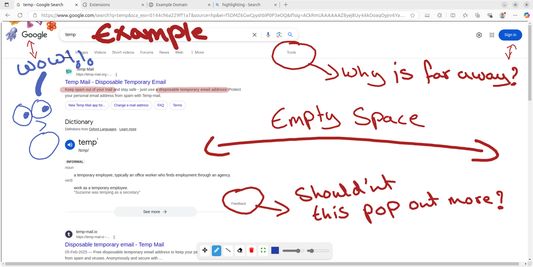
Om denne utvidinga
Whiteboard Pro - Simply Draw Anywhere 🎨
Effortlessly draw / write on any webpage! Whether you're taking notes, brainstorming, or teaching, Whiteboard Pro gives you the freedom to sketch, highlight, and annotate without limitations on sites.
You can work on any site, or on a separate blank tab.
✨ New Features:
✅ Arrows – Single and double-headed arrows to point things out and show connections.
✅ More Shapes – Diamonds and stars, in both outline and filled styles.
✅ Quick Marks – Drop a ✓ or a ✗ anywhere in a single drag.
✅ Speech Bubbles – Callouts with a pointer tail for notes that point at what you mean.
✅ Dashed & Dotted Lines – Every shape and the pencil can be solid, dashed, or dotted.
✅ Emoji Stamps – Over 100 emojis, dragged to any size.
✅ Redesigned Color Picker – A quick palette, and your recent custom colors remembered.
✅ Capture Just What You See – Screenshot the full page, or only what's on screen.
✅ Tidier Shapes Menu – Organized into a clean grid so the tool you want is easy to find.
🖊 Draw Freely – Sketch by hand, or create straight lines with ease.
🖍 Highlighter – A thick, see-through marker for highlighting text without hiding it.
🔷 A Full Shape Library – Rectangles, circles, triangles, diamonds and stars (outline or filled), plus lines, arrows, checkmarks, crosses and speech bubbles.
😀 Emoji Stamps – Pick from over 100 emojis and drop one at any size.
🎨 Fully Customizable – Adjust color, thickness and opacity, choose solid / dashed / dotted lines, and pick from a ready-made palette or any custom color you like.
✋ Move & Edit – Select anything you've drawn to move, resize or rotate it, erase individual marks, or clear the board in one click.
↩ Undo & Redo – Step back and forward through your changes at any time.
👆 Click-Through Mode – Flip a switch to interact with the page underneath while your drawings stay on screen.
📸 Screenshots – Capture the full page or just the visible screen, with or without your whiteboard on top, then preview and download it.
🧰 Toolbar Minimization – Move the toolbar to any edge of the screen, or hide it entirely to focus on drawing without distractions.
🗒 New Tab Whiteboard – Draw freely in a dedicated space from the popup.
🌗 Light & Dark – The toolbar automatically matches your system theme.
📜 Scroll-Friendly – Your drawings stay anchored to the page as you scroll, so annotations stick to what they're marking.
🌐 Works Everywhere – Covers the entire webpage, with a fix button if needed.
🧭 Cross-Browser – Available for Chrome, Edge and Firefox.
⚡ Lightweight & Fast – Designed for smooth, lag-free drawing.
🔄 Actively Developed – More features and improvements coming soon!
🔒 Privacy-Friendly – No ads, no tracking and no analytics. Your drawings stay on your device.
💜 Whiteboard Pro is built and maintained by a single developer. An optional subscription helps keep it running and funds what's coming next — including saving your whiteboards and syncing them across your devices. A free account unlocks screenshots with a monthly allowance; subscribing makes them unlimited.
Effortlessly draw / write on any webpage! Whether you're taking notes, brainstorming, or teaching, Whiteboard Pro gives you the freedom to sketch, highlight, and annotate without limitations on sites.
You can work on any site, or on a separate blank tab.
✨ New Features:
✅ Arrows – Single and double-headed arrows to point things out and show connections.
✅ More Shapes – Diamonds and stars, in both outline and filled styles.
✅ Quick Marks – Drop a ✓ or a ✗ anywhere in a single drag.
✅ Speech Bubbles – Callouts with a pointer tail for notes that point at what you mean.
✅ Dashed & Dotted Lines – Every shape and the pencil can be solid, dashed, or dotted.
✅ Emoji Stamps – Over 100 emojis, dragged to any size.
✅ Redesigned Color Picker – A quick palette, and your recent custom colors remembered.
✅ Capture Just What You See – Screenshot the full page, or only what's on screen.
✅ Tidier Shapes Menu – Organized into a clean grid so the tool you want is easy to find.
🖊 Draw Freely – Sketch by hand, or create straight lines with ease.
🖍 Highlighter – A thick, see-through marker for highlighting text without hiding it.
🔷 A Full Shape Library – Rectangles, circles, triangles, diamonds and stars (outline or filled), plus lines, arrows, checkmarks, crosses and speech bubbles.
😀 Emoji Stamps – Pick from over 100 emojis and drop one at any size.
🎨 Fully Customizable – Adjust color, thickness and opacity, choose solid / dashed / dotted lines, and pick from a ready-made palette or any custom color you like.
✋ Move & Edit – Select anything you've drawn to move, resize or rotate it, erase individual marks, or clear the board in one click.
↩ Undo & Redo – Step back and forward through your changes at any time.
👆 Click-Through Mode – Flip a switch to interact with the page underneath while your drawings stay on screen.
📸 Screenshots – Capture the full page or just the visible screen, with or without your whiteboard on top, then preview and download it.
🧰 Toolbar Minimization – Move the toolbar to any edge of the screen, or hide it entirely to focus on drawing without distractions.
🗒 New Tab Whiteboard – Draw freely in a dedicated space from the popup.
🌗 Light & Dark – The toolbar automatically matches your system theme.
📜 Scroll-Friendly – Your drawings stay anchored to the page as you scroll, so annotations stick to what they're marking.
🌐 Works Everywhere – Covers the entire webpage, with a fix button if needed.
🧭 Cross-Browser – Available for Chrome, Edge and Firefox.
⚡ Lightweight & Fast – Designed for smooth, lag-free drawing.
🔄 Actively Developed – More features and improvements coming soon!
🔒 Privacy-Friendly – No ads, no tracking and no analytics. Your drawings stay on your device.
💜 Whiteboard Pro is built and maintained by a single developer. An optional subscription helps keep it running and funds what's coming next — including saving your whiteboards and syncing them across your devices. A free account unlocks screenshots with a monthly allowance; subscribing makes them unlimited.
Vurdert 5 av 3 meldarar
Løyve og data
Meir informasjon
- Lenker for tillegg
- Versjon
- 2.1.1
- Storleik
- 908,6 KB
- Sist oppdatert
- 6 dagar sidan (26. juli 2026)
- Liknande kategoriar
- Lisens
- Alle rettar med atterhald
- Versjonshistorikk
- Legg til i samling