
Clean Twitter Autor: rxliuli
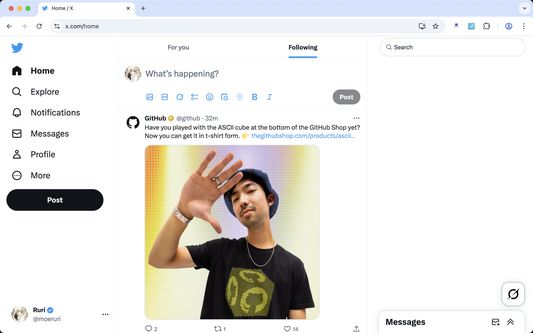
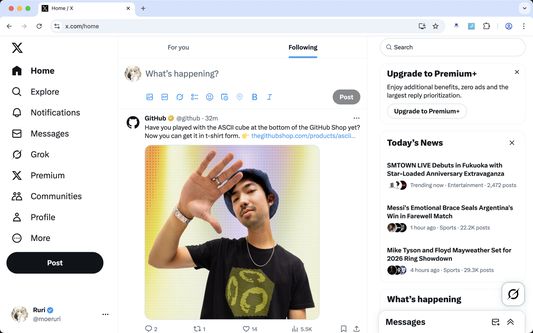
Clean up some annoying elements on Twitter and make your Twitter experience cleaner.
18 użytkowników18 użytkowników
Metadane rozszerzenia
Zrzuty ekranu

O tym rozszerzeniu
Clean up unnecessary elements on X (Twitter) and enjoy a cleaner, more focused browsing experience.
FEATURES
Branding:
• Restore classic Twitter logo - Bring back the bird logo
Layout:
• Hide right sidebar - Remove trending topics and suggestions
Left Navigation:
• Hide Chat - Remove the Chat/Messages tab
• Hide Grok - Remove the Grok AI assistant
• Hide Lists - Remove the Lists tab
• Hide Bookmarks - Remove the Bookmarks tab
• Hide Communities - Remove the Communities tab
• Hide Premium - Remove X Premium/Twitter Blue promotional elements
• Hide Profile - Remove the Profile navigation link
• Hide Creator Studio
• Hide Ads - Remove promotional advertisements from navigation
• Hide Create your Space
• Hide More - Remove the More menu option
• Hide Follow - Remove the Follow navigation
Tweet Actions:
• Hide Analytics - Remove analytics buttons from tweets
• Hide Bookmarks - Remove bookmark buttons from tweet actions
• Hide Grok - Remove the Grok AI assistant
Content Area:
• Hide Timeline Explore - Remove the Explore tab from your timeline
• Hide Discover More - Remove "Discover more" recommendations
• Hide Advertisement - Remove sponsored content and ads from your feed
GETTING STARTED
CUSTOMIZATION
All features can be individually toggled on/off through the extension popup. Choose exactly what you want to see and hide everything else.
SUPPORT
Join our Discord community for support, feature requests, and discussions: https://discord.gg/gFhKUthc88
Make X (Twitter) yours again - Install Clean Twitter today!
FEATURES
Branding:
• Restore classic Twitter logo - Bring back the bird logo
Layout:
• Hide right sidebar - Remove trending topics and suggestions
Left Navigation:
• Hide Chat - Remove the Chat/Messages tab
• Hide Grok - Remove the Grok AI assistant
• Hide Lists - Remove the Lists tab
• Hide Bookmarks - Remove the Bookmarks tab
• Hide Communities - Remove the Communities tab
• Hide Premium - Remove X Premium/Twitter Blue promotional elements
• Hide Profile - Remove the Profile navigation link
• Hide Creator Studio
• Hide Ads - Remove promotional advertisements from navigation
• Hide Create your Space
• Hide More - Remove the More menu option
• Hide Follow - Remove the Follow navigation
Tweet Actions:
• Hide Analytics - Remove analytics buttons from tweets
• Hide Bookmarks - Remove bookmark buttons from tweet actions
• Hide Grok - Remove the Grok AI assistant
Content Area:
• Hide Timeline Explore - Remove the Explore tab from your timeline
• Hide Discover More - Remove "Discover more" recommendations
• Hide Advertisement - Remove sponsored content and ads from your feed
GETTING STARTED
- Install the extension from Chrome Web Store
- Visit X (Twitter) - The extension activates automatically
- Click the extension icon in your toolbar to customize which features to enable or disable
- Your preferences are saved automatically and sync across devices
CUSTOMIZATION
All features can be individually toggled on/off through the extension popup. Choose exactly what you want to see and hide everything else.
SUPPORT
Join our Discord community for support, feature requests, and discussions: https://discord.gg/gFhKUthc88
Make X (Twitter) yours again - Install Clean Twitter today!
Ocenione na 5 przez jednego recenzenta
Uprawnienia i dane
Więcej informacji
- Strony dodatku
- Wersja
- 0.17.5
- Rozmiar
- 141,59 KB
- Ostatnia aktualizacja
- 5 dni temu (31 gru 2025)
- Powiązane kategorie
- Licencja
- Licencja MIT
- Historia wersji
- Dodaj do kolekcji