Dodatki do przeglądarki Firefox
  • Rozszerzenia
  • Motywy
    • do Firefoksa
    • Słowniki i pakiety językowe
    • Inne strony
    • Dodatki na Androida
Zaloguj się
Podgląd „QR Issue Card Printer PRO for Jira Cloud”

QR Issue Card Printer PRO for Jira Cloud Autor: MrAddon

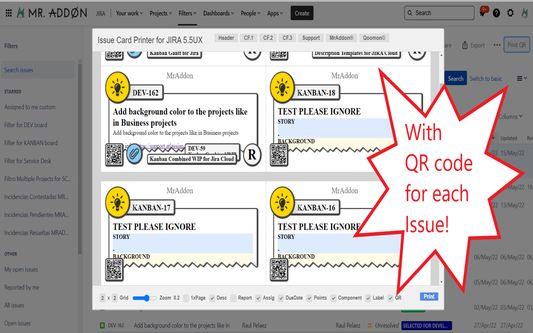
Print your filters and issues with a single click, with a configurable and beautiful layout.Show a large QR code in each card to quickly locate your tickets.Now you can also print from your Kanban or Scrum board and from your backlog view!New feature

EksperymentalneEksperymentalne
0 (recenzje: 0)0 (recenzje: 0)
2 użytkowników2 użytkowników
Pobierz Firefoksa i to rozszerzenie
Pobierz plik

Metadane rozszerzenia

Zrzuty ekranu
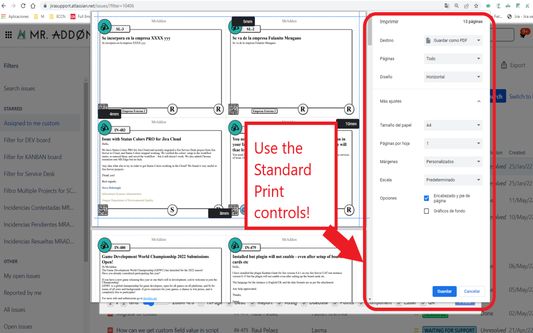
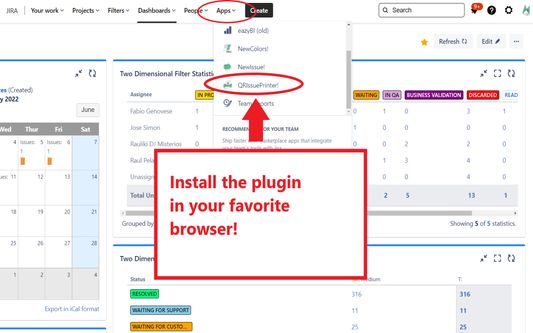
Install the add-on in your favorite browser!
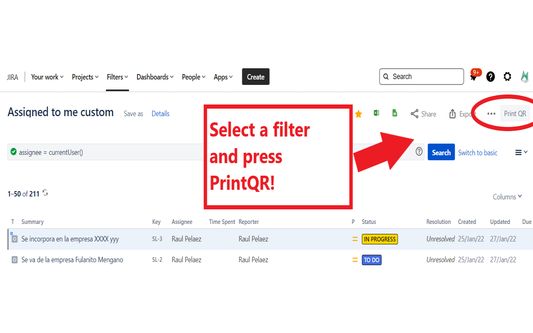
Go to Apps → QRIssuePrinter! and install the add-on in your favorite browserPush PrintQR! button in issues, filters or boards
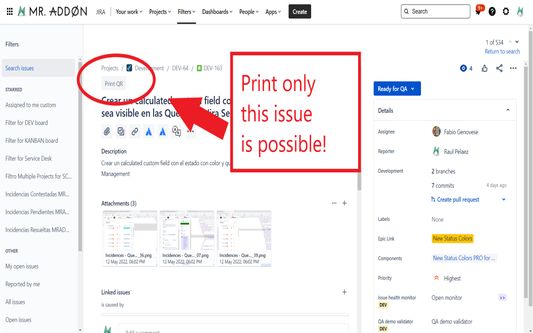
That’s all! Now take a look in your Issues, Filters and Kanban/SCRUM boards and backlogs and you will see a new button “Print QR”Ready to print in one click!!
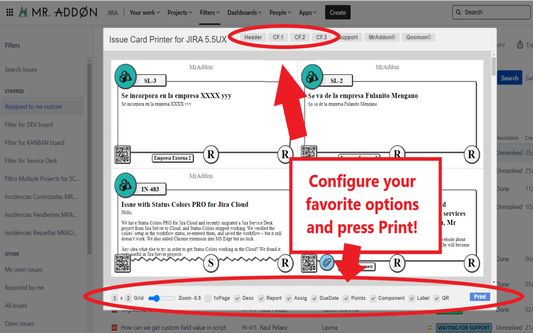
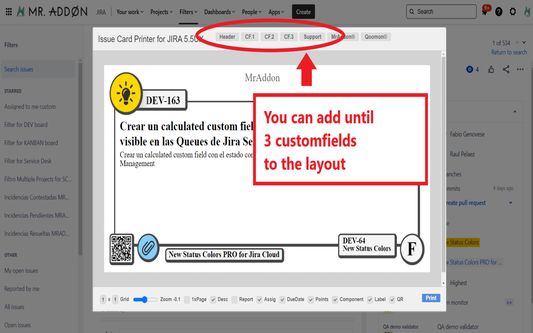
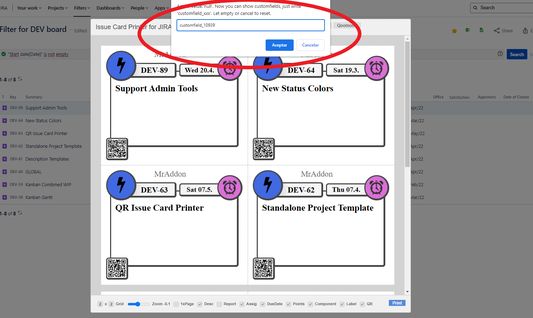
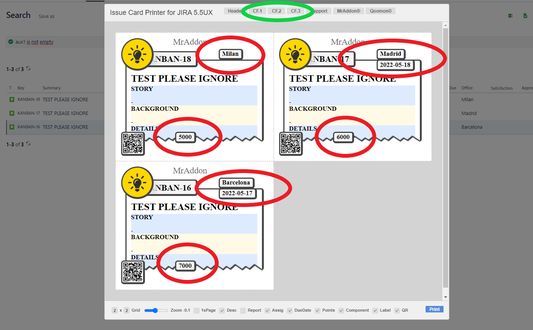
After press the “Print QR” button you will see a beatiful cards ready to print in one click!!Just configure the final part, page margins and Save it as PDF or just print in your usual printer!Now we can configure show/hide the system fields of Jira, we have a Zoom control and grid control, also of course, the QR code.If you need to print only one issue, it’s possible of course! Search the “Print QR” button and that’s all!Click in CF1 or CF2 or CF3 buttons and add the “customfield_xxxx” value where “xxxx” is the ID of the customfieldClick in CF1 or CF2 or CF3 buttons and add the “customfield_xxxx” value where “xxxx” is the ID of the customfieldClick in CF1 or CF2 or CF3 buttons and add the “customfield_xxxx” value where “xxxx” is the ID of the customfield
O tym rozszerzeniu
Print your filters and issues with a single click, with a configurable and beautiful layout.Show a large QR code in each card to quickly locate your tickets.Now you can also print from your Kanban or Scrum board and from your backlog view!New features coming soon!

Install the add-on in your favorite browser!
Go to Apps → QRIssuePrinter! and install the add-on in your favorite browser

Push PrintQR! button in issues, filters or boards
That’s all! Now take a look in your Issues, Filters and Kanban/SCRUM boards and backlogs and you will see a new button “Print QR”

Ready to print in one click!!
After press the “Print QR” button you will see a beatiful cards ready to print in one click!!

Vide summary: https://www.youtube.com/watch?v=AVp7n4f4qUk
Ocenione na 0 przez 0 recenzentów
Zaloguj się, aby ocenić to rozszerzenie
Nie ma jeszcze ocen

Zapisano ocenę w gwiazdkach

5
0
4
0
3
0
2
0
1
0
Nie ma jeszcze recenzji
Uprawnienia i dane

Wymagane uprawnienia:

  • Mieć dostęp do danych użytkownika w domenie „atlassian.net”
  • Mieć dostęp do danych użytkownika w domenie „jira.com”

Opcjonalne uprawnienia:

  • Mieć dostęp do danych użytkownika w domenie „atlassian.net”
  • Mieć dostęp do danych użytkownika w domenie „jira.com”
Więcej informacji
Więcej informacji
Strony dodatku
  • Domowa
  • Pomoc
  • Adres e-mail pomocy
Wersja
7.3.0
Rozmiar
170,84 KB
Ostatnia aktualizacja
3 miesiące temu (18 gru 2025)
Powiązane kategorie
  • Narzędzia twórców witryn
Licencja
Mozilla Public License 2.0
Historia wersji
  • Wszystkie wersje
Dodaj do kolekcji
Zgłoś ten dodatek
Strona domowa Mozilli

Dodatki

  • O serwisie
  • Blog dodatków do Firefoksa
  • Warsztat rozszerzeń
  • Strefa autora
  • Zasady programistów
  • Blog społeczności
  • Forum
  • Zgłoś błąd
  • Wytyczne recenzji

Przeglądarki

  • Desktop
  • Mobile
  • Enterprise

Produkty

  • Browsers
  • VPN
  • Relay
  • Monitor
  • Pocket
  • Bluesky (@firefox.com)
  • Instagram (Firefox)
  • YouTube (firefoxchannel)
  • Prywatność
  • Ciasteczka
  • Kwestie prawne

O ile nie wskazano inaczej, treść tej strony jest dostępna na warunkach licencji Creative Commons Attribution Share-Alike w wersji 3.0 lub nowszej.