
Page Draw & Doodle Autor: diemtea
Page Draw + Doodle transforms any webpage into an interactive canvas to draw and annotate on.
92 użytkowników92 użytkowników
Metadane rozszerzenia
Zrzuty ekranu

O tym rozszerzeniu
Designed for power users and casual doodlers alike, Page Draw & Doodle blends into your browsing experience with no page reloads, no complicated settings, just a lightweight, always-available canvas on top of any web page.
New in v1.1
Features
Known-issues, future update
New in v1.1
- Shortcuts - Undo (CTRL+Z), Redo (CTRL+Y), Clear (ALT+C), Toggle drawing (ALT+A). All modifiable via Firefox's Manage Extension Shortcuts page.
- Better UI - Improved stability and consistency across different themes and web pages.
Features
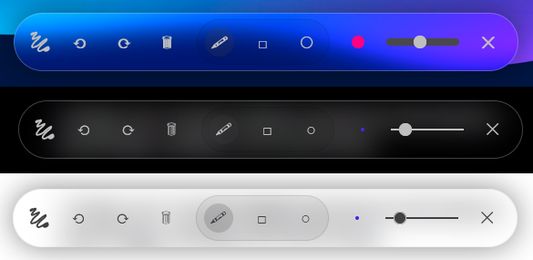
- Freehand Pencil Tool Draw anywhere on the page with adjustable brush size and color.
- Shape Modes Instantly switch between freehand, rectangle, and circle tools for precise annotations.
- Persistent Doodles All your drawings are saved per URL and reload automatically whenever you revisit.
- Undo / Redo / Clear Mistake? No worries. Step backward or forward through your strokes, or clear the canvas entirely.
- Draggable, Collapsible Toolbar Grab the “≡” handle to move your toolbar anywhere; click it to collapse or expand.
Known-issues, future update
- No scrolling in iframes or nested content Currently only scrolls the page, but does not react to iframes or scrollable content inside the page. Working on a fix!
- Inconsistent floating menu Floating menu sometimes takes the styling CSS of the page, producing inconsistent look and feel of the menu between different pages. Working on a fix!
Ocenione na 5 przez 2 recenzentów
Uprawnienia i dane
Wymagane uprawnienia:
- Mieć dostęp do kart przeglądarki
- Mieć dostęp do danych użytkownika na wszystkich stronach
Więcej informacji
- Wersja
- 1.1
- Rozmiar
- 20,76 KB
- Ostatnia aktualizacja
- 9 miesięcy temu (28 maj 2025)
- Powiązane kategorie
- Historia wersji
- Dodaj do kolekcji