
Patreon Easy Downloader Autor: Cosmious
Organize your favorite Patreon creators in one place. Download and manage your media ensuring they are uniformly and easily accessible. Focus on enjoying your content—not managing it. Never miss a file again.
Część funkcji może wymagać płatnościCzęść funkcji może wymagać płatności
1538 użytkowników1538 użytkowników
Metadane rozszerzenia
Zrzuty ekranu



O tym rozszerzeniu
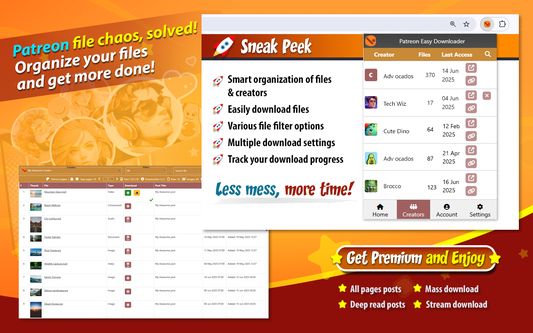
Patreon Easy Downloader helps you organize and download files from Patreon creators in one simple interface.
Browse posts, bulk download Patreon content and minimize duplicates or missed files, without scrolling through endless feeds.
Get a clear picture of what's going on in all posts by eliminating the need to scramble for scattered content.
Ensuring that your data is properly arranged, you no longer have to race against the clock to receive your rewards before they disappear.
Filter & search exactly what you're looking for. No more hunting for download links hidden in a wall of content.
Focus on enjoying your content—not managing it.
🧾 How to Use
You can add your Patreon.com creators to the extension with 3 ways. Before adding your creators we suggest to complete these 3 things first:
1. Sign in to your Patreon.com account
2. Subscribe to a Patreon.com creator
3. Sign in to the browser extension within your browser
➤ The first way is automatic and available only for Chrome users. Steps:
1. Click the browser extension (Home tab) and click the 'Import creators from Patreon' button. Follow the instructions on the consent screen
All creators you currently support, or have supported in the past, will be added to the extension (Creators Tab)
2. Click the 'Downloads Page' button. It isn't required to have the Patreon.com page opened in your browser
➤ The second way is also automatic. Steps:
1. Sign in to https://patreon.cosmious.com
2. Visit the My Creators page: https://patreon.cosmious.com/my-creators
3. Click the 'Continue with Patreon' button in Import creators from Patreon section. Follow the instructions on the consent screen
All creators you currently support, or have supported in the past, will be loaded. You can choose which ones to add
4. Click the 'Downloads Page' in the browser extension
➤ The third way is also automatic. Steps:
1. Visit the Patreon.com creator's home page
2. Click the browser extension (Home tab) and wait until the creator is detected
3. Click the 'Downloads Page' button. The creator will be added to your creator's list. It isn't required to have the Patreon.com page opened in your browser
➤ The fourth way is manual. Steps:
1. Click the browser extension and then click the 'Add creators' button
2. Type the creator's name in the search box and it will appear in the search results
3. Click the 'Add creator' icon next to the creator's name and it will be added to your creator's list
4. Click the 'Downloads Page' button
➤ The fifth way is manual. Steps:
1. Sign in to https://patreon.cosmious.com
2. Visit the My Creators page: https://patreon.cosmious.com/my-creators
3. The 'Add creators' section will appear
4. Type the creator's name in the search box and it will appear in the search results
5. Click the 'Add creator' icon next to the creator's name and it will be added to your creator's list
6. Click the 'Downloads Page' in the browser extension
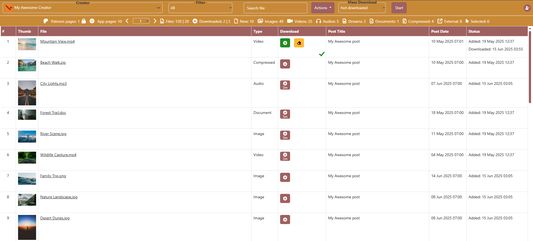
The 'Downloads Page' will gradually list the creator's available files.
🧩 Core features
- Automatically import creators you support from Patreon
- List files from creator's posts
- Search & filter files by file type, post, state
- Download attachments (any media type) into organized folders
- Various download settings
- Multiple mass download options
- Track download progress
⭐ Premium features information
Users have the option to upgrade to a Premium plan for one or more creators and enhance their experience within the extension.
Details about the Premium features, including their benefits and functionalities, are available on our website.
🌐 Visit https://patreon.cosmious.com for more information.
Browse posts, bulk download Patreon content and minimize duplicates or missed files, without scrolling through endless feeds.
Get a clear picture of what's going on in all posts by eliminating the need to scramble for scattered content.
Ensuring that your data is properly arranged, you no longer have to race against the clock to receive your rewards before they disappear.
Filter & search exactly what you're looking for. No more hunting for download links hidden in a wall of content.
Focus on enjoying your content—not managing it.
🧾 How to Use
You can add your Patreon.com creators to the extension with 3 ways. Before adding your creators we suggest to complete these 3 things first:
1. Sign in to your Patreon.com account
2. Subscribe to a Patreon.com creator
3. Sign in to the browser extension within your browser
➤ The first way is automatic and available only for Chrome users. Steps:
1. Click the browser extension (Home tab) and click the 'Import creators from Patreon' button. Follow the instructions on the consent screen
All creators you currently support, or have supported in the past, will be added to the extension (Creators Tab)
2. Click the 'Downloads Page' button. It isn't required to have the Patreon.com page opened in your browser
➤ The second way is also automatic. Steps:
1. Sign in to https://patreon.cosmious.com
2. Visit the My Creators page: https://patreon.cosmious.com/my-creators
3. Click the 'Continue with Patreon' button in Import creators from Patreon section. Follow the instructions on the consent screen
All creators you currently support, or have supported in the past, will be loaded. You can choose which ones to add
4. Click the 'Downloads Page' in the browser extension
➤ The third way is also automatic. Steps:
1. Visit the Patreon.com creator's home page
2. Click the browser extension (Home tab) and wait until the creator is detected
3. Click the 'Downloads Page' button. The creator will be added to your creator's list. It isn't required to have the Patreon.com page opened in your browser
➤ The fourth way is manual. Steps:
1. Click the browser extension and then click the 'Add creators' button
2. Type the creator's name in the search box and it will appear in the search results
3. Click the 'Add creator' icon next to the creator's name and it will be added to your creator's list
4. Click the 'Downloads Page' button
➤ The fifth way is manual. Steps:
1. Sign in to https://patreon.cosmious.com
2. Visit the My Creators page: https://patreon.cosmious.com/my-creators
3. The 'Add creators' section will appear
4. Type the creator's name in the search box and it will appear in the search results
5. Click the 'Add creator' icon next to the creator's name and it will be added to your creator's list
6. Click the 'Downloads Page' in the browser extension
The 'Downloads Page' will gradually list the creator's available files.
🧩 Core features
- Automatically import creators you support from Patreon
- List files from creator's posts
- Search & filter files by file type, post, state
- Download attachments (any media type) into organized folders
- Various download settings
- Multiple mass download options
- Track download progress
⭐ Premium features information
Users have the option to upgrade to a Premium plan for one or more creators and enhance their experience within the extension.
Details about the Premium features, including their benefits and functionalities, are available on our website.
🌐 Visit https://patreon.cosmious.com for more information.
Ocenione na 3 przez 22 recenzentów
Uprawnienia i dane
Wymagane uprawnienia:
- Pobierać pliki oraz odczytywać i modyfikować historię pobranych plików przeglądarki
- Mieć dostęp do kart przeglądarki
- Mieć dostęp do danych użytkownika na stronie „patreon.cosmious.com”
Opcjonalne uprawnienia:
- Wyświetlać powiadomienia
- Mieć dostęp do danych użytkownika w domenie „patreon.com”
- Mieć dostęp do danych użytkownika w domenie „patreonusercontent.com”
- Mieć dostęp do danych użytkownika w domenie „googleapis.com”
- Mieć dostęp do danych użytkownika na stronie „patreon.cosmious.com”
- Mieć dostęp do danych użytkownika na stronie „drive.google.com”
- Mieć dostęp do danych użytkownika na stronie „accounts.google.com”
Więcej informacji
- Odnośniki dodatku
- Wersja
- 322
- Rozmiar
- 706,05 KB
- Ostatnia aktualizacja
- 1 dzień temu (23 sie 2026)
- Powiązane kategorie
- Licencja
- Wszelkie prawa zastrzeżone
- Prywatność
- Zasady ochrony prywatności tego dodatku
- Historia wersji
- Etykiety
- Dodaj do kolekcji