
Quick Tabs Ported por Kevin Jones
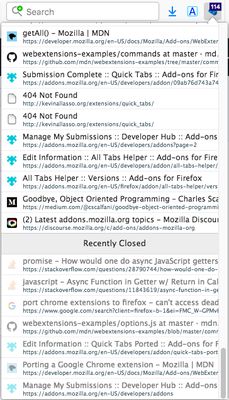
Ported version from the Chrome extension Quick Tabs, with a few small tweaks. Their description reads: A keyboard centric most recently used (MRU) ordered tab list plugin with search and switch functionality inspired by IntelliJ IDEA
203 usuários203 usuários
Metadados da extensão
Capturas de tela


Sobre esta extensão
A user who switched from Chrome to Firefox said this addon was the thing they missed the most about Chrome. I checked it out and as it had very good reviews, I decided to port it to Firefox. I made a few tweaks to make the shortcuts customizeable in Firefox in the Options page. Note that for the time being, I have disabled the previous/next tab in history shortcut implementation, because it seemed buggy, until I can figure out what the problem is.
Features (taken from the Chrome Web Store edition)
* Lists all the open tabs in Chrome across all of your open windows
* Tabs are listed in most recently used (MRU) order and excludes the current tab (since you're switching tabs)
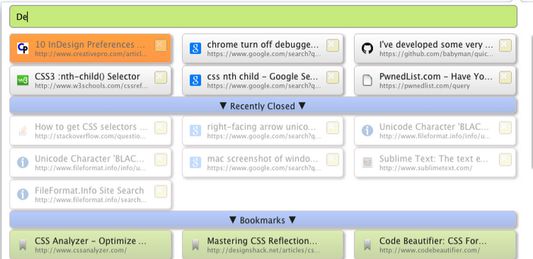
* Fuzzy search your bookmarks:
* Bookmarks are automatically searched when only a few tabs match your search string
* Add a space at the start or end of your search string to search bookmarks along with tabs
* Add two spaces at the start or end of your search string to search only bookmarks
* Fuzzy search your browser history:
* Add three spaces at the start or end of your search string to search browser history
* Find noisy tabs by searching for '<))' (then close them all with shift+ctrl+d ;-))
* Chrome keyboard shortcuts (configured using the keyboard shortcuts dialog at the bottom of the Chrome Extensions page):
* Shortcut key to launch popup window from most tabs (default ctrl+e, cmd+e on Mac, ctrl+q on Linux).
* Select previous tab without loading the popup window (unmapped by default)
* Select next tab without loading the popup window (unmapped by default)
* IMPORTANT the 'next tab' shortcut is only available for a second or so (while the badge text is orange) before the current tab is moved to the top of the MRU list.
* Tab list popup shortcut keys:
* Select previous tab (same as Chrome keyboard shortcut or up arrow)
* Select next tab (same as Chrome keyboard shortcut or down arrow)
* Switch to selected Item (enter)
* To close selected tab (default ctrl+d, see extension options)
* To close ALL displayed tabs in the tab list, honors search filtering (default shift+ctrl+d, see extension options)
* Displays the number of tabs you currently have open in all your Chrome windows
* Quickly search and select tabs by typing letters in the page title or url
* Track recently closed tabs and allow them to be searched and restored
* Popup customization using css
Features (taken from the Chrome Web Store edition)
* Lists all the open tabs in Chrome across all of your open windows
* Tabs are listed in most recently used (MRU) order and excludes the current tab (since you're switching tabs)
* Fuzzy search your bookmarks:
* Bookmarks are automatically searched when only a few tabs match your search string
* Add a space at the start or end of your search string to search bookmarks along with tabs
* Add two spaces at the start or end of your search string to search only bookmarks
* Fuzzy search your browser history:
* Add three spaces at the start or end of your search string to search browser history
* Find noisy tabs by searching for '<))' (then close them all with shift+ctrl+d ;-))
* Chrome keyboard shortcuts (configured using the keyboard shortcuts dialog at the bottom of the Chrome Extensions page):
* Shortcut key to launch popup window from most tabs (default ctrl+e, cmd+e on Mac, ctrl+q on Linux).
* Select previous tab without loading the popup window (unmapped by default)
* Select next tab without loading the popup window (unmapped by default)
* IMPORTANT the 'next tab' shortcut is only available for a second or so (while the badge text is orange) before the current tab is moved to the top of the MRU list.
* Tab list popup shortcut keys:
* Select previous tab (same as Chrome keyboard shortcut or up arrow)
* Select next tab (same as Chrome keyboard shortcut or down arrow)
* Switch to selected Item (enter)
* To close selected tab (default ctrl+d, see extension options)
* To close ALL displayed tabs in the tab list, honors search filtering (default shift+ctrl+d, see extension options)
* Displays the number of tabs you currently have open in all your Chrome windows
* Quickly search and select tabs by typing letters in the page title or url
* Track recently closed tabs and allow them to be searched and restored
* Popup customization using css
Avaliado em 4,5 por 1 revisor
Permissões e dados
Permissões necessárias:
- Ler e modificar favoritos
- Acessar o histórico de navegação
- Acessar as abas do navegador
Mais informações
- Links da extensão
- Versão
- 1.0.6
- Tamanho
- 120,7 KB
- Ultima atualização
- há 6 anos (12 de dez de 2019)
- Categorias relacionadas
- Licença
- Todos os direitos reservados
- Histórico de versões
- Adicionar a uma coleção