Extras do Firefox
  • Extensões
  • Temas
    • para o Firefox
    • Dicionários e pacotes de idiomas
    • Outros sites de navegadores
    • Extras para Android
Iniciar sessão
Pré-visualização de HTML Tag Changer

HTML Tag Changer por Kai Grunert

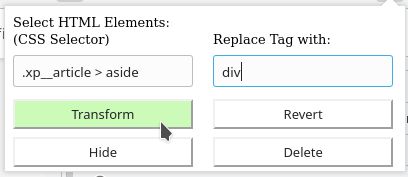
Select HTML elements and change their tag names. You can select elements with a CSS selector and specify the intended new tag name. You can also hide or remove the elements. E.g. this can be useful to include specific elements in the Reader View.

0 (0 reviews)0 (0 reviews)
3 Users3 Users
Transferir o Firefox e obter a extensão
Transferir ficheiro

Metadados da extensão

Capturas de ecrã
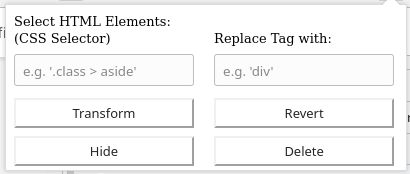
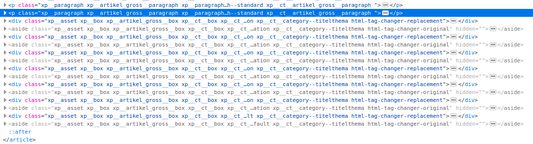
Default display if you open the add-onSelect the HTML elements with a CSS selector and type the new tag nameThe original source code before the transformationThe new source code after the transformation
Acerca desta extensão
This browser add-on can change the HTML element tag names on a web page into another tag name. You can select the HTML elements that should be replaced with a CSS selector and state the new tag names.

Furthermore you can hide or delete the selected elements from the web page. The former is usually preferred, because you will be able to revert the changes afterwards. If you use delete, you need to reload the complete page to revert the changes.

Example: The Reader View of Firefox includes and presents only a selection of HTML elements like <p>. But if the web page contains important hint or content boxes in <aside> elements, you will not see them in the Reader View. You can use this add-on to change all <aside> elements in appropriate elements before you turn on the Reader.

There is a Revert button - if it doesn't work correctly, just reload the complete page.

Hints:
  • Due to a lack of API support, the event listeners for an element can not be copied into the new element
  • Pay attention to the structure of a web page: some elements (often inline elements) don't allow to include other elements. E.g. if you want to change all <aside> elements into <p> elements, this can lead to unpredictable behavior if the <aside> element contains further block elements, because <p> is not allowed to contain block elements.
  • If the replacement contains web components, this can also lead to some side effects

Details:

The add-on does not delete the original elements, but it hides them. Therefore the actions can be reverted.
Rated 0 by 0 reviewers
Iniciar sessão para avaliar esta extensão
Não existem avaliações ainda

Avaliação de estrelas guardada

5
0
4
0
3
0
2
0
1
0
Ainda sem análises
Mais informação
Ligações do extra
  • Página inicial
  • Site de apoio
Versão
1.0
Tamanho
29,6 KB
Última atualização
há 6 anos (2 de mai de 2020)
Categorias relacionadas
  • Desenvolvimento da web
  • Aspeto
Licença
Licença personalizada
Histórico de versões
  • Ver todas as versões
Adicionar à coleção
Reportar este extra
Ir para a página inicial da Mozilla

Extras

  • Acerca
  • Blogue de extras do Firefox
  • Workshop de extensões
  • Central do programador
  • Políticas de programador
  • Blogue da comunidade
  • Fórum
  • Reportar um erro
  • Guia de análise

Navegadores

  • Desktop
  • Mobile
  • Enterprise

Produtos

  • Browsers
  • VPN
  • Relay
  • Monitor
  • Pocket
  • Bluesky (@firefox.com)
  • Instagram (Firefox)
  • YouTube (firefoxchannel)
  • Privacidade
  • Cookies
  • Informação legal

Exceto onde anotado o contrário, o conteúdo neste site está licenciado sob a licença Creative Commons Atribuição-CompartilhaIgual v3.0 ou qualquer versão mais recente.