
ScheduledSurfer por Jackers
The ScheduledSurfer extension provides a simple and efficient solution for those who want to automate the refreshing of their current browser tab. With this plugin, users can set a specific time and frequency for auto refresh.
Metadados da extensão
Capturas de ecrã
Acerca desta extensão
This plugin offers two main features:
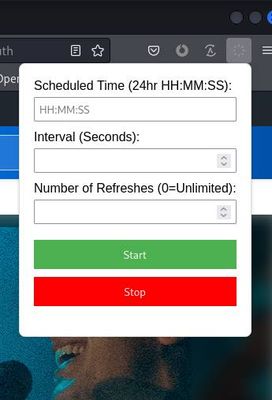
Scheduled Refresh: You can define a precise time (in 24hr format) when the page refresh should begin auto-refreshing. The page will refresh initially at the specified time and will continue to refresh at intervals you define in seconds.
User Defined Refresh Count: You can determine how many times the page should refresh. The plugin will respect this limit and cease refreshing after the specified number of refreshes.
Additional features include:
Save your Settings: Your preferences for refresh time and frequency are saved for future use.
Easy Control: With the intuitive Start and Stop buttons, you can easily control the refresh function.
Status Display: Stay informed about the plugin's activity with the status display.
Whether you need to keep a live-feed updated or periodically check for changes on a static website, ScheduledSurfer is the perfect tool to simplify your browsing experience.
ScheduledSurfer User Manual
1. Accessing ScheduledSurfer Once installed, the ScheduledSurfer icon will be visible on your Firefox toolbar. Click on the icon to open the ScheduledSurfer menu.
2. Setting Up ScheduledSurfer The ScheduledSurfer menu contains options for setting up the refresh schedule:
a. Scheduled Time: Enter the time in a 24-hour format system time (HH:MM:SS) when the refresh should begin.
b. Interval (Seconds): Specify the interval (in seconds) between each refresh.
c. Refresh Count: Define the number of times the page should be refreshed. If left blank or set to a negative value, the page will be refreshed indefinitely.
3. Starting and Stopping Refresh Once your settings are in place, you can start the automated refresh process by clicking the 'Start' button. The 'Stop' button will halt the refresh process.
4. Status Display The status display will keep you informed about the plugin's activity. It will show 'Started' when the refresh process is active and 'Stopped' when it is halted.
ScheduledSurfer provides an efficient way to automate your browsing activity. By customizing your refresh settings, you can ensure you're always up to date with your active webpages.
Scheduled Refresh: You can define a precise time (in 24hr format) when the page refresh should begin auto-refreshing. The page will refresh initially at the specified time and will continue to refresh at intervals you define in seconds.
User Defined Refresh Count: You can determine how many times the page should refresh. The plugin will respect this limit and cease refreshing after the specified number of refreshes.
Additional features include:
Save your Settings: Your preferences for refresh time and frequency are saved for future use.
Easy Control: With the intuitive Start and Stop buttons, you can easily control the refresh function.
Status Display: Stay informed about the plugin's activity with the status display.
Whether you need to keep a live-feed updated or periodically check for changes on a static website, ScheduledSurfer is the perfect tool to simplify your browsing experience.
ScheduledSurfer User Manual
1. Accessing ScheduledSurfer Once installed, the ScheduledSurfer icon will be visible on your Firefox toolbar. Click on the icon to open the ScheduledSurfer menu.
2. Setting Up ScheduledSurfer The ScheduledSurfer menu contains options for setting up the refresh schedule:
a. Scheduled Time: Enter the time in a 24-hour format system time (HH:MM:SS) when the refresh should begin.
b. Interval (Seconds): Specify the interval (in seconds) between each refresh.
c. Refresh Count: Define the number of times the page should be refreshed. If left blank or set to a negative value, the page will be refreshed indefinitely.
3. Starting and Stopping Refresh Once your settings are in place, you can start the automated refresh process by clicking the 'Start' button. The 'Stop' button will halt the refresh process.
4. Status Display The status display will keep you informed about the plugin's activity. It will show 'Started' when the refresh process is active and 'Stopped' when it is halted.
ScheduledSurfer provides an efficient way to automate your browsing activity. By customizing your refresh settings, you can ensure you're always up to date with your active webpages.
Rated 0 by 0 reviewers
Permissions and data
Mais informação
- Versão
- 0.2_alpha
- Tamanho
- 11,57 KB
- Última atualização
- há 3 anos (4 de jul de 2023)
- Categorias relacionadas
- Licença
- Licença Pública Mozilla 2.0
- Histórico de versões
- Adicionar à coleção