Translate Now por Geoffrey De Belie
Right click a selection, page or link to translate words in Firefox using Google Translate, DeepL Translator or Bing Translator. In Firefox voor Android you first make a selection and then you use the button.
Disponível no Firefox para Android™Disponível no Firefox para Android™
5036 Users5036 Users
Metadados da extensão
Capturas de ecrã
Acerca desta extensão
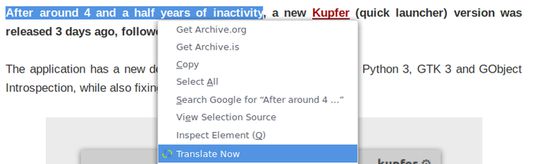
Select text on any page, right click and select Translate Now. This will open a new tab with the translation using Google Translate.
By default Translate Now uses Google Translate, but DeepL Translator and Bing Translator are also supported and can be set from the Preferences.
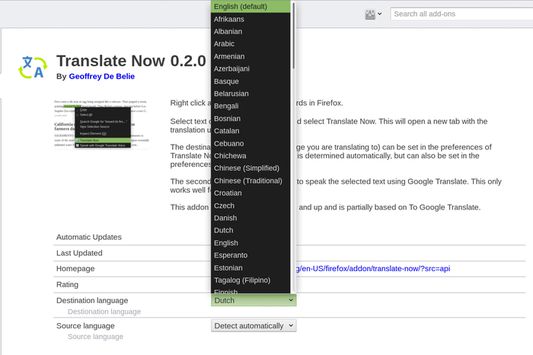
The destination language (the language you are translating to) can be set in the preferences of Translate Now. The source language is determined automatically, but can also be set in the preferences.
Features
- Supports Google Translate, Bing Translator and DeepL Translator.
- Broad support for source and destination languages.
- Make a selection, translate the current page or translate linked page.
- Use the toolbar icon to translate texts and right click the toolbar icon to gain access to the preferences.
- Highly customizable.
The first versions of Translate Now were partially based on To Google Translate.
By default Translate Now uses Google Translate, but DeepL Translator and Bing Translator are also supported and can be set from the Preferences.
The destination language (the language you are translating to) can be set in the preferences of Translate Now. The source language is determined automatically, but can also be set in the preferences.
Features
- Supports Google Translate, Bing Translator and DeepL Translator.
- Broad support for source and destination languages.
- Make a selection, translate the current page or translate linked page.
- Use the toolbar icon to translate texts and right click the toolbar icon to gain access to the preferences.
- Highly customizable.
The first versions of Translate Now were partially based on To Google Translate.
Rated 3,7 by 108 reviewers
Permissions and data
Permissões necessárias:
- Mostrar-lhe notificações
- Aceder aos separadores do navegador
- Aceder aos seus dados para todos os sites
Permissões opcionais:
- Aceder aos seus dados para todos os sites
Mais informação
- Ligações do extra
- Versão
- 5.0.4
- Tamanho
- 41,4 KB
- Última atualização
- há um ano (24 de ago de 2024)
- Categorias relacionadas
- Histórico de versões
- Adicionar à coleção
O programador desta extensão pede que apoie o desenvolvimento da mesma através de um pequeno donativo.