Suplimente pentru Firefox
  • Extensii
  • Teme
    • pentru Firefox
    • Dicționare și pachete lingvistice
    • Site-uri pentru alte browsere
    • Suplimente pentru Android
Intră în cont
Previzualizare Amazon DP and ASIN Only

Amazon DP and ASIN Only de DBSH

Adds an option to the context menu to open links to items on Amazon in a new tab, using only DP and the ASIN, stripping away all the, ref, tracking, and other unnecessary URL parameters so URLs look like https://www.amazon.com/dp/ASIN

0 (0 revizuiri)0 (0 revizuiri)
2 utilizatori2 utilizatori
Descarcă Firefox și obține extensia
Descarcă fișierul

Metadate extensie

Capturi de ecran
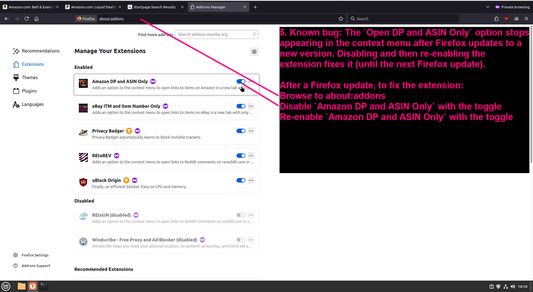
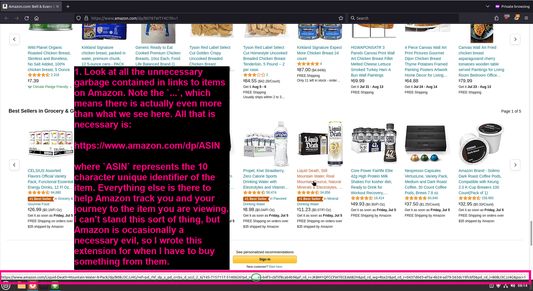
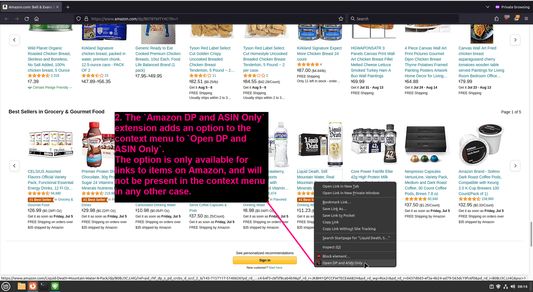
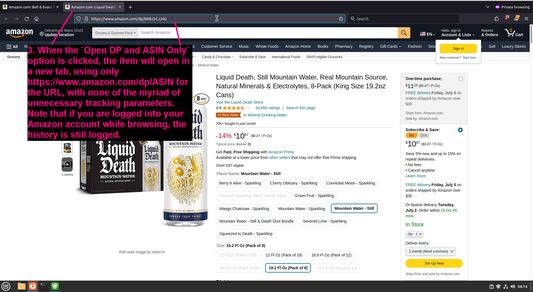
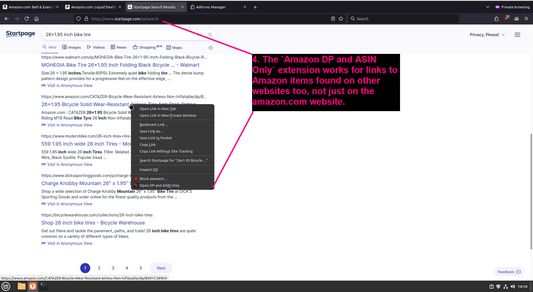
Look at all the unnecessary garbage contained in links to items on AmazonThe `Amazon DP and ASIN Only` extension adds an option to the context menu to `Open DP and ASIN Only`When the `Open DP and ASIN Only` option is clicked, the item will open in a new tab, using only https://www.amazon.com/dp/ASIN for the URL, with none of the myriad of unnecessary tracking parametersThe `Amazon DP and ASIN Only` extension works for links to Amazon items found on other websites too, not just on the amazon.com websiteKnown bug: The `Open DP and ASIN Only` option stops appearing in the context menu after Firefox updates to a new version
Despre această extensie
Adds an option to the context menu to open links to items on Amazon in a new tab, using only DP and the ASIN, stripping away all the, ref, tracking, and other unnecessary URL parameters so URLs look like https://www.amazon.com/dp/ASIN
Comentarii de la dezvoltator
To view this extension's source code:
  1. In a Firefox instance that already has this extension installed, type `about:profiles` in the Firefox address bar, then press Enter
  2. Under the profile labeled `This is the profile in use and it cannot be deleted`, click on the `Open Directory` button (appears as `Open Folder` on Windows) next to `Root Directory`
  3. In the file explorer window that opens, go into the `extensions` directory (the `extensions` folder)
  4. Copy the file `{91f0f467-2cdb-4bab-b460-652b7aceaacd}.xpi` and paste it somewhere else, such as your Desktop
  5. Rename the file, changing the extension to `.zip` - so `{91f0f467-2cdb-4bab-b460-652b7aceaacd}.xpi` becomes `{91f0f467-2cdb-4bab-b460-652b7aceaacd}.zip`
  6. Unzip the file `{91f0f467-2cdb-4bab-b460-652b7aceaacd}.zip`. The extracted files are the source, especially the .json and .js files.
Evaluat cu 0 de către 0 recenzori
Intră în cont pentru a evalua această extensie
Nu există încă evaluări

Evaluarea prin stele a fost salvată

5
0
4
0
3
0
2
0
1
0
Nicio recenzie încă
Permisiuni și date

Permisiuni necesare:

  • Să acceseze filele browserului
Află mai multe
Mai multe informații
Versiune
1.0.1
Mărime
27,53 KB
Ultima actualizare
2 ani în urmă (29 iun. 2024)
Categorii conexe
  • Confidențialitate și securitate
  • Cumpărături
Licență
Numai GNU General Public License v3.0
Politică de confidențialitate
Citește politica de confidențialitate pentru acest supliment
Istoricul versiunilor
  • Vezi toate versiunile
Adaugă în colecție
Raportează acest supliment
Du-te pe pagina de start Mozilla

Suplimente

  • Despre
  • Blog suplimente Firefox
  • Atelier de extensii
  • Centrul dezvoltatorilor
  • Politicile dezvoltatorilor
  • Blogul comunității
  • Forum
  • Raportează o defecțiune
  • Ghid pentru recenzii

Browsere

  • Desktop
  • Mobile
  • Enterprise

Produse

  • Browsers
  • VPN
  • Relay
  • Monitor
  • Pocket
  • Bluesky (@firefox.com)
  • Instagram (Firefox)
  • YouTube (firefoxchannel)
  • Confidențialitate
  • Cookie-uri
  • Mențiuni legale

Cu excepția cazurilor când se specifică altfel, conținutul de pe acest site este licențiat sub licența Creative Commons cu atribuire și distribuire în condiții identice v3.0 sau orice versiune ulterioară.