
Amazon Product Search and Shopping de Big Developer
Unofficial Amazon US product search and shopping extension! Search Amazon products directly from your Firefox search box (Omnibox).
9 utilizatori9 utilizatori
Metadate extensie
Capturi de ecran


Despre această extensie
Amazon US product search add-on will simplify your Amazon shopping experience! You just have to type your product name or category in Firefox search bar!
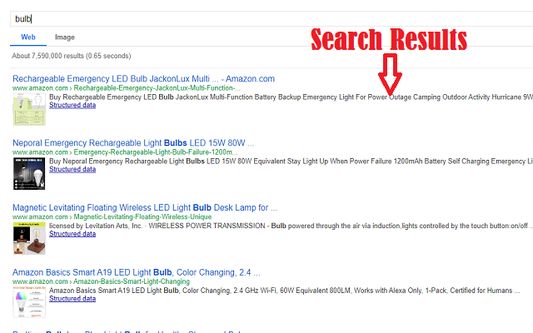
✔️Our add-on uses 'Specialized Google Search Engine' to search across the Amazon website and returns the perfect product matching with your search term.
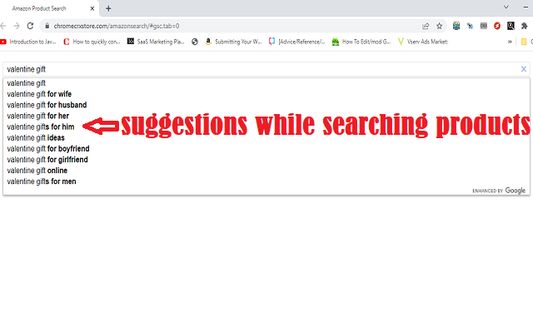
✔️You save time by directly searching in chrome search bar(Omnibox). Or simply click on extension icon to initiate Amazon product search instantly.
✔️So you don't have to login to Amazon site again and again.
✔️You don't have to go through sponsored Amazon listings.
✔️Also shows product images in search results! Making it easier to shortlist product.
How to Use
1.First open Amazon US website(https://www.amazon.com/). Keep it logged in to search and shop seamlessly directly from chrome omni box(searchbox).
2. Now you can click on extension icon to launch Amazon product search or use omnibox and type "amz", press 'SPACE' key, type to search the product of your choice & hit 'ENTER'.
3. When you find the product you were looking for just click the link.
4. If you are already logged into Amazon website you will be able to add the product to cart, else you will be asked to log in.
5. Enjoy Shopping on Amazon!.
Please note that this extension can only be used to search products on Amazon US website. To provide this functionality extension takes over your default search for seamless experience.
✔️Our add-on uses 'Specialized Google Search Engine' to search across the Amazon website and returns the perfect product matching with your search term.
✔️You save time by directly searching in chrome search bar(Omnibox). Or simply click on extension icon to initiate Amazon product search instantly.
✔️So you don't have to login to Amazon site again and again.
✔️You don't have to go through sponsored Amazon listings.
✔️Also shows product images in search results! Making it easier to shortlist product.
How to Use
1.First open Amazon US website(https://www.amazon.com/). Keep it logged in to search and shop seamlessly directly from chrome omni box(searchbox).
2. Now you can click on extension icon to launch Amazon product search or use omnibox and type "amz", press 'SPACE' key, type to search the product of your choice & hit 'ENTER'.
3. When you find the product you were looking for just click the link.
4. If you are already logged into Amazon website you will be able to add the product to cart, else you will be asked to log in.
5. Enjoy Shopping on Amazon!.
Please note that this extension can only be used to search products on Amazon US website. To provide this functionality extension takes over your default search for seamless experience.
Evaluat cu 4 de către 7 recenzori
Mai multe informații
- Linkurile suplimentului
- Versiune
- 1.1
- Mărime
- 84,77 KB
- Ultima actualizare
- 3 ani în urmă (15 feb. 2023)
- Categorii conexe
- Licență
- Mozilla Public License 2.0
- Istoricul versiunilor
- Adaugă în colecție