Cookie Manager Turbo de Mo
View and analyze the current tab's active cookies under the root domain and delete them.
Metadate extensie
Capturi de ecran
Despre această extensie
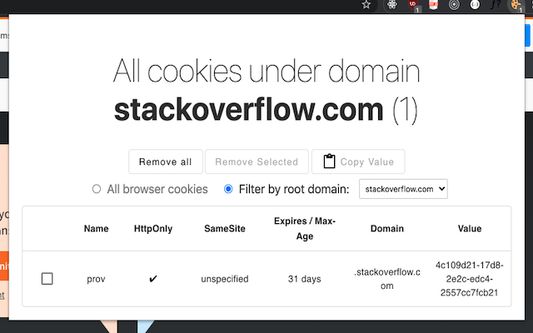
This simple extension allows you to see the details of cookies associated with the current tab's domain. It lists those cookies in a table format and allows you to delete one or all of them at once.
Works on both Firefox and Chrome.
This extension is useful for developers and those curious users who would like to take an active role in viewing the details of the current tab's cookies and deleting them.
Editing or adding new cookies for the current domain is not available yet in the most recent version of this extension.
For each cookie, you can view:
- Name
- HttpOnly
- SameSite
- Expires/Max-Age
- Value
See the screenshot for how it looks.
Pending features:
- Revamping UI
- Ability to edit existing cookies or add new ones to the current domain.
Icons made by Freepik from www.flaticon.com.
Works on both Firefox and Chrome.
This extension is useful for developers and those curious users who would like to take an active role in viewing the details of the current tab's cookies and deleting them.
Editing or adding new cookies for the current domain is not available yet in the most recent version of this extension.
For each cookie, you can view:
- Name
- HttpOnly
- SameSite
- Expires/Max-Age
- Value
See the screenshot for how it looks.
Pending features:
- Revamping UI
- Ability to edit existing cookies or add new ones to the current domain.
Icons made by Freepik from www.flaticon.com.
Evaluat cu 0 de către 0 recenzori
Permisiuni și date
Permisiuni necesare:
- Să șteargă istoricul recent de navigare, cookie-urile și datele asociate
- Să acceseze filele browserului
- Să îți acceseze datele pentru toate site-urile web
Mai multe informații
- Versiune
- 3.0
- Mărime
- 160,19 KB
- Ultima actualizare
- 5 ani în urmă (8 iun. 2021)
- Categorii conexe
- Licență
- Mozilla Public License 2.0
- Istoricul versiunilor
- Adaugă în colecție