
Copy Page Link de Nicholas Hoyt
Creates a formatted link to the current page and copies it to the clipboard.
73 de utilizatori73 de utilizatori
Metadate extensie
Capturi de ecran
Despre această extensie
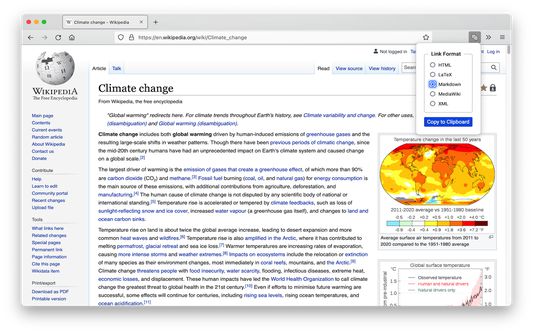
Copy Page Link creates link markup for the current page in the selected format
and copies it to the clipboard for pasting into another document.
Keyboard Accessibility
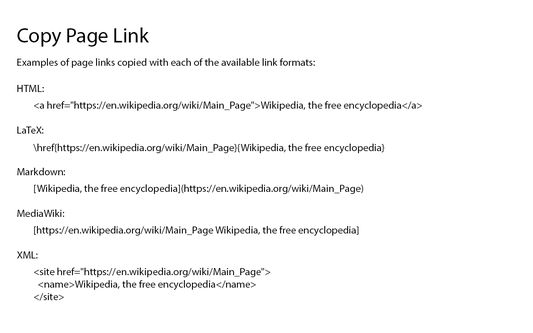
Copy Page Link provides the following choices for link format:
default, the page title is used as the link text. However, if there
is a text selection on the web page, it will be used as the link text
instead of the page title.
To use the XML format, you can configure the names of the XML elements and
attributes on the options page.
and copies it to the clipboard for pasting into another document.
Keyboard Accessibility
- The keyboard shortcut for Copy Page Link is 'alt-1' ('option-1' on the Mac).
- Copy Page Link "remembers" the last link format that was copied. To select another link format, use 'arrow-up' or 'arrow-down' to move through the list.
- When the desired link format is selected, press 'return' or 'enter' to copy the formatted link to the clipboard.
Copy Page Link provides the following choices for link format:
- HTML
- LaTeX
- Markdown (default)
- MediaWiki
- Textile
- XML
default, the page title is used as the link text. However, if there
is a text selection on the web page, it will be used as the link text
instead of the page title.
To use the XML format, you can configure the names of the XML elements and
attributes on the options page.
Evaluat cu 3,8 de către 4 recenzori
Permisiuni și date
Mai multe informații
- Linkurile suplimentului
- Versiune
- 3.3.0
- Mărime
- 30,88 KB
- Ultima actualizare
- 2 ani în urmă (17 nov. 2023)
- Categorii conexe
- Licență
- Mozilla Public License 2.0
- Istoricul versiunilor
- Adaugă în colecție