
Copy as Markdown de Laxman
Browser extension to copy hyperlinks, images, and selected text as Markdown
382 de utilizatori382 de utilizatori
Metadate extensie
Capturi de ecran


Despre această extensie
Features:
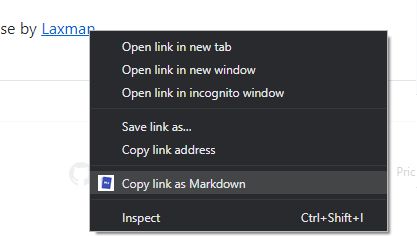
The extension allows you to copy selected text on a page as Markdown with support for features including the following
- Ability to copy links, images, and selected text as Markdown.
- Linked images, will have options to individually select link or images.
- Formatted text such as Italic, bold, strike-through, and inline code.
- Unordered and ordered lists, with task lists support.
- Tables, with respect to GFM.
- Fenced code blocks, with language detection using info strings.
Note: When copying links and images, Chrome doesn’t let you extract images alt text or anchors text content to be used in Markdown, instead the links themselves are used as link title. Firefox doesn’t have this limitation though.
Permissions:
The extension requires the following permission from you for working.
1. `contextMenus`: to show option when right-clicking.
2. `activeTab`: to be able to access content on page.
The extension can only write to your clipboard and not read from it in any way.
The extension allows you to copy selected text on a page as Markdown with support for features including the following
- Ability to copy links, images, and selected text as Markdown.
- Linked images, will have options to individually select link or images.
- Formatted text such as Italic, bold, strike-through, and inline code.
- Unordered and ordered lists, with task lists support.
- Tables, with respect to GFM.
- Fenced code blocks, with language detection using info strings.
Note: When copying links and images, Chrome doesn’t let you extract images alt text or anchors text content to be used in Markdown, instead the links themselves are used as link title. Firefox doesn’t have this limitation though.
Permissions:
The extension requires the following permission from you for working.
1. `contextMenus`: to show option when right-clicking.
2. `activeTab`: to be able to access content on page.
The extension can only write to your clipboard and not read from it in any way.
Evaluat cu 4,8 de către 12 recenzori
Permisiuni și date
Mai multe informații
- Linkurile suplimentului
- Versiune
- 25.6.9
- Mărime
- 168,51 KB
- Ultima actualizare
- 8 luni în urmă (9 iun. 2025)
- Categorii conexe
- Licență
- Licență MIT
- Istoricul versiunilor
- Adaugă în colecție