
Eklegu! de Gregory Smith
Esperanto/English word-search. Eklegu! is a browser extension for quickly translating Esperanto into English. It allows the user to select an Esperanto word and instantly see its English translation in a popup lightbox.
28 de utilizatori28 de utilizatori
Metadate extensie
Capturi de ecran
Despre această extensie
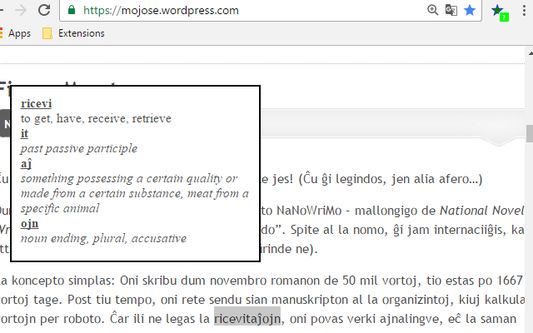
Eklegu! is a browser extension for quickly translating Esperanto into English. It allows the user to select an Esperanto word (by highlighting it with the mouse) and instantly see its English translation in a popup lightbox. The user can unselect the word (by clicking the mouse anywhere on the page) to dismiss the lightbox.
Eklegu! is fast, light-weight, and capable of off-line use. It was designed with Esperanto beginners (komencantoj) in mind, as an easy-to-use aid to reading articles, web pages, magazines and books. It works with html and plain-text pages. It also works with PDFs in Firefox. So, for instance, if you're on an Airplane reading an Esperanto PDF book, you can still use Eklegu! without being connected to the internet.
Instructions:
1. After installing the extension in your browser, you should see the Eklegu! icon, a little dark-green star with a blue outline and a gray question-mark, in your browser's toolbar. The gray question-mark indicates the extension is inactive. Click on the Eklegu! icon to activate it - the question mark should turn bright green to indicate that it is active.
2. Load any web page, html, plain text, or PDF (Firefox only) with Esperanto text into your browser.
3. Highlight any Esperanto word with your mouse. A light-box containing a breakdown of the word into English should appear.
4. Click with your mouse to un-highlight the word and dismiss the light-box.
5. Click the Eklegu! icon in your browser's tool bar again to deactivate it - the question mark should turn gray to indicate that it is inactive.
6. You can disable the Eklegu! extension from your browser's extension page to remove it from the toolbar.
Eklegu! works in both Firefox and Chrome. It was specifically developed on Windows 7 with Firefox versions 49 and 50 and Chrome Version 54.0.2840.99 m. However it will theoretically work in any browser that supports Webextensions. This should include Chrome, Edge, Firefox, Opera, and Safari on any platform (e.g., Windows, Linux, OSX, etc.). However it will not work in Firefox for Android (as of November 2016), since it does not support Webextensions.
Caveats:
Highly agglutinated words may have problems. For compound or hyphenated words words, try highlighting its components separately.
This version translates to English, only, however, it could easily be adapted to other languages by simply replacing the English defintions in the JSON objects in the (UTF-8) javascript dictionary files with definitions in the target languages.
This software is licensed under GPL 2.0 (see license.txt). It relies on the ESPDIC dictionary which is licensed under a Creative Commons License.
Eklegu! is fast, light-weight, and capable of off-line use. It was designed with Esperanto beginners (komencantoj) in mind, as an easy-to-use aid to reading articles, web pages, magazines and books. It works with html and plain-text pages. It also works with PDFs in Firefox. So, for instance, if you're on an Airplane reading an Esperanto PDF book, you can still use Eklegu! without being connected to the internet.
Instructions:
1. After installing the extension in your browser, you should see the Eklegu! icon, a little dark-green star with a blue outline and a gray question-mark, in your browser's toolbar. The gray question-mark indicates the extension is inactive. Click on the Eklegu! icon to activate it - the question mark should turn bright green to indicate that it is active.
2. Load any web page, html, plain text, or PDF (Firefox only) with Esperanto text into your browser.
3. Highlight any Esperanto word with your mouse. A light-box containing a breakdown of the word into English should appear.
4. Click with your mouse to un-highlight the word and dismiss the light-box.
5. Click the Eklegu! icon in your browser's tool bar again to deactivate it - the question mark should turn gray to indicate that it is inactive.
6. You can disable the Eklegu! extension from your browser's extension page to remove it from the toolbar.
Eklegu! works in both Firefox and Chrome. It was specifically developed on Windows 7 with Firefox versions 49 and 50 and Chrome Version 54.0.2840.99 m. However it will theoretically work in any browser that supports Webextensions. This should include Chrome, Edge, Firefox, Opera, and Safari on any platform (e.g., Windows, Linux, OSX, etc.). However it will not work in Firefox for Android (as of November 2016), since it does not support Webextensions.
Caveats:
Highly agglutinated words may have problems. For compound or hyphenated words words, try highlighting its components separately.
This version translates to English, only, however, it could easily be adapted to other languages by simply replacing the English defintions in the JSON objects in the (UTF-8) javascript dictionary files with definitions in the target languages.
This software is licensed under GPL 2.0 (see license.txt). It relies on the ESPDIC dictionary which is licensed under a Creative Commons License.
Evaluat cu 4,8 de către 6 recenzori
Permisiuni și date
Permisiuni necesare:
- Să acceseze filele browserului
- Să acceseze activitatea browserului în timpul navigării
- Să îți acceseze datele pentru toate site-urile web
Mai multe informații
- Versiune
- 1.5resigned1
- Mărime
- 681,72 KB
- Ultima actualizare
- 2 ani în urmă (25 apr. 2024)
- Categorii conexe
- Istoricul versiunilor
- Adaugă în colecție