
enhan(t) Note Taking Power Tool de Kepler Lab
Bookmark moments, capture screenshots, take notes and annotate during your meetings. Download the notes in a zip file.
3 utilizatori3 utilizatori
Metadate extensie
Capturi de ecran
Despre această extensie
Overview
Bookmark moments, capture screenshots, take notes and annotate during your meetings. Get transcript, meeting metrics and questions.
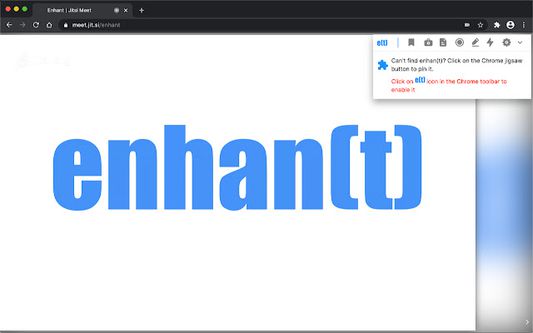
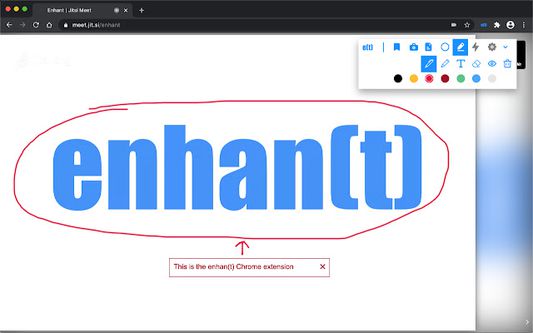
enhan(t) Note Taking Power Tool is an open source add-on that makes you super productive with the existing video conferencing solutions like Google Meet, Zoom, MS Teams and Jitsi. It enables you to take real time notes, bookmark important moments, and capture screenshots. It also helps you annotate within the opened page using pen, highlight and text tools.
As an efficient assistant, enhan(t) analytics module enables you to extract helpful insights like engagement, sentiment and questions from your online video interactions. It can be used during your sales calls, product walkthrough, interviews and online learning as well.
Features
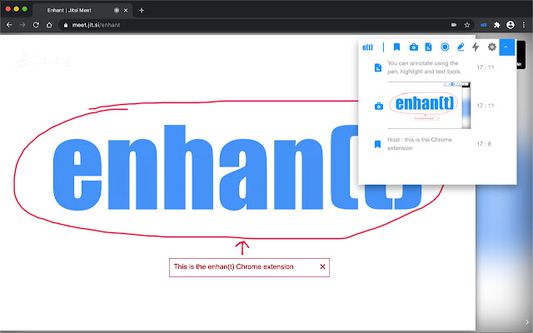
• Bookmark moments (to mark an important time in the meeting)
• Capture screenshots (to take a timestamped screenshot of the tab)
• Take notes (to take manual notes or using your voice along with when it was taken)
• Use voice commands such as "Take screenshot" or "Bookmark Moment" to do the same.
• Select text on the page to add it as a note.
• Download meeting data (which contains above mentioned bookmarks, screenshots and notes in .txt and .pdf file along with meeting transcript)
• Annotate within tab
o Draw over
o Highlight content
o Add text
o Change colors of above
o Erase/hide annotations
• Whitelist websites to enable enhan(t) on non-default sites
• Get host side transcription (via microphone) in the Basic mode.
• View meeting data in a comprehensive dashboard
To quickly get started with enhan(t), go to https://enhant.readthedocs.io/en/latest/getting_started_in_2_mins.html
Documentation
You can find the detailed documentation at https://enhant.readthedocs.io/
Open Source
enhan(t) is an MIT licensed open source project. You can go to https://github.com/keplerlab/enhant and check out the code. We would welcome your contributions.
Bookmark moments, capture screenshots, take notes and annotate during your meetings. Get transcript, meeting metrics and questions.
enhan(t) Note Taking Power Tool is an open source add-on that makes you super productive with the existing video conferencing solutions like Google Meet, Zoom, MS Teams and Jitsi. It enables you to take real time notes, bookmark important moments, and capture screenshots. It also helps you annotate within the opened page using pen, highlight and text tools.
As an efficient assistant, enhan(t) analytics module enables you to extract helpful insights like engagement, sentiment and questions from your online video interactions. It can be used during your sales calls, product walkthrough, interviews and online learning as well.
Features
• Bookmark moments (to mark an important time in the meeting)
• Capture screenshots (to take a timestamped screenshot of the tab)
• Take notes (to take manual notes or using your voice along with when it was taken)
• Use voice commands such as "Take screenshot" or "Bookmark Moment" to do the same.
• Select text on the page to add it as a note.
• Download meeting data (which contains above mentioned bookmarks, screenshots and notes in .txt and .pdf file along with meeting transcript)
• Annotate within tab
o Draw over
o Highlight content
o Add text
o Change colors of above
o Erase/hide annotations
• Whitelist websites to enable enhan(t) on non-default sites
• Get host side transcription (via microphone) in the Basic mode.
• View meeting data in a comprehensive dashboard
To quickly get started with enhan(t), go to https://enhant.readthedocs.io/en/latest/getting_started_in_2_mins.html
Documentation
You can find the detailed documentation at https://enhant.readthedocs.io/
Open Source
enhan(t) is an MIT licensed open source project. You can go to https://github.com/keplerlab/enhant and check out the code. We would welcome your contributions.
Evaluat cu 0 de către 0 recenzori
Permisiuni și date
Permisiuni necesare:
- Să descarce fișiere și să citească sau să modifice istoricul descărcărilor din browser
- Să acceseze filele browserului
- Să acceseze activitatea browserului în timpul navigării
- Să îți acceseze datele pentru toate site-urile web
Mai multe informații
- Linkurile suplimentului
- Versiune
- 0.2.9
- Mărime
- 997,67 KB
- Ultima actualizare
- 5 ani în urmă (7 apr. 2021)
- Categorii conexe
- Licență
- Licență MIT
- Istoricul versiunilor
- Adaugă în colecție