Suplimente pentru Firefox
  • Extensii
  • Teme
    • pentru Firefox
    • Dicționare și pachete lingvistice
    • Site-uri pentru alte browsere
    • Suplimente pentru Android
Intră în cont
Previzualizare GPTemail

GPTemail de andersonbcdefg

Use large language models (like OpenAI's GPT-3) to suggest e-mail replies for you. Currently works on Gmail, Yahoo, Outlook, and limited support for Hey. Detailed usage instructions here: https://github.com/andersonbcdefg/gptemail

0 (0 revizuiri)0 (0 revizuiri)
1 utilizator1 utilizator
Descarcă Firefox și obține extensia
Descarcă fișierul

Metadate extensie

Capturi de ecran
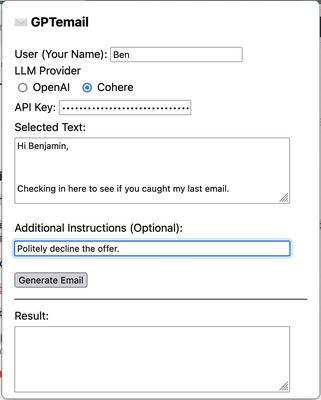
GPTemail popup. After entering my name and authentication for the large language model provider, I capture the text of the email I want to reply to, and provide instructions to generate a reply.
Despre această extensie
GPTemail allows you to capture information from your email client, and sent it to a large language model (like OpenAI's GPT3) to suggest a reply for you. Works on multiple e-mail clients, and allows you to choose between Cohere and OpenAI as the provider for the language model.
Comentarii de la dezvoltator
Detailed Description:
GPTemail is designed to be flexible, lightweight, and unobtrusive. Rather than deeply integrating with a particular e-mail client, GPTemail just reads the text you select with your cursor, or the text you paste into the extension popup. Here's how to use it:
  1. First, you need an API key so that GPTemail can talk to the language model. You can get one for free from OpenAI or Cohere. Create an OpenAI account here, or a Cohere account here and generate an API key. You'll probably want to stash it somewhere safe so that you can paste it in again if you ever need to. GPTemail stores your API key in local storage, so it never leaves your computer. It will persist across requests, but it might get forgotten when you restart the browser or clear its data. New OpenAI signups get some free usage, and after that runs out, each request costs ≤ $0.02. Cohere is totally free to use at the "Trial" level.
  2. After creating the API key, navigate to your e-mail website, and select the text you want to compose a response to. Click on the toolbar icon, or press ⌘ + Shift + E to open the GPTemail popup. If this is your first use, you'll have to enter your preferred name to sign your e-mails with (in the User field), and your OpenAI or Cohere API key, and select your preferred model (OpenAI or Cohere).
  3. The text you selected will show up in the "Selected Text" field. (If it doesn't, this means your e-mail client is an evil nightmare website with iframes and/or Shadow DOMs, and you should write them an angry letter! In this case, you can just paste in the text yourself.)
  4. GPTemail already understands that it should write a reply (from you) to this selected text. If there's any special instructions ("Decline the request", "Use a professional tone", "Wish them happy holidays"), add those in the optional instructions field.
  5. Click "Generate Email", and the reply will appear in the "Results" field, and will also be copied to the clipboard. If you don't like the result, you can always try again (generated e-mails are non-deterministic), and change your instructions to get a result more in line with what you want.
Evaluat cu 0 de către 0 recenzori
Intră în cont pentru a evalua această extensie
Nu există încă evaluări

Evaluarea prin stele a fost salvată

5
0
4
0
3
0
2
0
1
0
Nicio recenzie încă
Permisiuni și date

Permisiuni necesare:

  • Să introducă date în clipboard
  • Să îți acceseze datele pentru mail.google.com
  • Să îți acceseze datele pentru mail.yahoo.com
  • Să îți acceseze datele pentru outlook.live.com
  • Să îți acceseze datele pentru app.hey.com
Află mai multe
Mai multe informații
Linkurile suplimentului
  • Site pentru asistență
Versiune
1.0
Mărime
152,07 KB
Ultima actualizare
3 ani în urmă (23 dec. 2022)
Categorii conexe
  • Suport pentru limbi
  • Social și comunicare
Licență
Apache 2.0
Politică de confidențialitate
Citește politica de confidențialitate pentru acest supliment
Istoricul versiunilor
  • Vezi toate versiunile
Adaugă în colecție
Raportează acest supliment
Du-te pe pagina de start Mozilla

Suplimente

  • Despre
  • Blog suplimente Firefox
  • Atelier de extensii
  • Centrul dezvoltatorilor
  • Politicile dezvoltatorilor
  • Blogul comunității
  • Forum
  • Raportează o defecțiune
  • Ghid pentru recenzii

Browsere

  • Desktop
  • Mobile
  • Enterprise

Produse

  • Browsers
  • VPN
  • Relay
  • Monitor
  • Pocket
  • Bluesky (@firefox.com)
  • Instagram (Firefox)
  • YouTube (firefoxchannel)
  • Confidențialitate
  • Cookie-uri
  • Mențiuni legale

Cu excepția cazurilor când se specifică altfel, conținutul de pe acest site este licențiat sub licența Creative Commons cu atribuire și distribuire în condiții identice v3.0 sau orice versiune ulterioară.