Jira Exporter de Picsweb
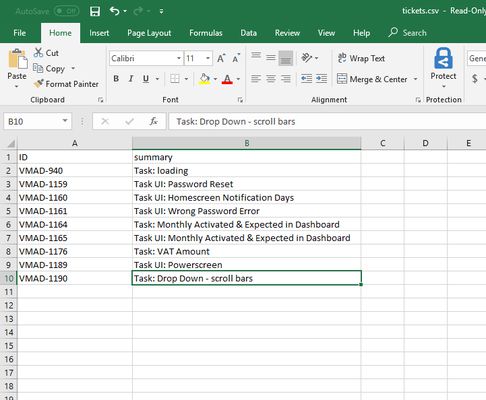
Export Jira tickets to csv file from Jira board. Latest version export JIRA tickets from Active Sprints board and Backlogs . watch demo - https://youtu.be/yKbO_U2ltHU Extension sponsored by https://bestvpn.se/ Best VPN
1 utilizator1 utilizator
Metadate extensie
Capturi de ecran
Despre această extensie
The extension export JIRA tickets from Active Sprints and Backlogs.
Latest version include copy to clipboard feature. User can copy individual ticket details to clipboard by clicking Copy button next it.
Follow this below steps to try the export option
1) Install add-on in Firefox.
2) Visit your Atlassion JIRA website . Go to active sprints or backlogs.
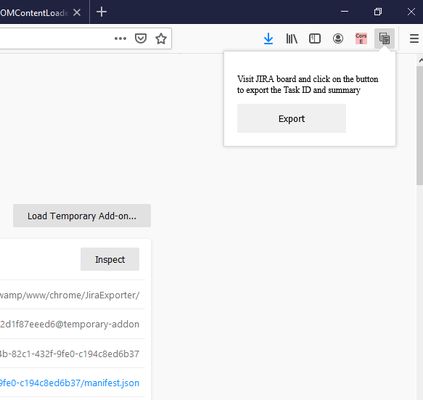
3) Click on the addon icon on top right side.
4) Click on the export button which will download csv file.
watch demo - https://youtu.be/yKbO_U2ltHU
Please share your valuable feedback. We will try to enhance this extension.
Extension sponsored by https://bestvpn.se/ Best VPN
Latest version include copy to clipboard feature. User can copy individual ticket details to clipboard by clicking Copy button next it.
Follow this below steps to try the export option
1) Install add-on in Firefox.
2) Visit your Atlassion JIRA website . Go to active sprints or backlogs.
3) Click on the addon icon on top right side.
4) Click on the export button which will download csv file.
watch demo - https://youtu.be/yKbO_U2ltHU
Please share your valuable feedback. We will try to enhance this extension.
Extension sponsored by https://bestvpn.se/ Best VPN
Evaluat cu 0 de către 0 recenzori
Permisiuni și date
Permisiuni necesare:
- Să introducă date în clipboard
- Să acceseze filele browserului
- Să îți acceseze datele pentru site-uri din domeniul atlassian.net
Mai multe informații
- Linkurile suplimentului
- Versiune
- 1.2.0
- Mărime
- 21,11 KB
- Ultima actualizare
- 6 ani în urmă (21 mai 2020)
- Categorii conexe
- Licență
- Toate drepturile rezervate
- Istoricul versiunilor
- Adaugă în colecție
Dezvoltatorul acestei extensii îți solicită să contribui pentru sprijinirea dezvoltării continue printr-o mică donație.
1) Install addon in Firefox
2) Visit your Atlassion JIRA website . Go to active sprints with tickets
3) Click on the addon icon on top right side
4) Click on the export button which will download csv file