
Kindle to Notion – Highlight Sync Made Simple de Túlio Sousa
1-click export of Kindle highlights to Notion. Organize by book, tag, and sync Kindle notes to Notion database
2 utilizatori2 utilizatori
Metadate extensie
Capturi de ecran




Despre această extensie
Kindle to Notion is the ultimate extension for readers, researchers, students, and knowledge workers who want to export Kindle highlights and notes directly into Notion databases. Forget copy-paste headaches. In just one click, your Kindle clippings, annotations, and notes are transformed into structured, searchable entries in Notion.
✨ Key Features
📖 Kindle Integration
-Extract highlights and notes directly from Kindle’s online notebook.
-Supports highlight colors and associated notes.
-Retrieves book title, author, and even the book cover image.
⚙️ Setup & Installation
-Install via Chrome Web Store or load manually in developer mode.
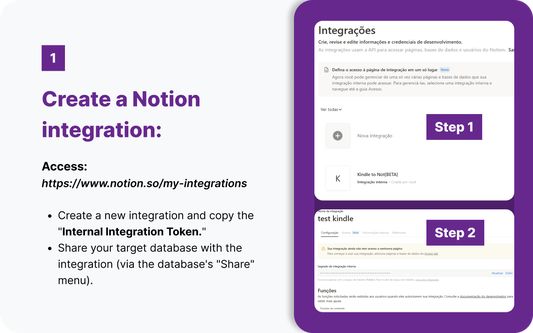
-Create a Notion integration and copy your Internal Integration Token.
-Share your target Notion database with this integration.
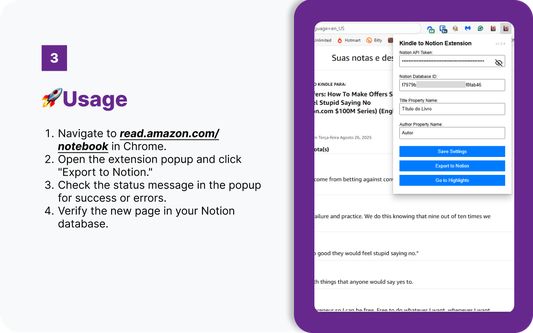
-Enter your Notion API Token and Database ID in the extension popup.
Save settings — and you’re ready!
🌍 Supported Kindle Regions
United States → read.amazon.com/notebook
Brazil → ler.amazon.com.br/notebook
🔧 Common Issues & Fixes
“Not on Kindle page” → Navigate to read.amazon.com/notebook first.
“Invalid token” → Double-check your Notion integration token.
“Database not found” → Verify ID and database sharing settings.
“No highlights found” → Ensure your Kindle page is fully loaded.
Are you a developer? Visit our github repo -> https://github.com/tuliosousapro/Kindle-To-Notion-Extension
✨ Key Features
📖 Kindle Integration
-Extract highlights and notes directly from Kindle’s online notebook.
-Supports highlight colors and associated notes.
-Retrieves book title, author, and even the book cover image.
⚙️ Setup & Installation
-Install via Chrome Web Store or load manually in developer mode.
-Create a Notion integration and copy your Internal Integration Token.
-Share your target Notion database with this integration.
-Enter your Notion API Token and Database ID in the extension popup.
Save settings — and you’re ready!
🌍 Supported Kindle Regions
United States → read.amazon.com/notebook
Brazil → ler.amazon.com.br/notebook
🔧 Common Issues & Fixes
“Not on Kindle page” → Navigate to read.amazon.com/notebook first.
“Invalid token” → Double-check your Notion integration token.
“Database not found” → Verify ID and database sharing settings.
“No highlights found” → Ensure your Kindle page is fully loaded.
Are you a developer? Visit our github repo -> https://github.com/tuliosousapro/Kindle-To-Notion-Extension
Evaluat cu 0 de către 0 recenzori
Permisiuni și date
Permisiuni necesare:
- Să acceseze filele browserului
- Să îți acceseze datele pentru ler.amazon.com.br
- Să îți acceseze datele pentru read.amazon.com
Permisiuni opționale:
- Să îți acceseze datele pentru ler.amazon.com.br
- Să îți acceseze datele pentru read.amazon.com
- Să îți acceseze datele pentru api.notion.com
- Să îți acceseze datele pentru www.amazon.com
- Să îți acceseze datele pentru www.amazon.com.br
Mai multe informații
- Linkurile suplimentului
- Versiune
- 1.5.1
- Mărime
- 70,53 KB
- Ultima actualizare
- 6 luni în urmă (29 aug. 2025)
- Categorii conexe
- Licență
- Licență MIT
- Politică de confidențialitate
- Citește politica de confidențialitate pentru acest supliment
- Istoricul versiunilor
- Etichete
- Adaugă în colecție
kindle2notion-extension/
├── manifest.json          # Extension configuration
├── popup.html             # User interface
├── popup.js               # UI logic and validation
├── popup.css              # Modern styling
├── contentScript.js       # Extracts data from Kindle's notebook page.
├── background.js          # Handles Notion API requests.
└── icons/                 # Extension icons
No build process required - it's vanilla JavaScript!)🤝Contributing <img src="https://img.shields.io/github/contributors/tuliosousapro/Kindle-To-Notion-Extension">
We welcome contributions to improve this extension! To contribute:
1. Fork this repository.
2. Create a new branch (
git checkout -b feature/your-feature).3. Make your changes and commit (
git commit -m "Add your feature").4. Push to your branch (
git push origin feature/your-feature).5. Open a pull request with a clear description of your changes.
Please ensure your code follows:
- JavaScript ES6+ standards.
- Chrome's Content Security Policy (no inline scripts).
- Clear commit messages and documentation.
🔐License
This project is licensed under the MIT License. See the LICENSE file for details.
🔒 Privacy & Security
👾Issues
Found a bug or have a feature idea? Open an issue right here in this repo.
- GitHub Issues
- Discussions: GitHub Discussions
Common Issues
| Issue | Solution |
|-------|----------|
| "Not on Kindle page" | Navigate to your Kindle notebook first |
| "Invalid token" | Check your Notion integration token |
| "Database not found" | Verify database ID and sharing permissions |
| "No highlights found" | Ensure the page has loaded completely |
| "Connection failed" | Use the "Test" button to diagnose issues |
🎈FAQ
💡 Curious how it works or have questions?
- Browse the FAQ CALABRESO EDITION for answers, tips, and more.
- Wiki: Project Wiki