Midnight Lizard de Pavel Agarkov
Custom color schemes for all websites: night mode, dark themes, blue light filter, screen shader, high contrast, grayscale, etc.
Disponibil pe Firefox pentru Android™Disponibil pe Firefox pentru Android™
7.239 de utilizatori7.239 de utilizatori
Metadate extensie
Capturi de ecran
Despre această extensie
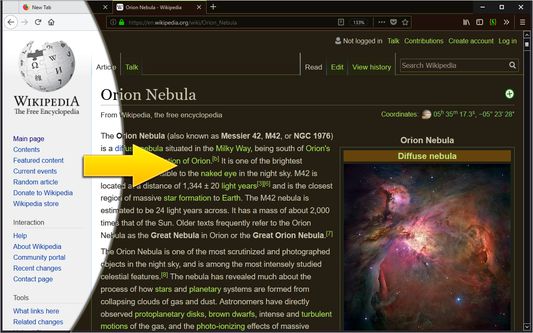
Midnight Lizard color schemes work across all websites. The extension offers many predefined color schemes to choose from, or you’re free to explore and install more at midnight-lizard.org
✔ Choose between dark, light, grayscale or colorful color schemes
✔ Modify existing or create new color schemes
✔ Use different color schemes on each website
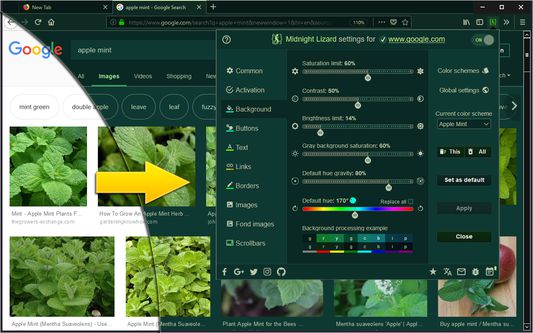
✔ Adjust brightness, saturation, contrast and hues
✔ Improve accessibility and readability
✔ Increase contrast to make text easier to read
✔ Apply blue light filter to shift all colors towards red light
✔ Keep original images and hues without inversion
✔ Schedule automatic activation and deactivation
✔ Use keyboard shortcuts to toggle extension
⮚ on current website: Alt+Shift+L
⮚ globally: Alt+Shift+M
✔ Use with local HTML files
✔ Shade bright colors and images
✔ Change any colour you want
✔ Dynamically change browser theme (disabled by default)
✔ Sync your settings
✔ Configure background, text, buttons, links, borders and images
✔ Apply globally, per-website or with url match patterns
✔ Switch between websites blacklist and whitelist modes
✔ Use Simplified mode to improve performance on heavy websites
✔ Contribute to our open source project on GitHub.com/Midnight-Lizard
✔ Donate to our OpenCollective.com/Midnight-Lizard
Please use additional extensions in order to replace default New Tab page - extensions cannot style it. Also extensions don't work on New Tab page, Firefox Add-ons store and all Firefox system pages due to security concerns.
Please take a look at this tutorial: HOW TO improve Midnight Lizard performance
✔ Choose between dark, light, grayscale or colorful color schemes
✔ Modify existing or create new color schemes
✔ Use different color schemes on each website
✔ Adjust brightness, saturation, contrast and hues
✔ Improve accessibility and readability
✔ Increase contrast to make text easier to read
✔ Apply blue light filter to shift all colors towards red light
✔ Keep original images and hues without inversion
✔ Schedule automatic activation and deactivation
✔ Use keyboard shortcuts to toggle extension
⮚ on current website: Alt+Shift+L
⮚ globally: Alt+Shift+M
✔ Use with local HTML files
✔ Shade bright colors and images
✔ Change any colour you want
✔ Dynamically change browser theme (disabled by default)
✔ Sync your settings
✔ Configure background, text, buttons, links, borders and images
✔ Apply globally, per-website or with url match patterns
✔ Switch between websites blacklist and whitelist modes
✔ Use Simplified mode to improve performance on heavy websites
✔ Contribute to our open source project on GitHub.com/Midnight-Lizard
✔ Donate to our OpenCollective.com/Midnight-Lizard
Please use additional extensions in order to replace default New Tab page - extensions cannot style it. Also extensions don't work on New Tab page, Firefox Add-ons store and all Firefox system pages due to security concerns.
Please take a look at this tutorial: HOW TO improve Midnight Lizard performance
Evaluat cu 4,3 de către 626 de recenzori
Permisiuni și date
Mai multe informații
- Linkurile suplimentului
- Versiune
- 10.7.1
- Mărime
- 1,04 MB
- Ultima actualizare
- 5 ani în urmă (20 ian. 2021)
- Categorii conexe
- Licență
- Licență MIT
- Istoricul versiunilor
- Adaugă în colecție
Dezvoltatorul acestei extensii îți solicită să contribui pentru sprijinirea dezvoltării continue printr-o mică donație.