
My Hours Time tracker de My Hours
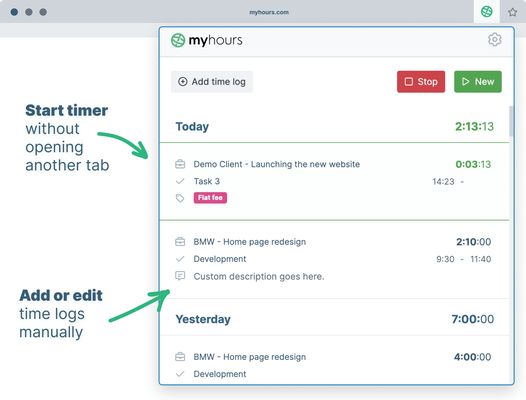
Track time without the need for opening another tab. Start timer or enter time manually right from the browser extension.
9 utilizatori9 utilizatori
Metadate extensie
Capturi de ecran

Despre această extensie
Track time without the need for opening another tab. Start timer or enter time manually right from the browser extension.
### Time tracking for teams
Track time without the need for opening another tab. Start timer or enter time manually right from the browser extension.
1. Setup your My Hours account
Sign up for My Hours account on myhours.com.
Create Projects, Tasks and Clients and invite your Team members to track time.
2. Download extension
Download Firefox extension from this page.
3. Sign in into your account
Each team member logs in with the same email and password they used in the web app.
4. Track time on projects & tasks
Select from a list of pre-assigned clients, project and tasks. Optionally add tags or custom description and enter time.
5. Start the timer or enter time manually
Start and stop the running stopwatch without opening another browser tab. Edit your time logs at any time.
6. Generate reports for clients or managers
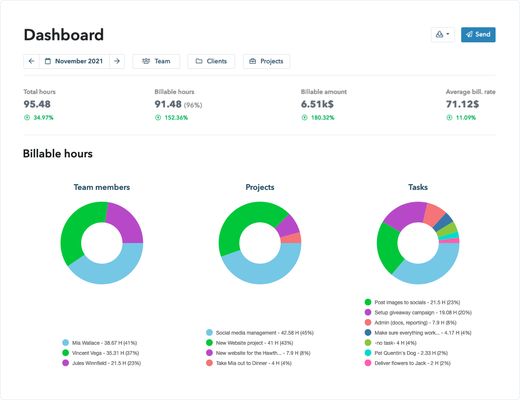
Finally go to myhours.com web app to create professional-looking reports for your clients or managers. Select from available reports and customize it based on your needs. Download to PDF or export to XLS.
For all questions reach out to support@myhours.com
### Time tracking for teams
Track time without the need for opening another tab. Start timer or enter time manually right from the browser extension.
1. Setup your My Hours account
Sign up for My Hours account on myhours.com.
Create Projects, Tasks and Clients and invite your Team members to track time.
2. Download extension
Download Firefox extension from this page.
3. Sign in into your account
Each team member logs in with the same email and password they used in the web app.
4. Track time on projects & tasks
Select from a list of pre-assigned clients, project and tasks. Optionally add tags or custom description and enter time.
5. Start the timer or enter time manually
Start and stop the running stopwatch without opening another browser tab. Edit your time logs at any time.
6. Generate reports for clients or managers
Finally go to myhours.com web app to create professional-looking reports for your clients or managers. Select from available reports and customize it based on your needs. Download to PDF or export to XLS.
For all questions reach out to support@myhours.com
Evaluat cu 0 de către 0 recenzori
Permisiuni și date
Permisiuni necesare:
- Să acceseze filele browserului
- Să îți acceseze datele pentru site-uri din domeniul monday.com
- Să îți acceseze datele pentru site-uri din domeniul basecamp.com
- Să îți acceseze datele pentru api2.myhours.com
- Să îți acceseze datele pentru login.myhours.com
- Să îți acceseze datele pentru app.clickup.com
- Să îți acceseze datele pentru app.asana.com
Mai multe informații
- Linkurile suplimentului
- Versiune
- 1.4.8
- Mărime
- 2,92 MB
- Ultima actualizare
- un an în urmă (19 dec. 2024)
- Categorii conexe
- Licență
- Toate drepturile rezervate
- Politică de confidențialitate
- Citește politica de confidențialitate pentru acest supliment
- Istoricul versiunilor
- Adaugă în colecție