
Petrecere Netflix de Netflix Party
Gazduieste sau alatura-te la Netflix Watch Party cu prietenii/familia ta online!
1.513 utilizatori1.513 utilizatori
Metadate extensie
Capturi de ecran

Despre această extensie
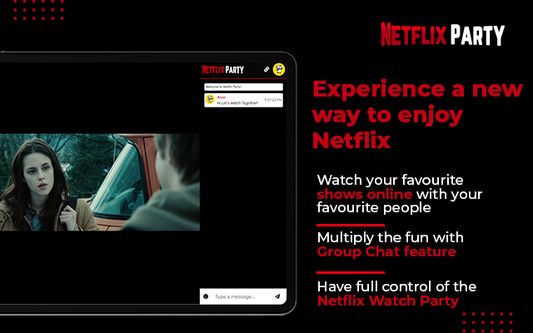
Netflix Party extension helps you binge-watch Netflix with your long-distance friends and family in perfect sync. Now you can watch your favorite TV shows, movies, series, or any video on Netflix with your friends who are living far away. Not only this, but it also facilitates HD streaming with various other amazing features!
How to use Netflix Party? :-
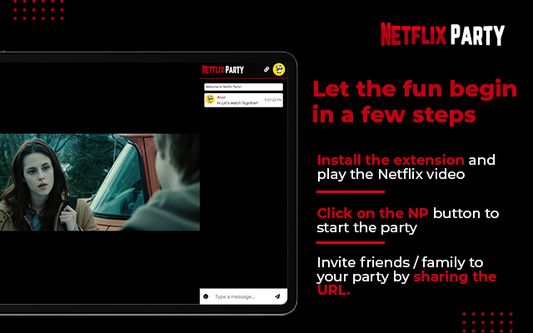
Netflix party has been developed to help worldwide Netflix fans stream their favorite Netflix shows, movies or videos with their loved ones living far away. You can use the Netflix Party extension within a few simple steps:-
> Install
Install the extension on your device by clicking on the blue “Add to Chrome” button. Then, select the Add Extension option. The extension will be installed on your device.
> Pin the extension to the toolbar
Open your web browser and go to the “Extensions” section. Pin the Netflix Party extension on the toolbar.
> Netflix Sign In
Log in to your Netflix account and search for the video you want to watch with your friends in the Netflix Watch Party. Now, play the video.
> Create Netflix Party
After playing the video, click on the NP icon located on the Toolbar. Click on the “Start the Party” option to create the Netflix party URL. Copy this URL and share with your friends to invite them to the watch party.
Note: if you want to have full control of the Netflix Watch Party, you should keep the “Only I have control” option green. Otherwise, if you do not want to keep full control of the Netflix watch party, you can turn it off.
> Join Netflix Party
Just click on the Netflix Watch Party link your friend shared with you. Now, you need to install the Netflix Party extension to join the watch party.
Features:-
Netflix Party extension comes with various unique features, which have been mentioned below:-
> Live Group Chat – Add some more fun to your Netflix Watch Party while having a chit chat with your friends during the party. You can also use emojis while chatting.
> HD Streaming – The extension enables you to enjoy full HD and smooth Netflix streaming.
> Compatible with different devices – The extensions supports various Chromebook, Windows, or macOS devices.
> Customize profile - Add a personal touch to your Netflix Party profile with fun avatars and nicknames.
> Have Full Control – You can keep full control of the watch party if you are hosting the party.
> Global access – You can use the extension all across the globe.
Support:-
For support, feedback or any other comments, reach us at team@netflixparty.live.
By installing the extension, you acknowledge that you have read Netflix Party Privacy Policy (https://www.netflixparty.live/privacy).
Disclaimer:-
Netflix is a trademark of Netflix, Inc. This application and its developer are in no way affiliated with Netflix, Inc.
This extension uses Google Analytics to collect extension usage statistics that helps improve user experience. If you want to opt out of Google Analytics tracking, please visit http://tools.google.com/dlpage/gaoptout, or you can set up a filter in Adblock Plus or similar ad blocker tools like AdBlock, uBlock or Adblock Pro.
How to use Netflix Party? :-
Netflix party has been developed to help worldwide Netflix fans stream their favorite Netflix shows, movies or videos with their loved ones living far away. You can use the Netflix Party extension within a few simple steps:-
> Install
Install the extension on your device by clicking on the blue “Add to Chrome” button. Then, select the Add Extension option. The extension will be installed on your device.
> Pin the extension to the toolbar
Open your web browser and go to the “Extensions” section. Pin the Netflix Party extension on the toolbar.
> Netflix Sign In
Log in to your Netflix account and search for the video you want to watch with your friends in the Netflix Watch Party. Now, play the video.
> Create Netflix Party
After playing the video, click on the NP icon located on the Toolbar. Click on the “Start the Party” option to create the Netflix party URL. Copy this URL and share with your friends to invite them to the watch party.
Note: if you want to have full control of the Netflix Watch Party, you should keep the “Only I have control” option green. Otherwise, if you do not want to keep full control of the Netflix watch party, you can turn it off.
> Join Netflix Party
Just click on the Netflix Watch Party link your friend shared with you. Now, you need to install the Netflix Party extension to join the watch party.
Features:-
Netflix Party extension comes with various unique features, which have been mentioned below:-
> Live Group Chat – Add some more fun to your Netflix Watch Party while having a chit chat with your friends during the party. You can also use emojis while chatting.
> HD Streaming – The extension enables you to enjoy full HD and smooth Netflix streaming.
> Compatible with different devices – The extensions supports various Chromebook, Windows, or macOS devices.
> Customize profile - Add a personal touch to your Netflix Party profile with fun avatars and nicknames.
> Have Full Control – You can keep full control of the watch party if you are hosting the party.
> Global access – You can use the extension all across the globe.
Support:-
For support, feedback or any other comments, reach us at team@netflixparty.live.
By installing the extension, you acknowledge that you have read Netflix Party Privacy Policy (https://www.netflixparty.live/privacy).
Disclaimer:-
Netflix is a trademark of Netflix, Inc. This application and its developer are in no way affiliated with Netflix, Inc.
This extension uses Google Analytics to collect extension usage statistics that helps improve user experience. If you want to opt out of Google Analytics tracking, please visit http://tools.google.com/dlpage/gaoptout, or you can set up a filter in Adblock Plus or similar ad blocker tools like AdBlock, uBlock or Adblock Pro.
Evaluat cu 3,2 de către 11 recenzori
Permisiuni și date
Permisiuni necesare:
- Să acceseze filele browserului
- Să îți acceseze datele pentru toate site-urile web
Mai multe informații
- Linkurile suplimentului
- Versiune
- 1.0.1
- Mărime
- 1,36 MB
- Ultima actualizare
- 3 ani în urmă (14 feb. 2023)
- Categorii conexe
- Licență
- Licență MIT
- Politică de confidențialitate
- Citește politica de confidențialitate pentru acest supliment
- Istoricul versiunilor
- Adaugă în colecție