
New Reddit Enhancements & Chemo de Lindsey Sim
A collection of improvements for new Reddit, including subreddit filtering, ad-blocking, user tags, image preview tweaks, video download links, and hiding of the trending and sidebar on r/all and r/popular feeds.
87 de utilizatori87 de utilizatori
Metadate extensie
Capturi de ecran
Despre această extensie
FEATURES:
USAGE:
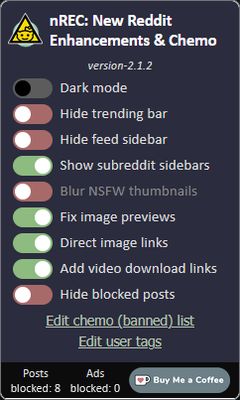
On installation, most features are enabled by default. However, features like Reddit Chemo and user tags need to be populated to see their full effects. Features can be enabled, disabled, and modified through the extension's UI (accessed by clicking the extension logo on the browser Toolbar).
Most features, such as dark mode, hide trending and sidebars, blur nsfw, fix image previews, direct image links, and add video download links can simply be toggled in the UI using the various controls.
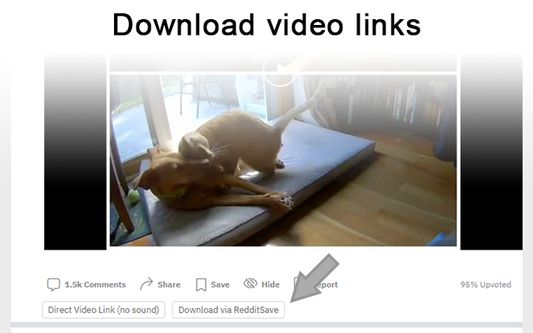
Add video download links attempts to add a direct link to the video (with buttons below the video). However, in the feed this is only possible with short videos (Reddit tries very hard to obfuscate video sources). If the buttons do not appear, try opening the post/comments. In the post/comment view, two links may be provided: one for the direct video (which may or may not have audio depending on the means to determining the original video source), and if the audio can't be rectified to the video, another to download the video (with audio) using RapidSave.
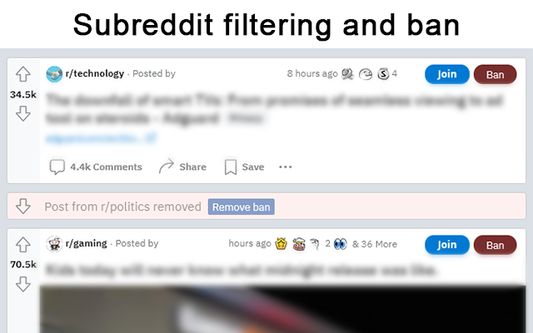
To add subreddits to Reddit Chemo's ban list, simply click the "ban" button next to posts in the r/all or r/popular feed from subreddits you do not wish to see. By default, a small strip will be shown in place of the blocked post. To hide this strip, toggle "Show/hide blocked posts" in the extension's UI. To remove subreddits from the ban go to "Edit banned list" in the extension's UI to view the full ban list and remove subreddits from it. The effects of removing subreddits from the ban list may not take effect until a page change or refresh.
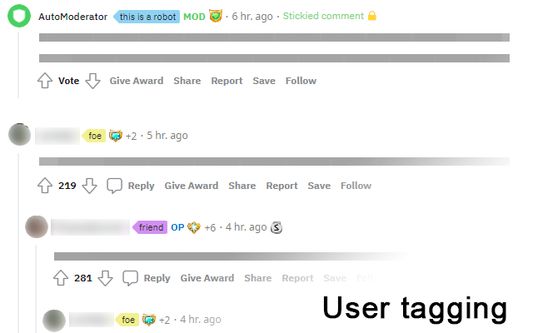
User Tags. Next to every username (including your own) you will see an empty 'tag' icon (or an active tag, if one was set). To set or edit this value, simply click once and type to edit the text. When in edit mode inside of a tag, click the tag again to cycle different tag colors. Click outside the tag or press 'enter' to save changes or press 'esc' to cancel changes. If the new tag value is set as empty or whitespace, the tag will be removed. All existing user tags may also be viewed and edited from the extension's UI. Click "Edit user tags" to get a list of all existing user tags and edit individual tags as necessary.
PRIVACY POLICY:
https://lindseysim.com/p/reddit-extension#goto-privacy-policy
SUPPORT:
If you liked this extension, consider donating @ https://ko-fi.com/F1F25YGLA
- Hide trending and sidebars. Add options to hide the trending strip, right sidebar, and/or subreddit sidebar.
- Blur NSFW. Quick option to blur NSFW thumbnails. Not a replacement for the similar option in the Reddit settings but provides a shortcut to quick turn on/off should the need arise without having to navigate through the settings.
- Fix image previews. Clicking on image previews take you directly to the image itself, instead of to the comment section. Image preview heights in gallery mode are fixed such that images no longer get vertically cut off.
- Direct image links. Bypass Reddit forcing direct image links onto a preview page/template.
- Add video download links. When viewing a video, download links are provided, using both a direct link and a link to download through rapidsave.com.
- Reddit Chemo. Filter feed posts by subreddit as well as removal of some advertisements.
- User Tags. Add tags to usernames.
USAGE:
On installation, most features are enabled by default. However, features like Reddit Chemo and user tags need to be populated to see their full effects. Features can be enabled, disabled, and modified through the extension's UI (accessed by clicking the extension logo on the browser Toolbar).
Most features, such as dark mode, hide trending and sidebars, blur nsfw, fix image previews, direct image links, and add video download links can simply be toggled in the UI using the various controls.
Add video download links attempts to add a direct link to the video (with buttons below the video). However, in the feed this is only possible with short videos (Reddit tries very hard to obfuscate video sources). If the buttons do not appear, try opening the post/comments. In the post/comment view, two links may be provided: one for the direct video (which may or may not have audio depending on the means to determining the original video source), and if the audio can't be rectified to the video, another to download the video (with audio) using RapidSave.
To add subreddits to Reddit Chemo's ban list, simply click the "ban" button next to posts in the r/all or r/popular feed from subreddits you do not wish to see. By default, a small strip will be shown in place of the blocked post. To hide this strip, toggle "Show/hide blocked posts" in the extension's UI. To remove subreddits from the ban go to "Edit banned list" in the extension's UI to view the full ban list and remove subreddits from it. The effects of removing subreddits from the ban list may not take effect until a page change or refresh.
User Tags. Next to every username (including your own) you will see an empty 'tag' icon (or an active tag, if one was set). To set or edit this value, simply click once and type to edit the text. When in edit mode inside of a tag, click the tag again to cycle different tag colors. Click outside the tag or press 'enter' to save changes or press 'esc' to cancel changes. If the new tag value is set as empty or whitespace, the tag will be removed. All existing user tags may also be viewed and edited from the extension's UI. Click "Edit user tags" to get a list of all existing user tags and edit individual tags as necessary.
PRIVACY POLICY:
https://lindseysim.com/p/reddit-extension#goto-privacy-policy
SUPPORT:
If you liked this extension, consider donating @ https://ko-fi.com/F1F25YGLA
Evaluat cu 4,4 de către 8 recenzori
Permisiuni și date
Permisiuni necesare:
- Blochează conținutul pe orice pagină
- Să îți acceseze datele pentru site-uri din domeniul reddit.com
Permisiuni opționale:
- Să îți acceseze datele pentru www.reddit.com
- Să îți acceseze datele pentru reddit.com
- Să îți acceseze datele pentru i.redd.it
- Să îți acceseze datele pentru external-preview.redd.it
- Să îți acceseze datele pentru preview.redd.it
Mai multe informații
- Linkurile suplimentului
- Versiune
- 2.1.5
- Mărime
- 76,79 KB
- Ultima actualizare
- 7 luni în urmă (10 sept. 2025)
- Categorii conexe
- Licență
- Licență MIT
- Istoricul versiunilor
- Etichete
- Adaugă în colecție