
Next Page X de Tom
Use the shortcut keys to move to the next page.
2 utilizatori2 utilizatori
Metadate extensie
Capturi de ecran
Despre această extensie
Use the shortcut keys to move to the next page.
Explanation.
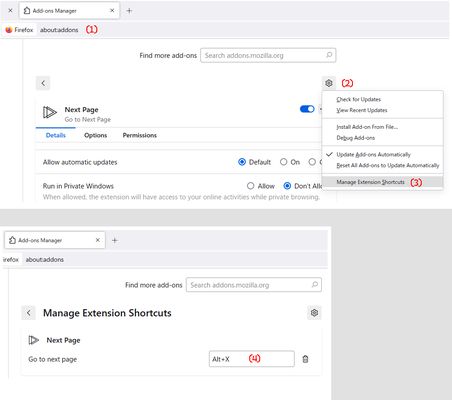
The first step is to set the shortcut keys.
Access to about:addons, addons page , Ctrl + Shift + A.
Click to addon tool button and setting shortcut key (S).
Default is Alt + X. But not optimal for many people.
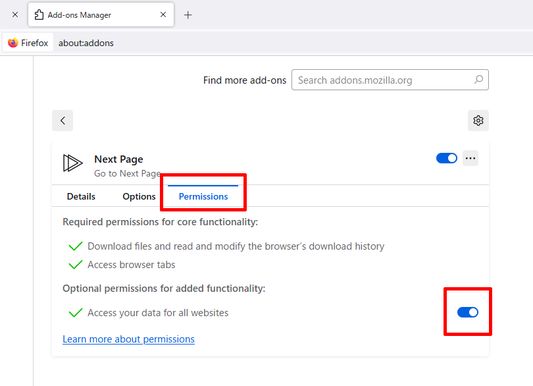
Next, open the extension permissions.
Check the permissions.
Open the extension options.
The regex try to increment the page number by + 1 for the next page.
Format is
(Front $1)(page number $x)(Back $x + 1) $x is next form
Example
https://developer.mozilla.org/ja/search?q=html&page=2
https://github.com/abc?p=12
https://abc.com/abc/page/2/
(https://.+(\?|&|/)(p|page)(=|/))([0-9]+)(.*) : next form in 5
Next. url, xpath
You need the URL and the XPath of the element containing the link (href attribute)
to the page you want to navigate.
Example
https://developer.mozilla.org/en-US/search?q=addon
to
https://developer.mozilla.org/en-US/search?q=, //ul[contains(@class, "pagination")] / li / a[last()][contains(text(),"Next")]
If necessary, you can use https:// , //a[contains(text(),"Next")]
but to avoid issues, it is recommended to write the URL up to the trailing slash after the domain, like https://x.xx/.
Please use the Import and Export buttons to work in the editor.
Sample
https://developer.mozilla.org/ , //ul[contains(@class, "pagination")] / li / a[last()][contains(text(),"Next")]
https://www.bing.com/search? , //nav[@role="navigation"] /ul / li /a[contains(@class, "sb_pagN")]
https://www.google.com/search?q= , //a[@id="pnnext"]
https://search.yahoo.com/ , //div[contains(@class, "pagination")]
Explanation.
The first step is to set the shortcut keys.
Access to about:addons, addons page , Ctrl + Shift + A.
Click to addon tool button and setting shortcut key (S).
Default is Alt + X. But not optimal for many people.
Next, open the extension permissions.
Check the permissions.
Open the extension options.
The regex try to increment the page number by + 1 for the next page.
Format is
(Front $1)(page number $x)(Back $x + 1) $x is next form
Example
https://developer.mozilla.org/ja/search?q=html&page=2
https://github.com/abc?p=12
https://abc.com/abc/page/2/
(https://.+(\?|&|/)(p|page)(=|/))([0-9]+)(.*) : next form in 5
Next. url, xpath
You need the URL and the XPath of the element containing the link (href attribute)
to the page you want to navigate.
Example
https://developer.mozilla.org/en-US/search?q=addon
to
https://developer.mozilla.org/en-US/search?q=, //ul[contains(@class, "pagination")] / li / a[last()][contains(text(),"Next")]
If necessary, you can use https:// , //a[contains(text(),"Next")]
but to avoid issues, it is recommended to write the URL up to the trailing slash after the domain, like https://x.xx/.
Please use the Import and Export buttons to work in the editor.
Sample
https://developer.mozilla.org/ , //ul[contains(@class, "pagination")] / li / a[last()][contains(text(),"Next")]
https://www.bing.com/search? , //nav[@role="navigation"] /ul / li /a[contains(@class, "sb_pagN")]
https://www.google.com/search?q= , //a[@id="pnnext"]
https://search.yahoo.com/ , //div[contains(@class, "pagination")]
Evaluat cu 0 de către 0 recenzori
Permisiuni și date
Permisiuni necesare:
- Să descarce fișiere și să citească sau să modifice istoricul descărcărilor din browser
- Să îți acceseze datele pentru toate site-urile web
Mai multe informații
- Linkurile suplimentului
- Versiune
- 4
- Mărime
- 18,56 KB
- Ultima actualizare
- un an în urmă (8 apr. 2025)
- Categorii conexe
- Licență
- Mozilla Public License 2.0
- Istoricul versiunilor
- Adaugă în colecție