
Page Draw & Doodle de diemtea
Page Draw + Doodle transforms any webpage into an interactive canvas to draw and annotate on.
91 de utilizatori91 de utilizatori
Metadate extensie
Capturi de ecran

Despre această extensie
Designed for power users and casual doodlers alike, Page Draw & Doodle blends into your browsing experience with no page reloads, no complicated settings, just a lightweight, always-available canvas on top of any web page.
New in v1.1
Features
Known-issues, future update
New in v1.1
- Shortcuts - Undo (CTRL+Z), Redo (CTRL+Y), Clear (ALT+C), Toggle drawing (ALT+A). All modifiable via Firefox's Manage Extension Shortcuts page.
- Better UI - Improved stability and consistency across different themes and web pages.
Features
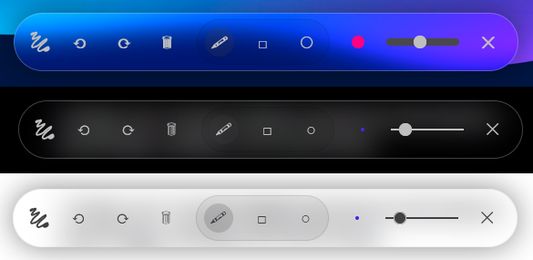
- Freehand Pencil Tool Draw anywhere on the page with adjustable brush size and color.
- Shape Modes Instantly switch between freehand, rectangle, and circle tools for precise annotations.
- Persistent Doodles All your drawings are saved per URL and reload automatically whenever you revisit.
- Undo / Redo / Clear Mistake? No worries. Step backward or forward through your strokes, or clear the canvas entirely.
- Draggable, Collapsible Toolbar Grab the “≡” handle to move your toolbar anywhere; click it to collapse or expand.
Known-issues, future update
- No scrolling in iframes or nested content Currently only scrolls the page, but does not react to iframes or scrollable content inside the page. Working on a fix!
- Inconsistent floating menu Floating menu sometimes takes the styling CSS of the page, producing inconsistent look and feel of the menu between different pages. Working on a fix!
Evaluat cu 5 de către 2 recenzori
Permisiuni și date
Permisiuni necesare:
- Să acceseze filele browserului
- Să îți acceseze datele pentru toate site-urile web
Mai multe informații
- Linkurile suplimentului
- Versiune
- 1.1
- Mărime
- 20,76 KB
- Ultima actualizare
- 9 luni în urmă (28 mai 2025)
- Categorii conexe
- Istoricul versiunilor
- Adaugă în colecție