Password Lock for WhatsApp Web de Chandler Stimson
Automatically lock WhatsApp Web after a period of time or by pressing the action button
578 de utilizatori578 de utilizatori
Metadate extensie
Capturi de ecran
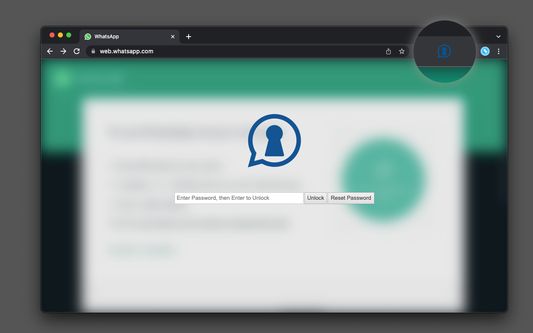
Despre această extensie
This extension allows you to password-protect your WhatsApp Web account. It offers two modes of operation:
The extension prompts you to enter the password when you open WhatsApp Web.
The extension only prompts you to enter the password after a period. In this mode, you can ask to lock WhatsApp after the period is expired.
Usage Instruction:
After installation, click the action button once to open WhatsApp Web next to your current tab.
Enter your password and confirm it in the confirmation box.
Press the "Change Password" button to activate the password protection. From now on, the extension will block WhatsApp access on any subsequent requests.
Notes:
* Press the action button to lock WhatsApp Web. This will lock all open instances of WhatsApp. The extension will open a new, locked one for you if there are no instances.
* You can also configure a keyboard shortcut for the action button. This way, you can quickly lock WhatsApp when needed.
* The extension also locks right-click context menu. You can disable this feature from the "options" panel
The extension prompts you to enter the password when you open WhatsApp Web.
The extension only prompts you to enter the password after a period. In this mode, you can ask to lock WhatsApp after the period is expired.
Usage Instruction:
After installation, click the action button once to open WhatsApp Web next to your current tab.
Enter your password and confirm it in the confirmation box.
Press the "Change Password" button to activate the password protection. From now on, the extension will block WhatsApp access on any subsequent requests.
Notes:
* Press the action button to lock WhatsApp Web. This will lock all open instances of WhatsApp. The extension will open a new, locked one for you if there are no instances.
* You can also configure a keyboard shortcut for the action button. This way, you can quickly lock WhatsApp when needed.
* The extension also locks right-click context menu. You can disable this feature from the "options" panel
Evaluat cu 5 de către 5 recenzori
Permisiuni și date
Permisiuni necesare:
- Să îți acceseze datele pentru web.whatsapp.com
Permisiuni opționale:
- Să îți acceseze datele pentru web.whatsapp.com
Mai multe informații
- Linkurile suplimentului
- Versiune
- 0.1.5
- Mărime
- 154,23 KB
- Ultima actualizare
- 10 luni în urmă (13 feb. 2025)
- Categorii conexe
- Licență
- Mozilla Public License 2.0
- Istoricul versiunilor
- Adaugă în colecție
Dezvoltatorul acestei extensii îți solicită să contribui pentru sprijinirea dezvoltării continue printr-o mică donație.