
Patreon Easy Downloader de Cosmious
Organize your favorite Patreon creators in one place. Download & manage your media ensuring they are uniformly & easily accessible. Focus on enjoying your content—not managing it. Never miss a file again.
Unele funcționalități pot fi cu platăUnele funcționalități pot fi cu plată
965 de utilizatori965 de utilizatori
Metadate extensie
Capturi de ecran



Despre această extensie
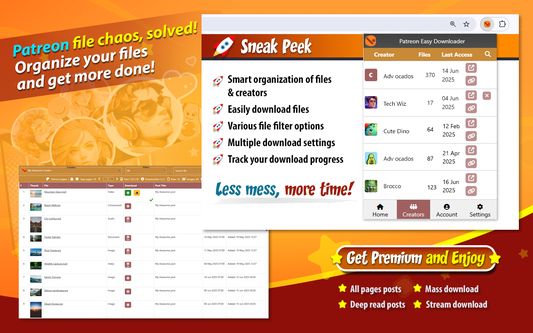
The app that helps you maintain all of your favorite creators from Patreon in one place.
This extension transforms the messy, infinite feed into an organized system where every file is easy to locate and download.
Get a clear picture of what's going on in all posts by eliminating the need to scramble for scattered content.
Turn your purchased assets into a navigable list, making every media effortlessly accessible despite the initial overload.
Ensuring that your data is properly arranged, you no longer have to race against the clock to receive your rewards before they disappear.
Filter & search exactly what you're looking for. No more hunting for download links hidden in a wall of content.
Bulk download files. Track your download progress to minimize duplicates or missed files.
Focus on enjoying your content—not managing it.
🧾 How to Use
You can add your Patreon.com creators to the extension with 3 ways. Before adding your creators we suggest to complete these 3 things first:
1. Sign in to your Patreon.com account
2. Subscribe to a Patreon.com creator
3. Sign in to the browser extension within your browser
➤ The first way is automatic. Steps:
1. Visit the Patreon.com creator's home page
2. Click the browser extension (Home tab) and wait until the creator is detected
3. Click the 'Downloads Page' button when it appears. The creator will be added to your creator's list. It isn't required to have the Patreon.com page opened in your browser
➤ The second way is manual. Steps:
1. Click the browser extension and then click the 'Add creators' button
2. Type the creator's name in the search box and it will appear in the search results
3. Click the 'Add creator' icon next to the creator's name and it will be added to your creator's list
4. Click the 'Downloads Page' button (Home tab)
➤ The third way is also manual and it is available for users having browser extension version 300 and above. Steps:
1. Sign in to https://patreon.cosmious.com
2. Visit the My Creators page: https://patreon.cosmious.com/my-creators
3. The 'Add creators' section will appear
4. Type the creator's name in the search box and it will appear in the search results
5. Click the 'Add creator' icon next to the creator's name and it will be added to your creator's list
6. Click the 'Downloads Page' in the browser extension
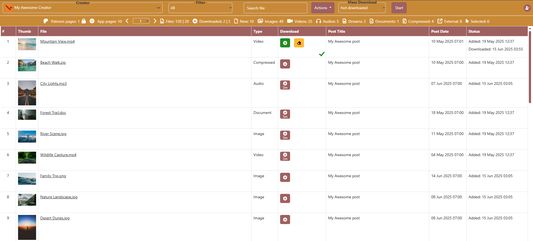
The 'Downloads Page' will gradually list the creator's available files.
🧩 Features
- List files from creator's posts
- Search & filter files by file type, post, state
- Download creators' files to separate subfolders
- Various download settings
- Multiple mass download options
- Track your download progress
⭐ Premium features information
Users have the option to upgrade to a Premium plan for one or more creators and enhance their experience within the extension.
Details about the Premium features, including their benefits and functionalities, are available on our website.
🌐 Visit https://patreon.cosmious.com for more information.
This extension transforms the messy, infinite feed into an organized system where every file is easy to locate and download.
Get a clear picture of what's going on in all posts by eliminating the need to scramble for scattered content.
Turn your purchased assets into a navigable list, making every media effortlessly accessible despite the initial overload.
Ensuring that your data is properly arranged, you no longer have to race against the clock to receive your rewards before they disappear.
Filter & search exactly what you're looking for. No more hunting for download links hidden in a wall of content.
Bulk download files. Track your download progress to minimize duplicates or missed files.
Focus on enjoying your content—not managing it.
🧾 How to Use
You can add your Patreon.com creators to the extension with 3 ways. Before adding your creators we suggest to complete these 3 things first:
1. Sign in to your Patreon.com account
2. Subscribe to a Patreon.com creator
3. Sign in to the browser extension within your browser
➤ The first way is automatic. Steps:
1. Visit the Patreon.com creator's home page
2. Click the browser extension (Home tab) and wait until the creator is detected
3. Click the 'Downloads Page' button when it appears. The creator will be added to your creator's list. It isn't required to have the Patreon.com page opened in your browser
➤ The second way is manual. Steps:
1. Click the browser extension and then click the 'Add creators' button
2. Type the creator's name in the search box and it will appear in the search results
3. Click the 'Add creator' icon next to the creator's name and it will be added to your creator's list
4. Click the 'Downloads Page' button (Home tab)
➤ The third way is also manual and it is available for users having browser extension version 300 and above. Steps:
1. Sign in to https://patreon.cosmious.com
2. Visit the My Creators page: https://patreon.cosmious.com/my-creators
3. The 'Add creators' section will appear
4. Type the creator's name in the search box and it will appear in the search results
5. Click the 'Add creator' icon next to the creator's name and it will be added to your creator's list
6. Click the 'Downloads Page' in the browser extension
The 'Downloads Page' will gradually list the creator's available files.
🧩 Features
- List files from creator's posts
- Search & filter files by file type, post, state
- Download creators' files to separate subfolders
- Various download settings
- Multiple mass download options
- Track your download progress
⭐ Premium features information
Users have the option to upgrade to a Premium plan for one or more creators and enhance their experience within the extension.
Details about the Premium features, including their benefits and functionalities, are available on our website.
🌐 Visit https://patreon.cosmious.com for more information.
Evaluat cu 2,5 de către 18 recenzori
Permisiuni și date
Permisiuni necesare:
- Să descarce fișiere și să citească sau să modifice istoricul descărcărilor din browser
- Să acceseze filele browserului
- Să îți acceseze datele pentru patreon.cosmious.com
Permisiuni opționale:
- Să îți afișeze notificări
- Să îți acceseze datele pentru site-uri din domeniul patreon.com
- Să îți acceseze datele pentru site-uri din domeniul patreonusercontent.com
- Să îți acceseze datele pentru site-uri din domeniul googleapis.com
- Să îți acceseze datele pentru patreon.cosmious.com
- Să îți acceseze datele pentru drive.google.com
- Să îți acceseze datele pentru accounts.google.com
Mai multe informații
- Linkurile suplimentului
- Versiune
- 303
- Mărime
- 695,88 KB
- Ultima actualizare
- 8 zile în urmă (15 feb. 2026)
- Categorii conexe
- Licență
- Toate drepturile rezervate
- Politică de confidențialitate
- Citește politica de confidențialitate pentru acest supliment
- Istoricul versiunilor
- Etichete
- Adaugă în colecție