
qwiklinks de ruyili
Access long URLs with short, easy-to-remember names.
Niciun utilizatorNiciun utilizator
Metadate extensie
Capturi de ecran
Despre această extensie
Access long URLs with short, easy-to-remember names.
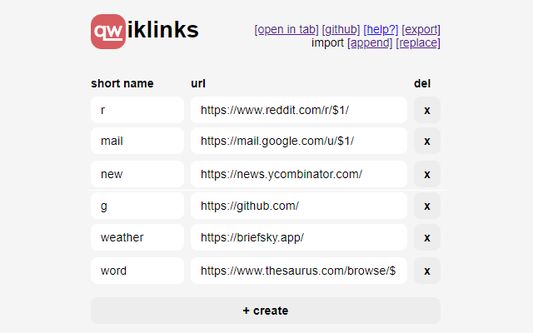
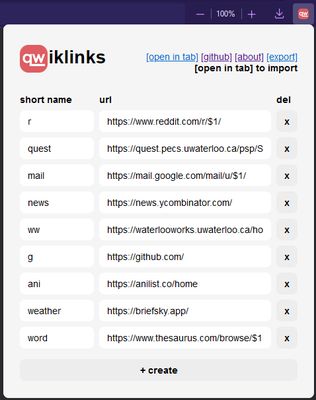
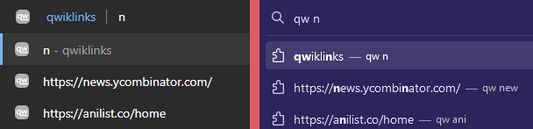
The qwiklinks extension allows you to access your links through the browser search bar. Simply type "qw <name>" and hit enter to load the corresponding URL. A list of suggestions matching what you currently have typed will appear as you type the name.
Why
qwiklinks was built as a way to help people get around in their browser faster. Instead of having to memorize URL prefixes or randomly typing in keywords until the search bar autocompletes the URL, you can simply associate the URL with a short and memorable name. In a sense, qwiklinks are similar to bookmarks, but don't require you to use your mouse, take up no screen space, and don't force you to sift through a sea of bookmarks to find the one you're looking for.
Arguments
You can specify arguments by inserting placeholders such as $1, $2, and $3 in your URL. To use these placeholders, simply type the arguments after the qwiklink name, separated by spaces; for instance, "qw mail 0" replaces all occurences of "$1" in the "mail" qwiklink URL with "0".
The qwiklinks extension allows you to access your links through the browser search bar. Simply type "qw <name>" and hit enter to load the corresponding URL. A list of suggestions matching what you currently have typed will appear as you type the name.
Why
qwiklinks was built as a way to help people get around in their browser faster. Instead of having to memorize URL prefixes or randomly typing in keywords until the search bar autocompletes the URL, you can simply associate the URL with a short and memorable name. In a sense, qwiklinks are similar to bookmarks, but don't require you to use your mouse, take up no screen space, and don't force you to sift through a sea of bookmarks to find the one you're looking for.
Arguments
You can specify arguments by inserting placeholders such as $1, $2, and $3 in your URL. To use these placeholders, simply type the arguments after the qwiklink name, separated by spaces; for instance, "qw mail 0" replaces all occurences of "$1" in the "mail" qwiklink URL with "0".
Evaluat cu 0 de către 0 recenzori
Permisiuni și date
Permisiuni necesare:
- Să descarce fișiere și să citească sau să modifice istoricul descărcărilor din browser
Mai multe informații
- Linkurile suplimentului
- Versiune
- 1.1
- Mărime
- 16,75 KB
- Ultima actualizare
- 3 ani în urmă (16 apr. 2023)
- Categorii conexe
- Licență
- Mozilla Public License 2.0
- Istoricul versiunilor
- Adaugă în colecție