
Ui.Vision de Ui.Vision Open-Source RPA Software
Open-source Ui.Vision is RPA software for task & test automation. It is 3 tools in 1: Visual BROWSER automation with Selenium IDE import/export, 2: Visual DESKTOP automation and 3: (optional) Prompting with integrated Anthropic Claude Computer Use
5.682 de utilizatori5.682 de utilizatori
Metadate extensie
Capturi de ecran




Despre această extensie
Easy automation for busy people. Ui.Vision automates web and desktop apps, so you can focus on your most important work.
New: Anthropic Claude Computer Use Integration
Open-Source Ui.Vision has consistently been at the forefront of visual web automation. With Claude’s integration, we’re taking the next step forward. The aiComputerUse command allows you to automate complex tasks with a single line of code that would traditionally require hundreds of lines of classic Ui.Vision commands (such as XClick, OCRExtractScreenshot, If/then statements, and more). For example, you can teach Ui.Vision to play TicTacToe with just one short "Play this game..." prompt.
What is Ui.Vision?
Ui.Vision is open-source and “lives” in the web browser, but it can do desktop automation as well. It is a universal task and test automation tool that combines the best of classical web automation with modern, AI-powered automation concepts. UI Vision combines 3 powerful tools into one:
(1) Visual Web Automation and UI Testing
The Visual UI testing commands of Ui.Vision help web designers and developers to verify and validate the layout of websites and canvas elements. UI Vision can read and recognize images and text inside canvas elements, images and videos.
Ui.Vision can resize the browser's window in order to emulate various resolutions. This is particularly useful to test layouts on different browser resolutions, and to validate visually perfect mobile, web, and native apps.
(2) Visual Desktop Automation for Windows, Mac and Linux
Ui.Vision can not only see and automate everything inside the web browser. It uses image and text recognition for open-source RPA, desktop automation and screen scraping. Ui.Vision can read images and text on your desktop and click, move, drag & drop the mouse and simulate keyboard input.
The desktop automation feature requires the installation of the free RPA XModules. This is a separate software package available for Windows, Mac and Linux. It adds the “eyes” and “hands” to the open-source RPA core.
(3) Selenium IDE Alternative
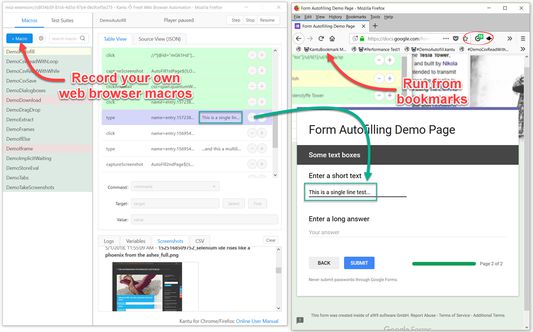
Ui.Vision includes our own open-source implementation of Selenium IDE commands for general web automation, web testing, form filling & web scraping. But Ui.Vision has a different design philosophy then the classic Selenium IDE. On the one hand it is a record & replay tool for automated testing just like the classic Selenium IDE, but even more it is a "swiss army knife" for general web automation like screen scraping, automating file uploads and autofill form filling. It has many features that the classic IDE does not (want to) have. For example, you can run your macros directly from the browser as bookmarks or even embed them on your website. If there’s an activity you have to do repeatedly, just create a web macro for it. The next time you need to do it, the entire macro will run at the click of a button and do the work for you.
Ui.Vision is a open-source alternative to iMacros, Katalon, UIPath and Selenium IDE, and supports all important Selenium IDE commands. When you invest the time to learn Ui.Vision, you learn Selenium IDE at the same time.
Ui.Vision includes many features that are not found in the classic Selenium IDE, such as the ability to write and read CSV files (data-driven testing), visual checks for UI testing, file download automation, PDF testing and the ability to take full web page and desktop screenshots.
(API) Integrate with your favorite tools via command line
One of the best Ui.Vision features for experts is its extensive command line API. This allows you to integrate Ui.Vision with any application (e. g. Jenkins and other CI/CD tools, task scheduler,...) and any programming or scripting language (e. g. Python or Powershell).
For developers: The source code of the Ui.Vision extension is published at https://github.com/A9T9/RPA
Happy Automating!
For questions and suggestions, please visit the active Ui.Vision RPA forum.
New: Anthropic Claude Computer Use Integration
Open-Source Ui.Vision has consistently been at the forefront of visual web automation. With Claude’s integration, we’re taking the next step forward. The aiComputerUse command allows you to automate complex tasks with a single line of code that would traditionally require hundreds of lines of classic Ui.Vision commands (such as XClick, OCRExtractScreenshot, If/then statements, and more). For example, you can teach Ui.Vision to play TicTacToe with just one short "Play this game..." prompt.
What is Ui.Vision?
Ui.Vision is open-source and “lives” in the web browser, but it can do desktop automation as well. It is a universal task and test automation tool that combines the best of classical web automation with modern, AI-powered automation concepts. UI Vision combines 3 powerful tools into one:
(1) Visual Web Automation and UI Testing
The Visual UI testing commands of Ui.Vision help web designers and developers to verify and validate the layout of websites and canvas elements. UI Vision can read and recognize images and text inside canvas elements, images and videos.
Ui.Vision can resize the browser's window in order to emulate various resolutions. This is particularly useful to test layouts on different browser resolutions, and to validate visually perfect mobile, web, and native apps.
(2) Visual Desktop Automation for Windows, Mac and Linux
Ui.Vision can not only see and automate everything inside the web browser. It uses image and text recognition for open-source RPA, desktop automation and screen scraping. Ui.Vision can read images and text on your desktop and click, move, drag & drop the mouse and simulate keyboard input.
The desktop automation feature requires the installation of the free RPA XModules. This is a separate software package available for Windows, Mac and Linux. It adds the “eyes” and “hands” to the open-source RPA core.
(3) Selenium IDE Alternative
Ui.Vision includes our own open-source implementation of Selenium IDE commands for general web automation, web testing, form filling & web scraping. But Ui.Vision has a different design philosophy then the classic Selenium IDE. On the one hand it is a record & replay tool for automated testing just like the classic Selenium IDE, but even more it is a "swiss army knife" for general web automation like screen scraping, automating file uploads and autofill form filling. It has many features that the classic IDE does not (want to) have. For example, you can run your macros directly from the browser as bookmarks or even embed them on your website. If there’s an activity you have to do repeatedly, just create a web macro for it. The next time you need to do it, the entire macro will run at the click of a button and do the work for you.
Ui.Vision is a open-source alternative to iMacros, Katalon, UIPath and Selenium IDE, and supports all important Selenium IDE commands. When you invest the time to learn Ui.Vision, you learn Selenium IDE at the same time.
Ui.Vision includes many features that are not found in the classic Selenium IDE, such as the ability to write and read CSV files (data-driven testing), visual checks for UI testing, file download automation, PDF testing and the ability to take full web page and desktop screenshots.
(API) Integrate with your favorite tools via command line
One of the best Ui.Vision features for experts is its extensive command line API. This allows you to integrate Ui.Vision with any application (e. g. Jenkins and other CI/CD tools, task scheduler,...) and any programming or scripting language (e. g. Python or Powershell).
For developers: The source code of the Ui.Vision extension is published at https://github.com/A9T9/RPA
Happy Automating!
For questions and suggestions, please visit the active Ui.Vision RPA forum.
Evaluat cu 4,3 de către 50 de recenzori
Permisiuni și date
Permisiuni necesare:
- Să facă schimb de mesaje cu alte programe în afară de Firefox
- Să citească și să modifice marcaje
- Să obțină date din clipboard
- Să introducă date în clipboard
- Să descarce fișiere și să citească sau să modifice istoricul descărcărilor din browser
- Să îți afișeze notificări
- Să controleze setările proxy ale browserului
- Să acceseze filele browserului
- Să îți acceseze datele pentru toate site-urile web
Permisiuni opționale:
- Să îți acceseze datele pentru toate site-urile web
Mai multe informații
- Linkurile suplimentului
- Versiune
- 9.5.3
- Mărime
- 6,81 MB
- Ultima actualizare
- un an în urmă (22 mart. 2025)
- Categorii conexe
- Istoricul versiunilor
- Adaugă în colecție