
Save To IC Links de Icsoft Pty Ltd
This extension adds the current URL to IC Links bookmarking site.
Niciun utilizatorNiciun utilizator
Metadate extensie
Capturi de ecran
Despre această extensie
Save to IC Links browser add-on adds the current URL to the IC Links web application.
Features
IC Links is a bookmarking site web application that is available to use on your own premises and is available at Docker Hub, this is the browser extension for adding links to it.
Some of the best features of this addon combined with the associated web site are:
Instructions for Use
This information is also available by clicking on the Help menu item after this add-on is installed.
If another company/end user has set up and is hosting the IC Links we application, the Server Location box in the options of the add-on can be used to enter that web sites (sub)domain name.
A new page can be created on the IC Links web application, by clicking on the Add A New Page link, filling out the Page Title box and clicking the Add Page button.
After a page has been created the UUID of that page must be copied from the URL at the top of the browser (this will be changed to a button in a future version) and copied into the options of the add-on in the box titled UUID.
A UUID looks like this:
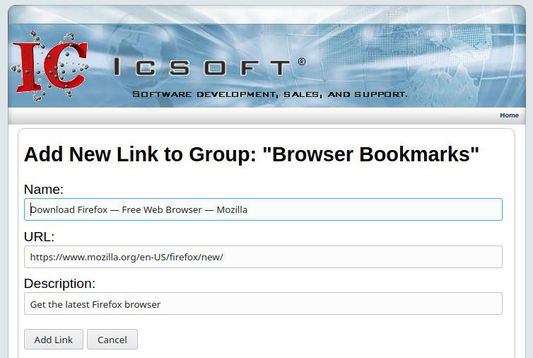
Once the Server Location box and page UUID box has been filled out with valid values in the options of the add-on, browsing to a page that the user would like to bookmark, and clicking on the add-on, allows the add-on to open up a new tab pointing to the Add New Link page on the IC Links web application with the text boxes filled out, then by clicking on the Add Link button, the IC Links web application creates a new link on the aforementioned page that was created.
Any text highlighted on the page that the user would like to bookmark, before the add-on is clicked, will be inserted into the Description box, otherwise the words Link added from browser will be displayed.
Features
IC Links is a bookmarking site web application that is available to use on your own premises and is available at Docker Hub, this is the browser extension for adding links to it.
Some of the best features of this addon combined with the associated web site are:
- Get your bookmarks anywhere without having to sync.
- Unlimited groups and bookmark pages.
- Available from ANY web browser.
- No javascript needed.
- Run your own IC Links server wherever you want.
- Works in an business Intranet, Internet not needed.
Instructions for Use
This information is also available by clicking on the Help menu item after this add-on is installed.
If another company/end user has set up and is hosting the IC Links we application, the Server Location box in the options of the add-on can be used to enter that web sites (sub)domain name.
A new page can be created on the IC Links web application, by clicking on the Add A New Page link, filling out the Page Title box and clicking the Add Page button.
After a page has been created the UUID of that page must be copied from the URL at the top of the browser (this will be changed to a button in a future version) and copied into the options of the add-on in the box titled UUID.
A UUID looks like this:
XXXXXXXX-XXXX-XXXX-XXXX-XXXXXXXXXXXXWhere X is a number, or a letter between and including A-F.
Once the Server Location box and page UUID box has been filled out with valid values in the options of the add-on, browsing to a page that the user would like to bookmark, and clicking on the add-on, allows the add-on to open up a new tab pointing to the Add New Link page on the IC Links web application with the text boxes filled out, then by clicking on the Add Link button, the IC Links web application creates a new link on the aforementioned page that was created.
Any text highlighted on the page that the user would like to bookmark, before the add-on is clicked, will be inserted into the Description box, otherwise the words Link added from browser will be displayed.
Evaluat cu 0 de către 0 recenzori
Mai multe informații
- Linkurile suplimentului
- Versiune
- 1.1.2
- Mărime
- 20,26 KB
- Ultima actualizare
- 6 ani în urmă (3 apr. 2020)
- Categorii conexe
- Licență
- Mozilla Public License 2.0
- Politică de confidențialitate
- Citește politica de confidențialitate pentru acest supliment
- Istoricul versiunilor
- Adaugă în colecție