
Science Research Assistant de Science Research Tools
Search for scientific information as quickly as possible while researching and writing scientific papers. Its algorithm summarizes the text on any web page, providing the most frequently used keywords and phrases and highlighting key information.
327 de utilizatori327 de utilizatori
Metadate extensie
Capturi de ecran
Despre această extensie
Science Research Assistant is a browser extension that helps scientists, journalists, and readers to find and utilize the existing body of scientific research. Finding facts and information as efficiently and quickly as possible is always priority while researching and writing your own thesis.
Its algorithm summarizes the text on any web page, providing the most frequently used keywords and phrases and highlighting key information. You can tweak the algorithm by providing your own rules. This will help you to quickly go through the most important information on any web page, including lengthy scientific papers that might contain a couple thousand words, or sometimes even more.
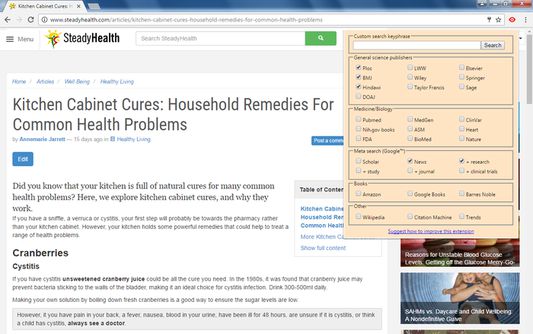
After that, you can select any keyword or phrase on any web page and quickly search on 30+ scientific journals for that keyword (Plos, BMJ, PubMed, BioMed, Nature, Wiley, Elsevier, NIH, FDA and many others). You can also create your own keyword for your search. We strive to give priority to open access journals, but understand the scientific importance of each and every information source.
Moreover, there are useful meta-search options and other tools which might help you in your search for scientific information.
Even if you are still not decided on your hypothesis or the topic of your interest, this tool can help you to quickly navigate through the massive amounts of information available. For example, using the News or Trends option, you can quickly learn how popular some topic is and is likely to become over the time, and even get some related suggestions and ideas.
Science Research Assistant will help you to:
Usage:
Its algorithm summarizes the text on any web page, providing the most frequently used keywords and phrases and highlighting key information. You can tweak the algorithm by providing your own rules. This will help you to quickly go through the most important information on any web page, including lengthy scientific papers that might contain a couple thousand words, or sometimes even more.
After that, you can select any keyword or phrase on any web page and quickly search on 30+ scientific journals for that keyword (Plos, BMJ, PubMed, BioMed, Nature, Wiley, Elsevier, NIH, FDA and many others). You can also create your own keyword for your search. We strive to give priority to open access journals, but understand the scientific importance of each and every information source.
Moreover, there are useful meta-search options and other tools which might help you in your search for scientific information.
Even if you are still not decided on your hypothesis or the topic of your interest, this tool can help you to quickly navigate through the massive amounts of information available. For example, using the News or Trends option, you can quickly learn how popular some topic is and is likely to become over the time, and even get some related suggestions and ideas.
Science Research Assistant will help you to:
- Search and analyze the complex structure of web information
- Use inductive or deductive research methods for scientific discovery
- Choose a writing topic and/or hypothesis
- Find scientific journal articles
- Find books
- Use helpful meta-search patterns to dig deeper into the web
- Narrowing down your writing theme
- Expanding information horizontally in order to find a more appropriate writing theme
- Find definitions
- Track news and trends
Usage:
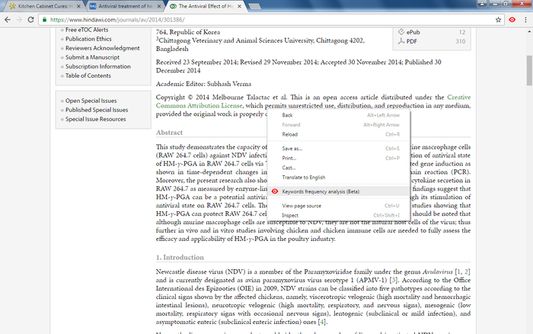
- Keyword analysis – click the right mouse button and then choose “Keyword frequency analysis (beta)” from the context menu.
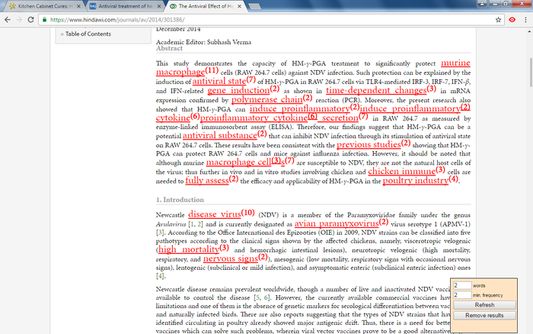
- Keyword distribution – click on the highlighted keyword to see all its appearances in the text.
- Keywords analysis settings overlay – choose the number of words in a keyword phrase (one to five) and the minimum required frequency within the text (from two to 10) you would like to get analysis for. Click the refresh button or remove the results button to remove the analysis.
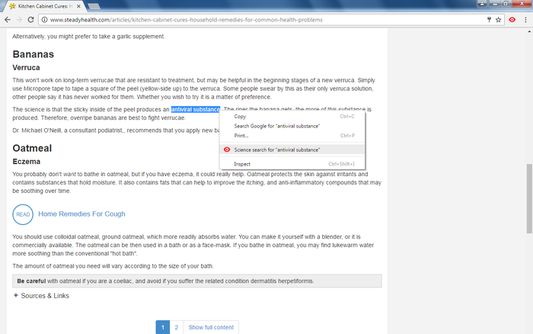
- Selection search – select any word in text on a web page, click the right mouse button, and choose “Science search for ..” from your context menu. This activates a search of various journals and web tools (see settings popup).
- Settings/Manual search – click on the extension icon in the top right corner of your web browser to get a settings/manual search popup; all your changes will be automatically saved.
Evaluat cu 4,8 de către 4 recenzori
Mai multe informații
- Linkurile suplimentului
- Versiune
- 1.0.3resigned1
- Mărime
- 30,38 KB
- Ultima actualizare
- 2 ani în urmă (25 apr. 2024)
- Categorii conexe
- Licență
- Mozilla Public License 2.0
- Istoricul versiunilor
- Adaugă în colecție