
screenshot any element de vacantthinker
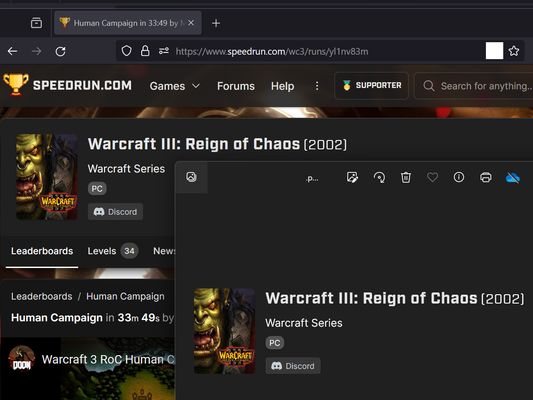
webpage screenshot support: screenshot full page pick one element to screenshot
24 de utilizatori24 de utilizatori
Metadate extensie
Capturi de ecran



Despre această extensie
Extension User Guide
📸 1. How to Capture a Full Page
🎯 2. How to Capture a Specific Element
⚠️ 3. Known Limitations
Browser extensions are restricted by standard security architectures and cannot run on native browser pages or official extension stores.
Examples of restricted pages include:
* Official Stores: Mozilla Add-ons Store (
📸 1. How to Capture a Full Page
- Right-click anywhere on the web page to open the context menu.
- Select "Screenshot Full Page" from the list.
🎯 2. How to Capture a Specific Element
- Click the extension icon in your browser toolbar.
- Move your mouse over the specific web element you want to capture. A red selection box will highlight the targeted area.
- Left-click the element. The extension will automatically capture the highlighted area and download it as a
.pngfile.
⏳ Note: Capturing larger web elements or extensive sections may take a few moments to process and download.
⚠️ 3. Known Limitations
Browser extensions are restricted by standard security architectures and cannot run on native browser pages or official extension stores.
Examples of restricted pages include:
* Official Stores: Mozilla Add-ons Store (
addons.mozilla.org).Evaluat cu 5 de către 2 recenzori
Permisiuni și date
Permisiuni necesare:
- Să îți afișeze notificări
- Să acceseze filele browserului
- Să îți acceseze datele pentru toate site-urile web
Colectare de date:
- Dezvoltatorul spune că extensia nu necesită colectarea de date.
Mai multe informații
- Linkurile suplimentului
- Versiune
- 2026.5.30.1
- Mărime
- 12,11 KB
- Ultima actualizare
- o lună în urmă (30 mai 2026)
- Categorii conexe
- Istoricul versiunilor
- Etichete
- Adaugă în colecție