
SDDTikTok: Download TikTok Videos Free de DataToolVip
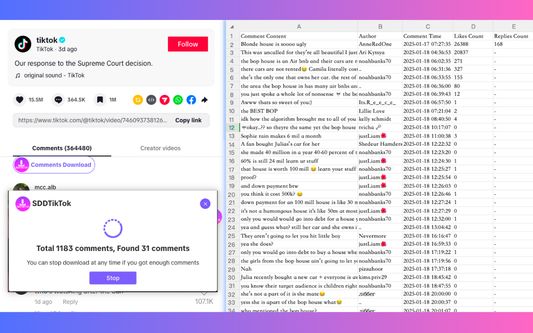
SDDTikTok, one-click downloads TikTok videos and images, extracts audio, deeply analyzes creator data.
316 utilizatori316 utilizatori
Metadate extensie
Capturi de ecran

Despre această extensie
TikTok Web Version, free download of individual and batch TikTok videos; batch acquisition of creator data.
🎨 Key Features
- Fast Download: Save TikTok videos to your local device in one click, enjoying high-definition video content.
- Easy Operation: Intuitive interface, easy to learn, and quick to master.
- Bulk Acquisition: Support for batch downloads, efficiently manage your video resources.
🚀 Core Functions
- ✅ High Definition, Watermark-Free: Enjoy the original high-quality video experience.
- ✅ One-Click Save: Save individual videos from your homepage, recommendations, search results, or creator's video lists with a single click.
- ✅ No Login Required: Skip the繁琐 login process and directly download your favorite videos.
- ✅ Batch Processing: Easily manage and batch download videos from creators.
🎨 User Guide
1. Individual Video Download:
- While browsing videos, click the 【Download】icon at the bottom right corner of the video to choose 【Download】and save the video.
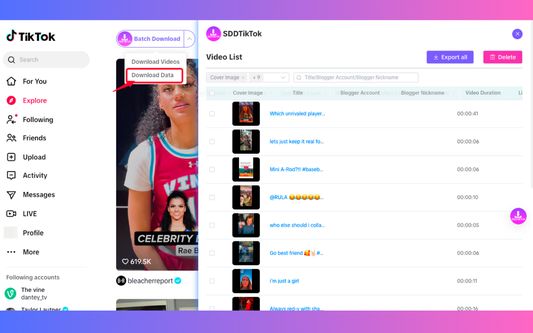
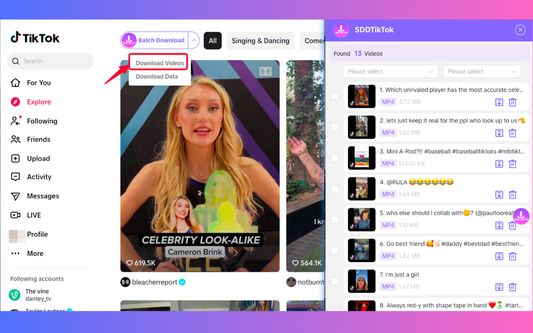
2. Batch Video and Data Download:
- While browsing videos, click the 【Batch Download】button at the top left corner of the video, and choose to download data or videos.
- Click 【Batch Download Videos】or 【Batch Download Data】to enter the batch download page and manage and download the added videos or data.
3. Creator Video and Data Batch Download:
- Visit the creator's profile you wish to download from, click the 【Batch Download】button to the right of the follow button, and choose to download data or videos.
- Click 【Batch Download Videos】or 【Batch Download Data】to enter the batch download page and manage and download the added videos or data.
👑 Who is Using It?
Especially suitable for:
- Operation staff who need to save creative videos
- Content creators collecting video materials
- Startup teams conducting competitive analysis
- Operators collecting market data
- Sales elites conducting regional research
- Business development teams looking for business opportunities
🚀 Super Easy to Get Started
Video download in three steps:
1️⃣ Install the plugin
2️⃣ Open the video page
3️⃣ Click the download button to save with one click!
🔐 Security is Absolutely Guaranteed
- No need to register or log in to use
- Data security, privacy worry-free
- Compliant and legal, rest assured to use
📱 Support Situation
- Video download: Universal for all platforms
- Continuously updated, becoming more powerful in functionality
🎨 Key Features
- Fast Download: Save TikTok videos to your local device in one click, enjoying high-definition video content.
- Easy Operation: Intuitive interface, easy to learn, and quick to master.
- Bulk Acquisition: Support for batch downloads, efficiently manage your video resources.
🚀 Core Functions
- ✅ High Definition, Watermark-Free: Enjoy the original high-quality video experience.
- ✅ One-Click Save: Save individual videos from your homepage, recommendations, search results, or creator's video lists with a single click.
- ✅ No Login Required: Skip the繁琐 login process and directly download your favorite videos.
- ✅ Batch Processing: Easily manage and batch download videos from creators.
🎨 User Guide
1. Individual Video Download:
- While browsing videos, click the 【Download】icon at the bottom right corner of the video to choose 【Download】and save the video.
2. Batch Video and Data Download:
- While browsing videos, click the 【Batch Download】button at the top left corner of the video, and choose to download data or videos.
- Click 【Batch Download Videos】or 【Batch Download Data】to enter the batch download page and manage and download the added videos or data.
3. Creator Video and Data Batch Download:
- Visit the creator's profile you wish to download from, click the 【Batch Download】button to the right of the follow button, and choose to download data or videos.
- Click 【Batch Download Videos】or 【Batch Download Data】to enter the batch download page and manage and download the added videos or data.
👑 Who is Using It?
Especially suitable for:
- Operation staff who need to save creative videos
- Content creators collecting video materials
- Startup teams conducting competitive analysis
- Operators collecting market data
- Sales elites conducting regional research
- Business development teams looking for business opportunities
🚀 Super Easy to Get Started
Video download in three steps:
1️⃣ Install the plugin
2️⃣ Open the video page
3️⃣ Click the download button to save with one click!
🔐 Security is Absolutely Guaranteed
- No need to register or log in to use
- Data security, privacy worry-free
- Compliant and legal, rest assured to use
📱 Support Situation
- Video download: Universal for all platforms
- Continuously updated, becoming more powerful in functionality
Evaluat cu 5 de către 2 recenzori
Permisiuni și date
Permisiuni necesare:
- Să descarce fișiere și să citească sau să modifice istoricul descărcărilor din browser
- Să deschidă fișiere descărcate pe calculator
- Să acceseze filele browserului
- Să îți acceseze datele pentru www.tiktok.com
- Să îți acceseze datele pentru ads.tiktok.com
- Să îți acceseze datele pentru api.datatool.vip
- Să îți acceseze datele pentru www.datatool.vip
- Să îți acceseze datele pentru creatormarketplace.tiktok.com
- Să îți acceseze datele pentru test.fmpets.cn:8112
- Să îți acceseze datele pentru local.sddtiktok.com:8106
- Să îți acceseze datele pentru chatgpt.com
- Să îți acceseze datele pentru chat.openai.com
- Să îți acceseze datele pentru www.doubao.com
- Să îți acceseze datele pentru kimi.moonshot.cn
- Să îți acceseze datele pentru www.kimi.com
- Să îți acceseze datele pentru chat.deepseek.com
- Să îți acceseze datele pentru claude.ai
- Să îți acceseze datele pentru chat.x.ai
- Să îți acceseze datele pentru grok.com
- Să îți acceseze datele pentru gemini.google.com
- Să îți acceseze datele pentru www.sddtiktok.com
Mai multe informații
- Linkurile suplimentului
- Versiune
- 1.2.2
- Mărime
- 3,17 MB
- Ultima actualizare
- 5 luni în urmă (12 nov. 2025)
- Categorii conexe
- Licență
- Mozilla Public License 2.0
- Istoricul versiunilor
- Etichete
- Adaugă în colecție